11ENGLISH
TROUBLESHOOTING
If there is a problem with your shredder, check below for the symptoms and steps to resolve. If you
continue to have problems, contact customer support at our Service Center.
DONOTATTEMPTTOREPAIRBYOPENINGTHESHREDDERHEAD.Thiswillcompletely
voidtheproductwarranty.
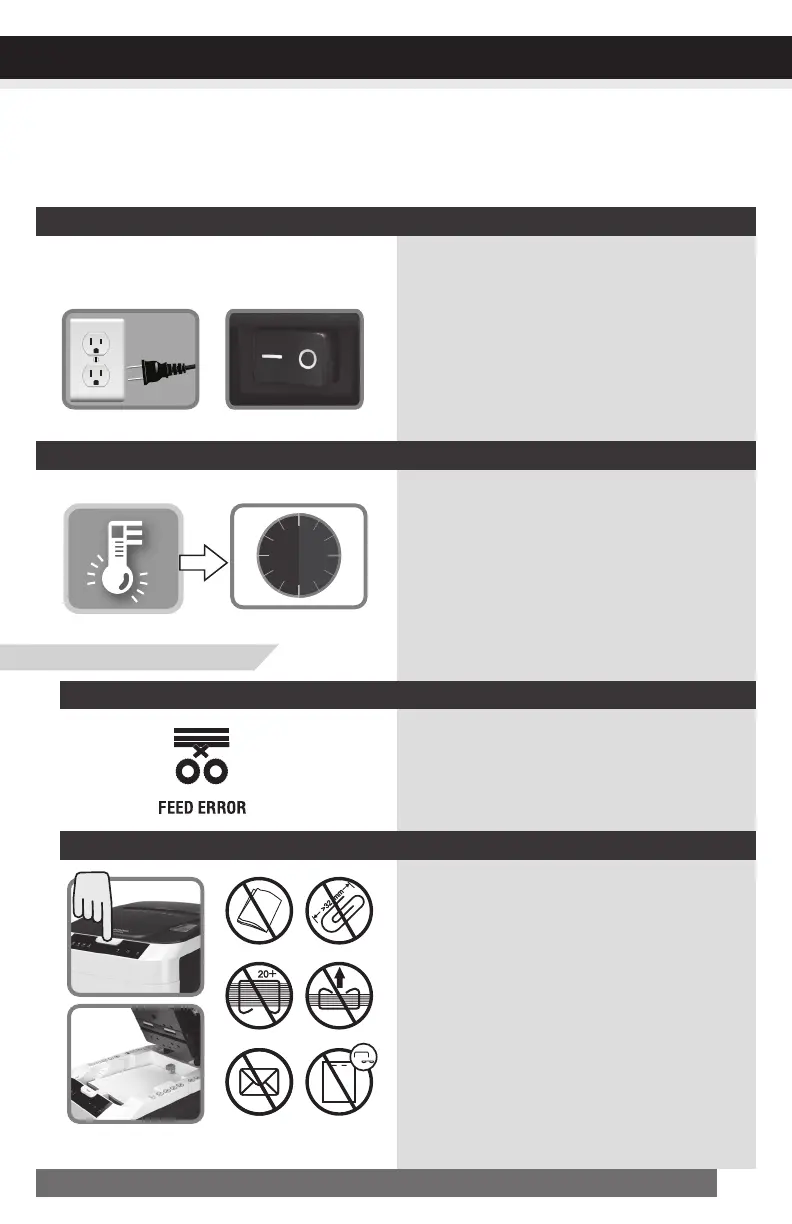
1)Make sure power cord is plugged into
a functioning 120-V standard house-
hold power outlet.
2)Check if the blue Power On icon is lit.
3)Check that the lid and waste bin are
properly closed.
No-powertotheshredder
If Overheat light is lit in red, turn shred-
der off and let it cool down for 45 min-
utes. Turn shredder on, check Overheat
light again, and restart shredding only
when light is not lit.
RED light indicates paper in paper
tray cannot be grabbed into shredding
slot. Open lid to make sure papers are
unfolded and positioned properly.
IfFeedErroriconislit
Shredderisjammedorrunscontinuously
Shredderdoesnotfeedorshredpaper
Check power outlet
Check main power
switch located at
back of machine
Overheat Cool down
• Open lid, remove the remaining stack of
paper and carefully pull the jammed
paper out of the cutters.
• Remove folded papers, staples and clips.
• Remove any materials with adhesive
labels.
• Make sure papers are positioned
properly. Staples must be placed in either
top left or top right of paper tray.
Auto-Feedmode:
CONTINUED NEXT PAGE
s
t
a
p
l
e
d
p
a
p
e
r
s
s
t
a
p
l
e
d
p
a
p
e
r
s
j
u
m
b
o
c
l
i
p
s
f
o
l
d
e
d
s
h
e
e
t
s
u
n
o
p
e
n
e
d
m
a
i
l
/
e
n
v
e
l
o
p
e
s
n
o
s
t
a
p
l
e
s
i
n
c
e
n
t
e
r


 To Next Page