12 ENGLISH
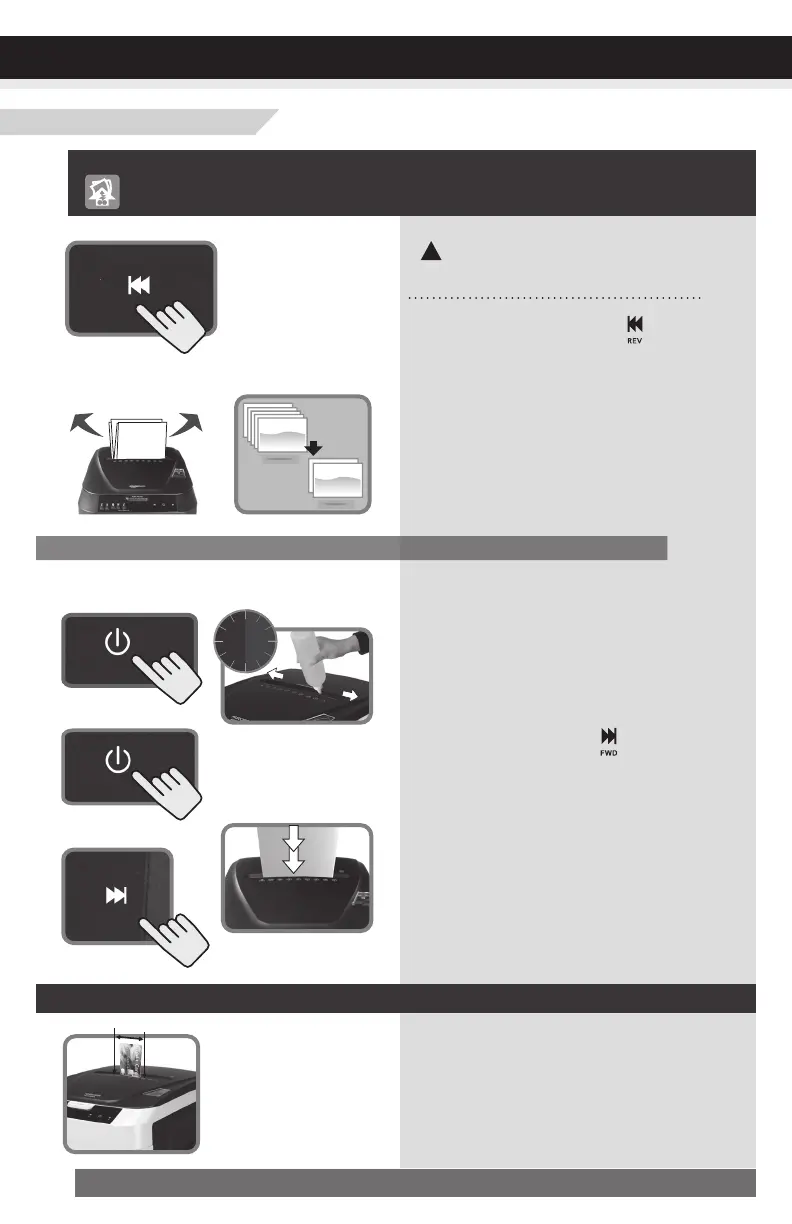
Power Off then pull
paper side to side
• Position credit card or small piece of
paper over the credit card section of the
Feeder (center position).
• Try again.
Shredderdoesnotfeedorshredcreditcardorsmallpieceofpaper
Warning:DONOTUSEANY
SPRAYCANSORAEROSOLS.
!
Shredderisjammedandrunsin“Reverse”modeonly/
Overloadiconislitinred
1)Press the reverse button ( ) for
5 sec.
2)Turn off shredder then pull paper side
to side to remove jammed paper (as
much as possible).
3)Reduce the number of sheets being
fed (count pages to be sure not to exceed
the maximum sheet count).
1)Turn off shredder.
2)Apply shredder oil to the feed slot
(shredder oil not included). Let oil soak in
to paper and machine for 30 minutes.
3)Set the Power button to Auto/On.
4)Press forward button ( ) or use thick
paper stock/ greeting card to manually
activate the shredder into cutting mode o
push the jam through.
5)Reduce the number of sheets being
fed (count pages to be sure not to exceed
the maximum sheet count). Refeed the
paper.
Reverse for 5 sec
Turn off shredder
Press “Forward”
Reduce sheets
Apply shredder oil and
wait for 30min.
Use thick paper to
push jam through
Min
30
Feed in the center
Or
Turn on shredder
Manual-Feedmode:
With stubborn situations where the reverse function does not help, follow the steps below:
TROUBLESHOOTING


 To Next Page