Preparation before use
Manually shooting or recording under "TEST" mode
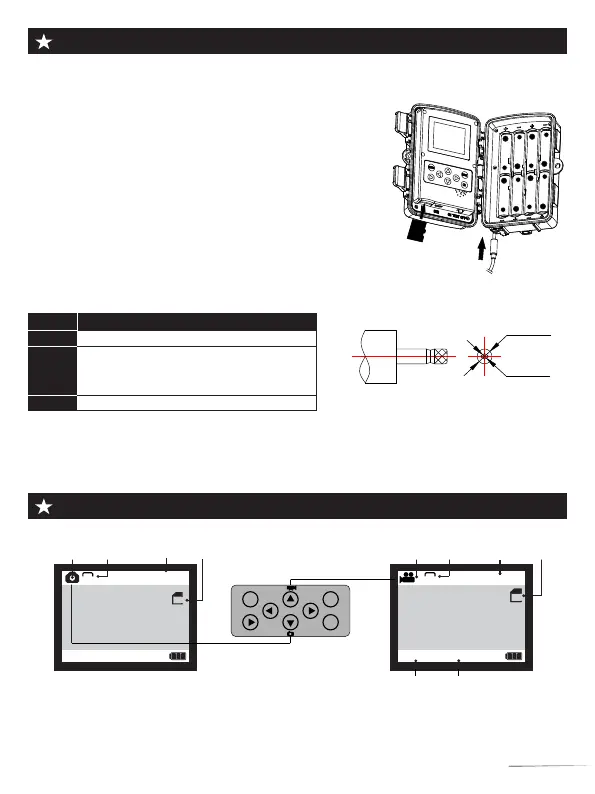
● Slide the switch to “TEST” position (The screen is on).
● Press Key ▲ or ▼ Key to quickly shift between photographing an videoing.
● Press Key “SHOT” to record or take a picture.
Mode
ON
TEST
OFF
Description
1. Monitoring mode.
1. Setup.
2. Manual shooting of photos or videos.
3. Check and replay.
1.Switch off camera.
+
-
+
-
+
-
+
-
+
-
+
-
+
-
+
-
Camera
Image
Video
time
SD
00:00:00
720
SD
TF
Card
00/00/00 00:00:00
Video Mode
Date Time
MENU
SHOT
OK
REPLAY
3.5mm
1.35mm
DC MATE PLUG
Adapter
Camera
Image
16M
Picture
Quantity
9999
SD
TF
Card
Photo
size
Video
resolution
Photo Mode
Note: In the "TEST" mode, if you do not operate for a long time, the
camera will enter the power saving mode and the screen will shut down.
The screen can be turned on by pressing any button on the camera.
1.Power selection
1.1 Insert 8×1.5V AA battery into the battery
compartment.
1.2 When using the power adapter (optional):At the
bottom of the camera,there is external power supply
port,which support DC12V 2A power,power plug size is
3.5X1.35mm.
2.Insert a micro SD storage card (Class 10 TF card,
FAT/FAT32)
Notes:
①.Be sure the camera is powered OFF before inserting
or removing SD cards or batteries
②.Please format the memory card before the first use.
3.Switch Function Introduction:
03



 To Next Page