Bringing people together
auta.es
HI-767 _ V 1.0
FUNCIÓN
FUNCTION
BINARIO BINARY
2, 3, 4, 5
Nº de tonos de llamada
Nº of calling tones
6
La entrada permite la apertura de puerta, solo al recibir una llamada.
En el módulo 750799 la entrada sería TP1
The input allows open the door, only when a call is received.
In the module 750799 the input would be TP1
7
Activa la función “Apertura automática” durante la llamada
Activates the function “Automatic opening” during the call
8
El pulsador AUX pasa a controlar la salida “AUX2” con el módulo (750799)
The AUX push-button control the “AUX2” output with the module (750799)
255
Retorno a valores de fábrica
Back to factory settings
1 tono 1 tone 2 tonos 2 tones 3 tonos 3 tones 4 tonos 4 tones
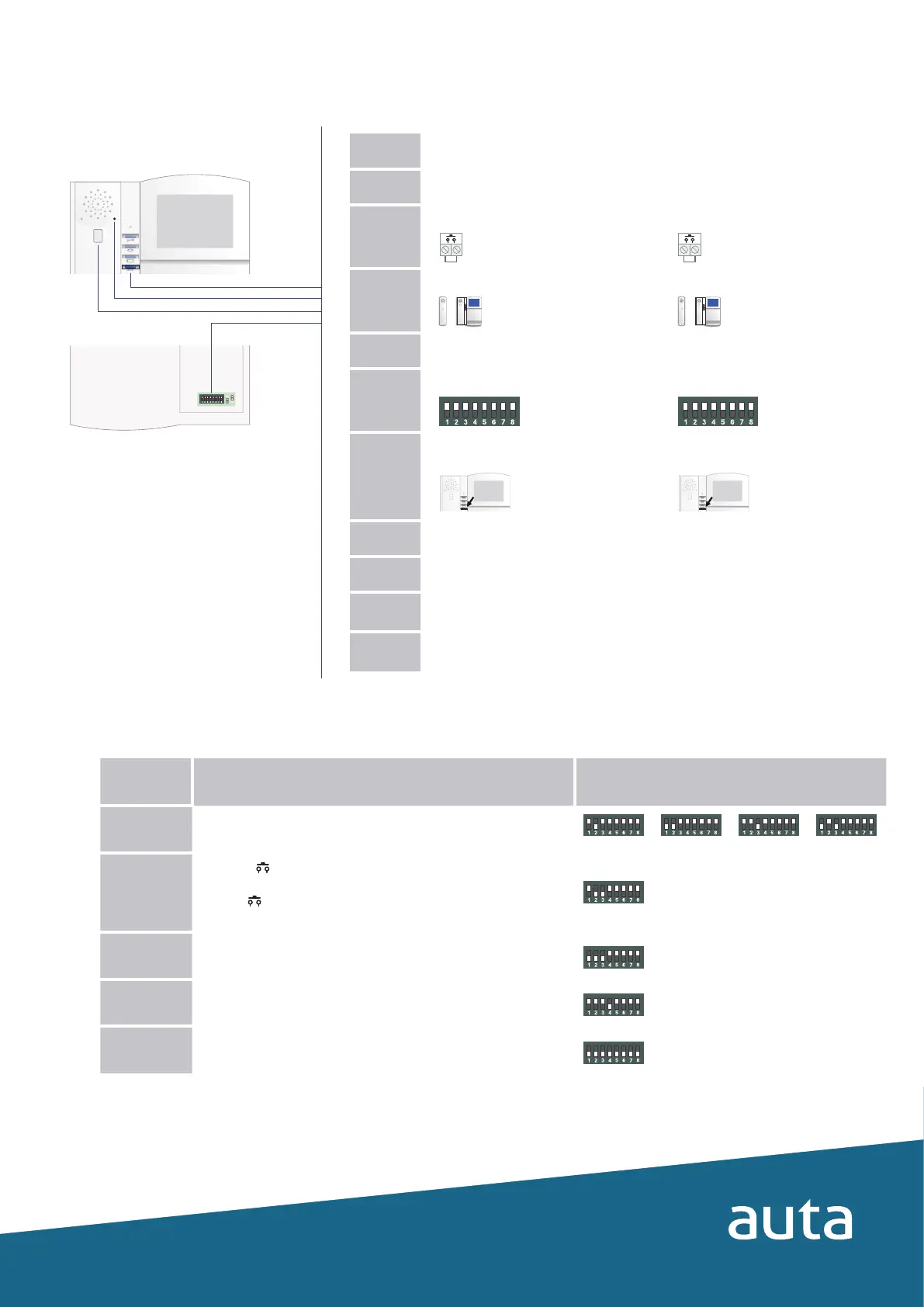
Funciones especiales (INSTALACIÓN) Special functions (INSTALLATION)
Tabla de funciones especiales Special functions table
Programación de funciones especiales Programming of special functions
AUX
1º
Apagar el monitor
Turn OFF the monitor
2º
Anotar coniguración del monitor
Write down monitor settings
3º
Realizar un puente como indica el dibujo
Do a bridge as picture shows
4º
Descolgar el auricular
Pick up the handset
5º
Encender el monitor (led ROJO)
Turn ON the monitor (RED led)
6º
Conigurar el código de función (tabla)
Set the desired function code (template)
7º
Validar el código presionando el pulsador
AUX (led NARANJA)
Validate the code by pressing the AUX
push-button (ORANGE led)
8º
Apagar el monitor
Turn OFF the monitor
9º
Deshacer el puente realizado en el paso 3
Remove the bridge done in the step 3
10º
Restablecer coniguración del monitor
anotada en el paso 2
Restore the monitor coniguration written
in the step 2
11º
Encender el monitor
Turn ON the monitor
AUXAUX




 To Previous Page