LIUPJQ001_eng-00 AUTEC
18
The STOP pushbutton should be pressed when it is necessary to op the
Machine immediately whenever a dangerous condition occurs.
The Machine Manufacturer and/or the Inaller mu provide the User with the
inructions and warnings concerning possible risks that may originate from
the Machine op (by way of example: movement inertia, swinging load…).
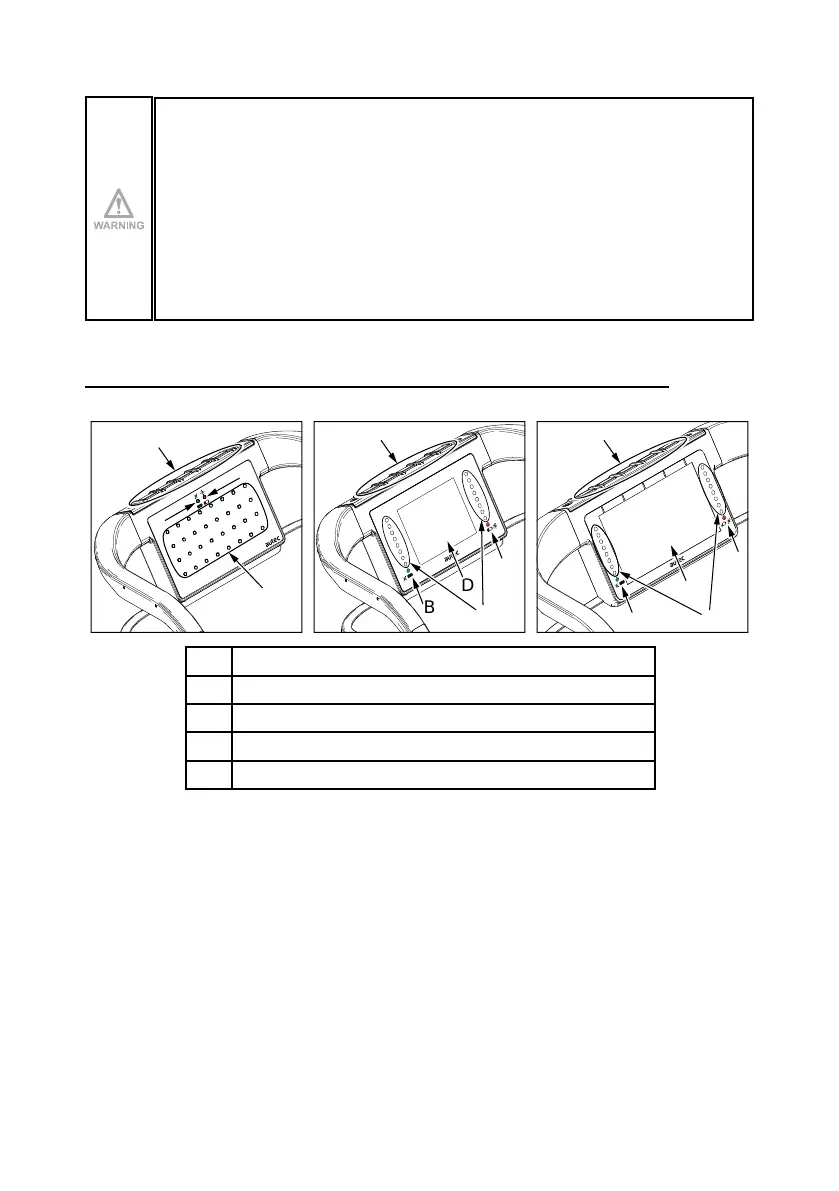
8.4 Pushbuttons for display/LED
LED matrix 2.8” display 4.3” display
A
B
C
E
B
D
A
C
B
A
D
C
A Red LED
B Green LED
C LEDs for Data Feedback function
D Display
E Keys
The pushbuttons [E] on the Transmitting Unit are used to interact with the display [D] and the
LEDs for Data Feedback function [C].



 To Next Page