6
8
10
12
5
7
9
11
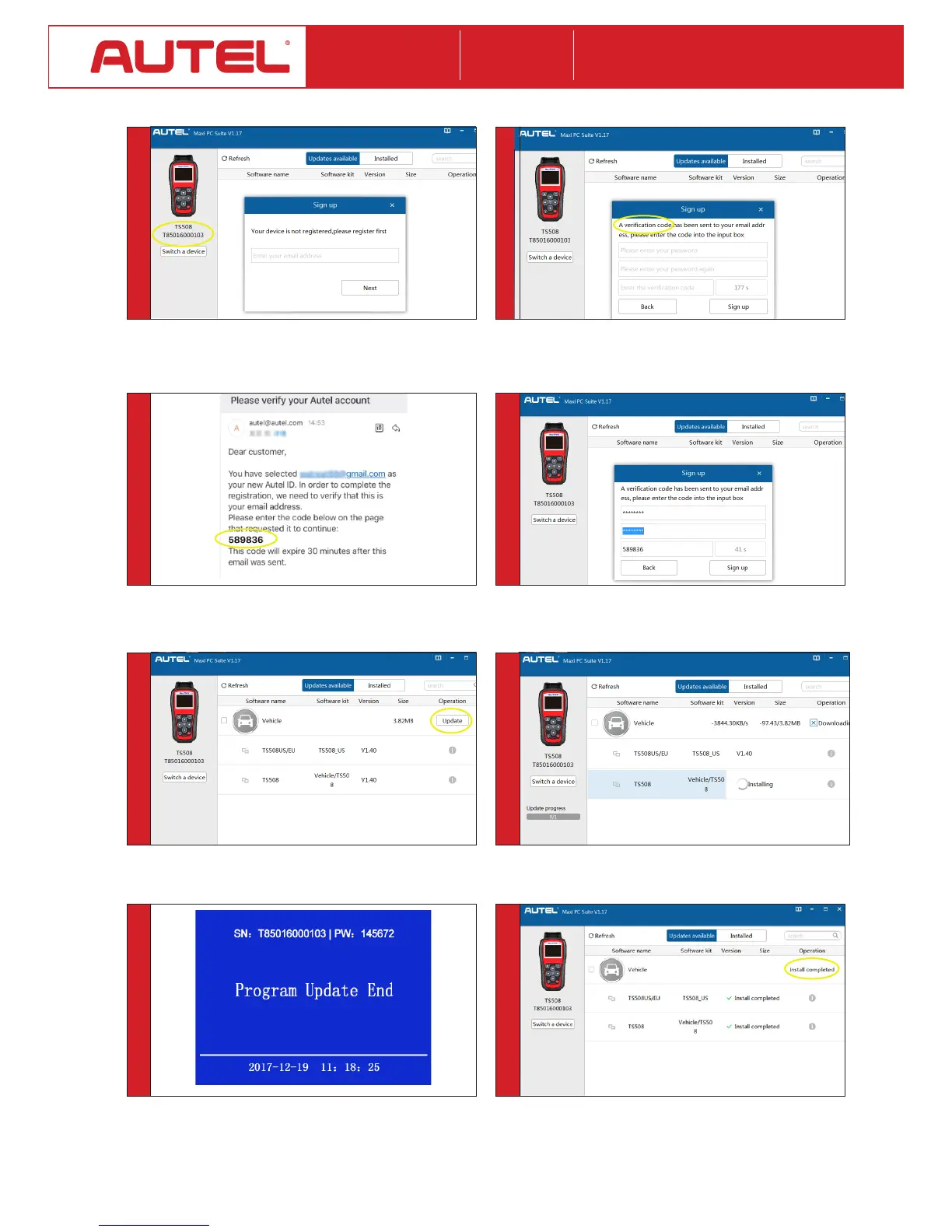
• Theapplicationwillscanthetoolserialnumber.Amessage
willdisplayifthetoolisnotregistered.Fillinyouremailaddress
astheAutelAccounttoregisterthetool.Ifthetoolisalready
registered,gotoStep9.
• Avericationcodewillbesenttoyouremailaddress.(Ifyour
emailaddresshasbeensignedupbefore,justllinyourAutel
IDpassword.)
• Cometoyouremailbox.Findthevericationcodefromyour
email.
• Enterthevericationcode.CreateandinputaPasswordinthe
spaceprovided,clicktheSignUpbutton.Yourtoolhasnowbeen
registeredwithyouremailaddressasYourAutelAccount.
• Theapplicationwilldisplayalistingofavailableupdates.Click
Updatebuttontoinitiatedownload.
• Waitfortheupdatestocomplete.Theupdateprocesscanbe
monitoredonthedisplay.
• Downloadedsoftwarewilloverwriteandreplaceexistingsoftware
ontool.Themessage“ProgramUpdateEnd”willdisplayontool
oncecompleted.
• Whentheapplicationdisplays“InstallCompleted,”youmay
disconnectUSBcablefromPCandTool.Yourtoolisreadytouse.













 To Next Page