20
| ATKey for FIDO U2F
• ATKey.Pro is FIDO U2F ready, it can be a security key for 2
nd
factor authentication.
• Here are FIDO2 U2F ready service:
• Or you can search and find available FIDO U2F certified server
here: https://fidoalliance.org/certification/fido-certified-
products/?appSession=8YT7Z25V0DOH6M41OQG26WI22N0F6D5MF9W19F58545OZ
WKJPBOH5XMB874A6596S8432G491GGF12B5Y7PIAM6PKR09S5G9Z3Q9T0FLK91C544
5079DO1NWZFP8714Q
• But, Chrome browser only
• Google:
• Turn on 2-Step Verification,
https://support.google.com/accounts/answer/185839?co=GENIE.Platf
orm%3DDesktop&hl=en
• Use a security key for 2-Step Verification,
https://support.google.com/accounts/answer/6103523?co=GENIE.Plat
form%3DAndroid&hl=en
• Facebook: https://www.facebook.com/help/148233965247823
• Gitlab: Enable 2FA via U2F device,
https://docs.gitlab.com/ee/user/profile/account/two_factor_authentication.ht
ml
• Salesforce:
https://help.salesforce.com/articleView?id=security_u2f_enable.htm&t
ype=5
• Dropbox: https://help.dropbox.com/teams-admins/team-member/enable-
two-step-verification
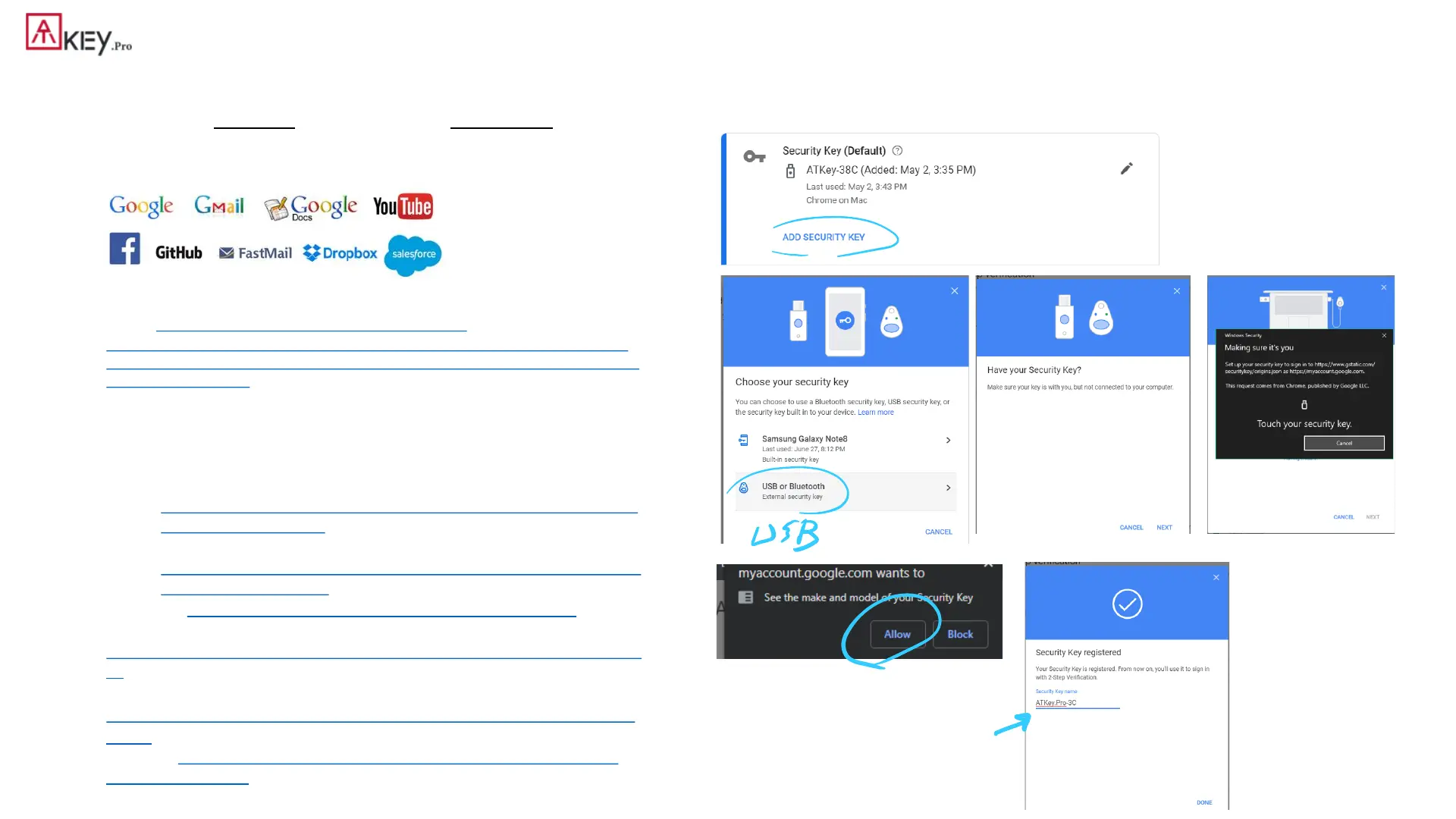
• (e.g.) Google account – add ATKey.Pro as security to Google account:
Insert ATKey.Pro into
USB port
Touch enrolled
fingerprint to verify
Click “Allow”
Ready, type in name of
security key


 To Next Page