PRESS
BOTH
6
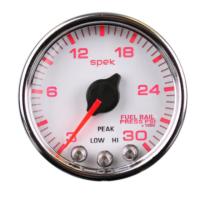
Flow Chart Programming Instructions for : Fuel Rail Pressure Gauge 2 1/16”
Submenu
(enter from main menu)
(Press two(2) buttons simultaneously for 5 seconds)
OPTION:RESTORE FACTORY DEFAULT:
While in PEAK PLAYBACK, press and hold the
center and right buttons for five seconds. Dial
pointer will step five times and return to zero.
This will erase all user-programmed calibrations
and settings, and return to NORMAL/DIAL
BRIGHTNESS.
OPTION:DEMO MODE:
WHILE IN COLOR SCHEME, press and hold the center and
right buttons for five seconds. Dial will scroll through the
seven color schemes. The HI,LOW and PEAK will light,
and the dial pointer will move. Press the center button to
return to NORMAL/DIAL BRIGHTNESS.
PRESS
BOTH
PRESS
BOTH
Calibrate Gauge to Environment: Turn the ignition ON with the engine
OFF. While in the Normal Mode, press and hold the CENTER and LEFT but-
tons for five (5) seconds. The dial face plate will flash GREEN rapidly. Press
the CENTER mode button to save the setting and return to NORMAL OPERA-
TION.
Default Pressure Settings:
High Fuel Rail Pressure.....29,500 PSI
Low Fuel Rail Pressure......12,000 PSI
PRESS
BOTH
OPTION A:POINTER BRIGHTNESS:
Press CENTER and LEFT buttons for five (5) seconds to
enter pointer brightness mode. The dial pointer will start to
flash and point to the upper right.
PRESS ONE
AT A TIME
DOWN
-
UP
+
OPTION:POINTER BRIGHTNESS:
Press LEFT or RIGHT buttons to adjust pointer
brightness. Press the CENTER burron to save and
return to NORMAL/DIAL BRIGHTNESS.


 To Next Page