EasyManua.ls Logo

AUTOHELM ST 50 plus - Creating and Using Sail Plans

AUTOHELM ST 50 plus
47 pages
Print Icon
To Next Page IconTo Next Page
To Previous Page IconTo Previous Page
Loading...
3
.3
Sail
Plan
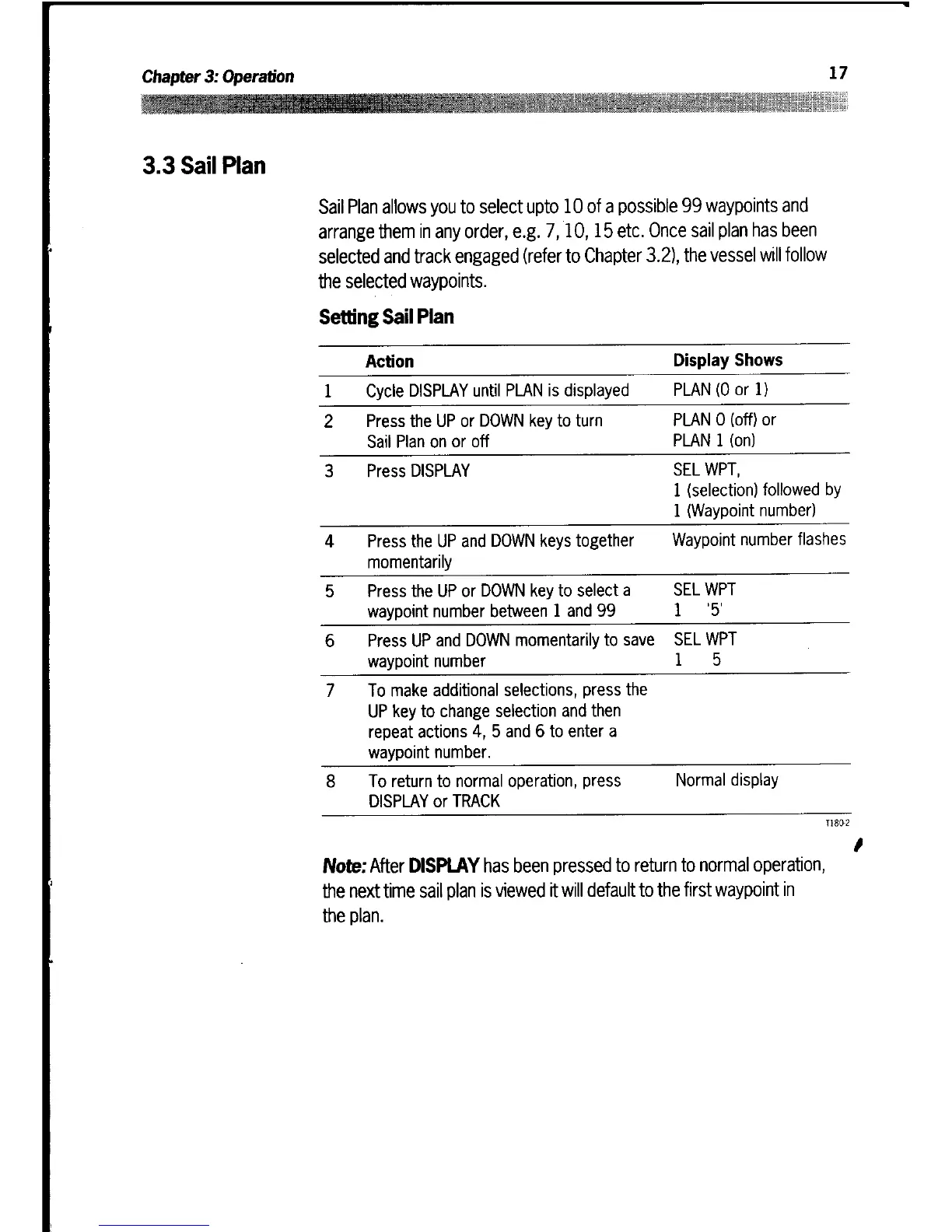
Sail
Plan allows
you
to select
upto
10
of
a
possible
99
waypoints
and
arrange
them
in
any
order,
e
.g
.
7,10,15
etc
.
Once
sail
plan
has been
selected
and
track
engaged
(refer
to
Chapter
3
.2),
the
vessel
will
follow
the
selected
waypoints
.
Setting
Sail
Plan
Note
:
After
DISPLAY
has been pressed
to
return
to
normal
operation,
the
next time
sail
plan
is
viewed
it
will
default
to
the
first
waypoint
in
the
plan
.
Action
Display
Shows
1
Cycle
DISPLAY
until
PLAN
is
displayed
PLAN
(0 or
1)
2
Press
the
UP
or
DOWN
key
to turn
Sail
Plan
on
or off
PLAN
0
(off)
or
PLAN
1 (on)
3
Press
DISPLAY
SEL
WPT,
1
(selection)
followed
by
1
(Waypoint
number)
4
Press
the
UP
and
DOWN
keys
together
momentarily
Waypoint
number
flashes
5
Press
the
UP
or
DOWN
key
to
select
a
waypoint
number
between
1
and
99
SEL
WPT
1
'5'
6
Press
UP and
DOWN
momentarily
to save
waypoint
number
SEL
WPT
1
5
7 To
make
additional
selections,
press
the
UP
key
to
change
selection
and
then
repeat
actions
4,
5
and
6
to
enter
a
waypoint
number
.
8
To
return
to
normal
operation,
press
DISPLAY
or
TRACK
Normal
display