EasyManua.ls Logo

AUTOHELM ST 50 plus - Waypoint Management

AUTOHELM ST 50 plus
47 pages
Print Icon
To Next Page IconTo Next Page
To Previous Page IconTo Previous Page
Loading...
3
.2
Waypoint
Display
and
Entry
This
section
describes
how
to
:
set
up
a
waypoint,
select
a
waypoint
as a
target waypoint,
change
a
target
waypoint,
reverse
a
route
of
waypoints
for
a
homeward
journey
and,
finally,
how
the
instrument
can
automatically
or
manually
advance
to
the
next
waypoint
.
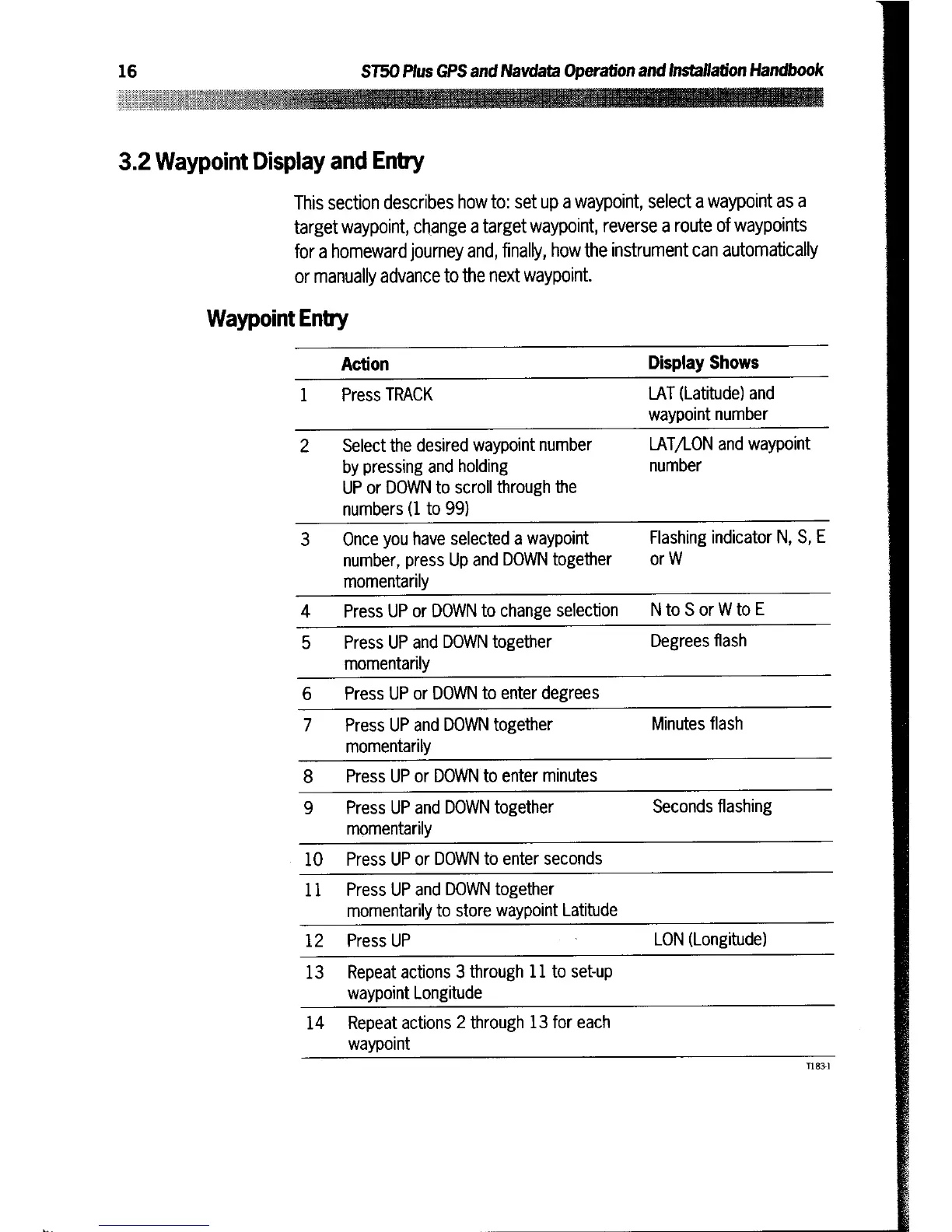
Waypoint
Entry
Action
Display
Shows
1
Press
TRACK
LAT
(Latitude)
and
waypoint
number
2
Select
the
desired
waypoint
number
by
pressing
and
holding
UP
or
DOWN
to
scroll
through
the
numbers
(1
to
99)
LAT/LON
and
waypoint
number
3
Once
you
have
selected
a
waypoint
number,
press
Up and
DOWN
together
momentarily
Flashing
indicator
N,
S,
E
or
W
4
Press
UP
or
DO
WN
to
c
hange
s
election
N
to
S
or
W
to
E
5
Press
UP
and
DOWN
together
momentarily
Degrees
flash
6 P
r
es
s
UP
or
DO
WN
to
enter
deg
r
e
es
7
Press
UP
and
DOWN
together
momentarily
Minutes
flash
8
Press
UP
or
DOWN
to
enter
minutes
9
Press
UP
and
DOWN
together
momentarily
Seconds
flashing
10
Press
UP
or
DOWN
to
enter
seconds
11
Press
UP
and
DOWN
together
momentarily
to
store
waypoint
Latitude
12
Press
UP
LON
(Longitude)
13
Repeat
actions
3
through
11
to
set-up
waypoint
Longitude
14
Repeat
actions
2
through
13
for
each
waypoint