16.5 CLOSE SAFETY OBSTRUCTION
TEST.
The
door
now
has
to be tested
for response to
an
obstruction
while it
is
opening and
closing.
Press
the
yellow
button
with the door
in the open
position
,the
door should start
closing. When
the door
reaches half the closing
distance
hold the bottom of the door
with
your hands If
the door
does
not reverse
open
easily
the force may
be excessive and
need adjusting.
IMPORTANT
NOTICE:
PLEASE
EXTEND ANTENNA
TO
ITS MAXMUM
LENGTH.DO
NOT LEAVE
COILED.
DO
NOT
CUT
ANTENNA
WIRE.IF
THIS NOTICE IS
NOT
FOLLOWED
RANGE WILL
BE REDUCED
STEP
17 STORING
THE TRANSMITTER
CODE
INTO
THE CONTROLLERS
RECETYER.
The memory
in
the controllers
receiver can store
up to
27
different
transmitter codes.
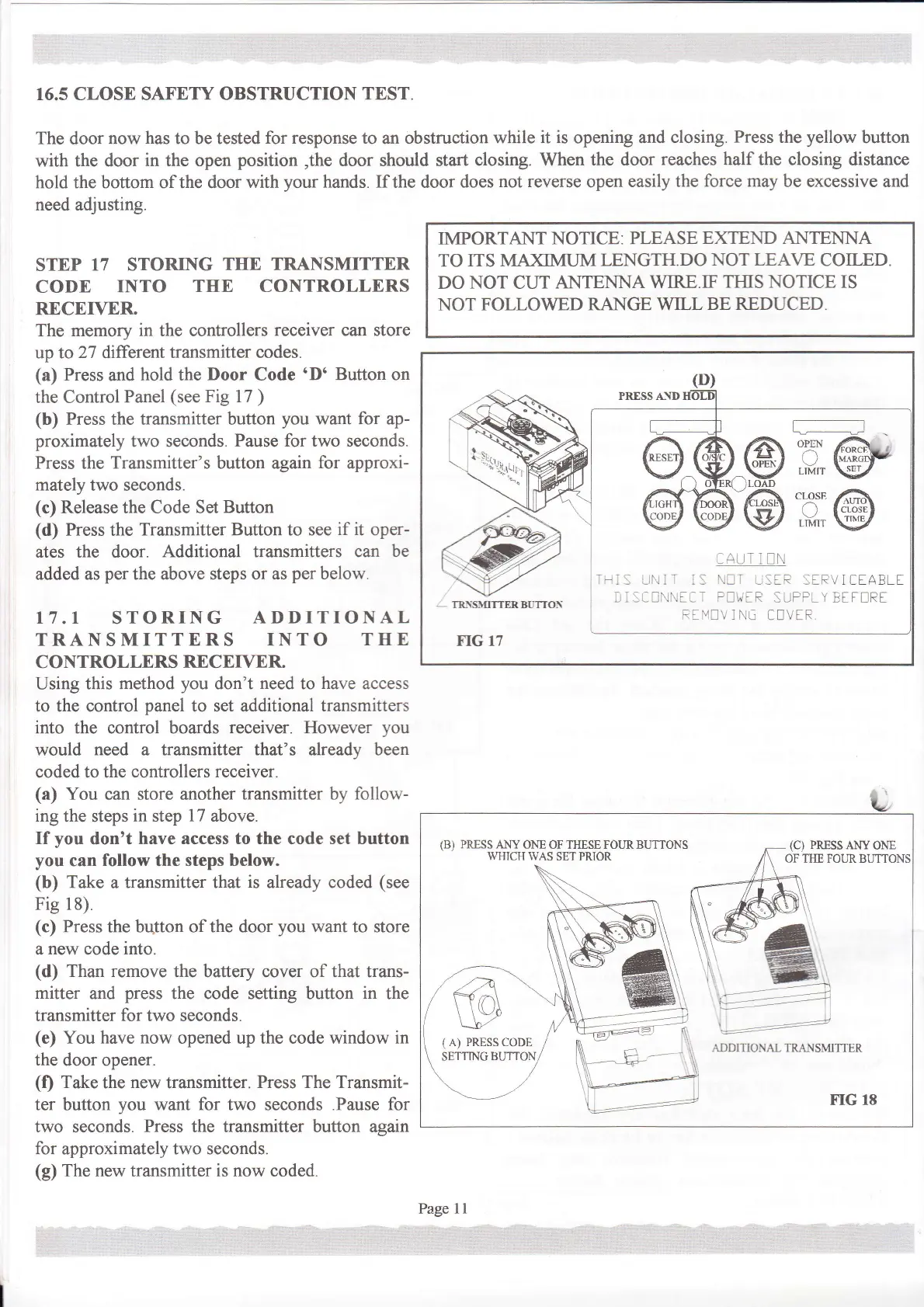
(a)
Press
and
hold the
Door
Code
'D'
Button on
the Control
Panel
(see
Fig l7
)
(b)
Press the transmitter button
you
want for ap-
proximately
two seconds.
Pause for two seconds.
Press
the
Transmitter's button again
for
approxi-
mately
two seconds.
(c)
Release the Code Set
Buuon
(d)
Press
the
Transmitter Button to see
if it
oper-
ates the door.
Additional transmitters can
be
added as
per
the above steps
or as
per
below.
17.I
STORING
ADDITIONAL
TRANSMITTERS INTO
THE
CONTROLLERS
RECETVER
Using
this method
you
don't
need
to
have
access
to the control
panel
to set additional
transmitters
into
the control boards
receiver. However
you
would
need a transmitter that's already been
coded to the controllers
receiver.
(a)
You can store another transmitter by follow-
ing
the steps
in step
17
above.
If
you
don't
have access to the code set button
you
can
follow the steps below.
(b)
Take
a
transmitter that
is
already coded
(see
Fig 18)
(c)
Press the button of the door
you
want to store
a
new
code
into.
(d)
Than remove
the battery cover of
that
trans-
mitter
and
press
the code setting button
in
the
transmitter for two seconds.
(e)
You
have
now
opened up the code window
in
the
door opener.
(f)
Take
the
new
transmitter.
Press The Transmit-
ter button
you
want
for
two seconds .Pause
for
two
seconds.
Press
the transmitter button again
for approximately two seconds.
(g)
The new transmitter
is now
coded.
(B) PRESS ANy ONE
OF THESE FOUR BUTTONS
\\THICH WAS
SET PRIOR
(C)
PRESSANYONE
OFTIIEFOIJE.
t--t:::-t:-
ADDITIONAI TRANSM]TTER
i:r_!
-irlr
r:
\.trI
_!lR:fRVICEABLt
-,-
:al'.t.raa-
-nnaR
SuPPLY
Btt!Rt
F-li/IV
I Na
CIVtR
Page ll


 To Next Page
 Loading...