EasyManua.ls Logo

Automatic Technology Australia Securalift GDO 2v4 - Step 21 Setting of Time; Courtesy Light

Default Icon
18 pages
Print Icon
To Next Page IconTo Next Page
To Previous Page IconTo Previous Page
Loading...
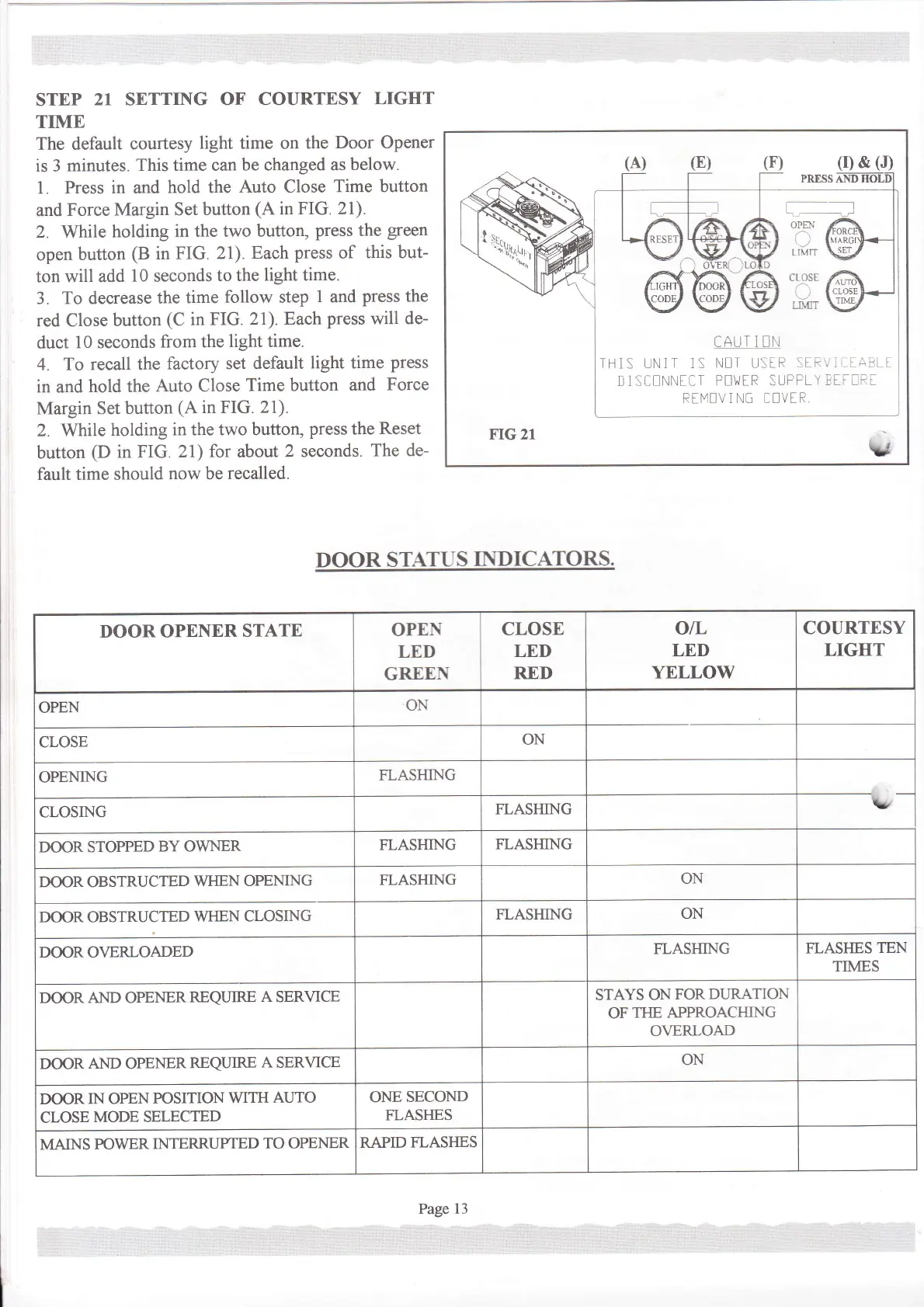
STEP
21
SETTING
OF COURTESY
LIGHT
TIME
The default
courtesy
light
time on
the
Door Opener
is 3
minutes.
This time can
be changed as
below.
1 Press in and
hold the
Auto Close
Time button
and
Force
Margin Set
button
(A
in
FIG. 2l).
2.
While
holding
in the two
button,
press
the
green
open
button
(B
in FIG.
21).
Each
press
of
this but-
ton
will add
10
seconds
to the
light time.
3. To decrease
the
time
follow
step
1
and
press
the
red
Close
button
(C
in FIG.
21). Each
press
will de-
duct
10 seconds
from the
light time.
4. To recall the
factory set
default
light time
press
in and hold the
Auto Close
Time button
and
Force
Margin Set button
(A
in FIG. 21).
2.
While
holding
in the two button,
press
the
Reset
button
(D
in
FIG. 21)
for
about
2
seconds.
The de-
fault time
should
now be
recalled.
DOOR
STATUS
II.{DICATORS.
(r)
&
(J)
CAUI I U.i
THlS UN]T 1S
N[T U:IR
:'-
D]StlNNtII
PEilTR SUFPLY
RTI"1[V I N[
'!VtR
FIG 21
\{
DOOR OPENER
STATE
OPEN
LED
GREEN
CLOSE
LED
RED
otL
LEI)
YELLOW
COURTESY
LIGHT
OPEN
ON
CLOSE
ON
OPENING
FLASHING
CLOSING
FLASHING
L
DOOR STOPPED
BY OWNER
FLASHING
FLASHING
DOOR OBSTRUCTED
WHEN OPEMNG
FLASHING
ON
DOOR OBSTRUCTED
WHEN
CLOSING
FLASHING
ON
DOOR OVERLOADED
FLASHING
FLASI{ES
TEN
TIMES
DOOR AND OPENERREQUIRE
A
SERVICE
STAYS
ONFORDL]RATION
OF
THE APPROACHING
O\ERLOAD
DOOR
AND
OPENER
REQIIIRE
A
SERVICE
ON
DOOR
IN OPEN
POSITION
WITH
AUTO
CLOSE
MODE SELECTED
ONE
SECOND
FLASI{ES
MAINS
POWER
INTERRUPTED
TO OPENER
RAPID
FLAS}IES
Page
13

Related product manuals