EasyManua.ls Logo

Automatic Technology Australia Securalift GDO 2v4 - Important Note

Default Icon
18 pages
Print Icon
To Next Page IconTo Next Page
To Previous Page IconTo Previous Page
Loading...
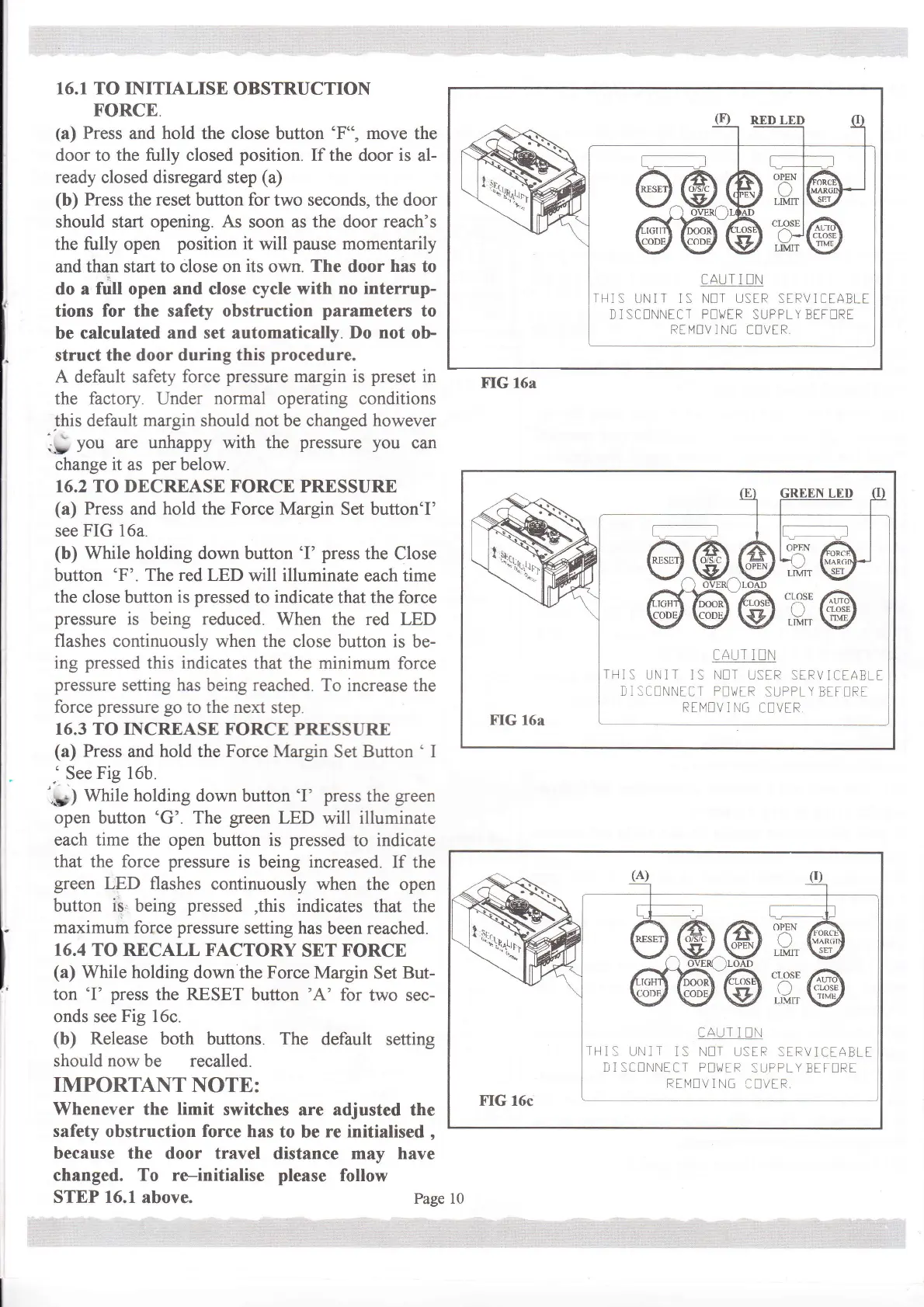
16.1 TO INITIALISE
OBSTRUCTION
FORCE.
(a)
Press
and hold
the close button
'F",
move
the
door
to the fully closed
position.
If
the door
is
al-
ready
closed disregard step
(a)
(b)
Press
the
reset
button
for
two seconds, the door
should start opening.
As
soon as the door
reach's
the fully open
position
it will
pause
momentarily
and than start
to close on
its
own.
The
door
has
to
do a
full
open and close
cycle with
no interrup-
tions
for
the safety
obstruction
parameters
to
be calculated
and set automatically.
Do not
ob
struct the
door during this
procedure.
A
default safety
force
pressure
margin is
preset
in
the
factory.
Under
normal
operating conditions
this default
margin
should
not
be changed
however
.-
yo,
are unhappy with the
pressure you
can
change it as
per
below.
16.2 TO DECREASE FORCE PRESSURE
(a)
Press
and
hold
the
Force Margin
Set button'I'
see
FIG 16a.
(b)
While
holding
down button
'I'
press
the Close
button
'F'.
The red LED
will illuminate
each time
the close
button
is
pressed
to
indicate
that the force
pressure
is being reduced.
When the red LED
flashes continuously when
the close button is
be-
ing
pressed
this
indicates
that
the
minimum
force
pressure
setting has
being
reached.
To increase
the
force
pressure go
to the next
step.
16.3 TO INCREASE
FORCE PRESSURE
(a)
Press
and
hold
the Force Margin
Set
Button
'
I
'
See
Fig 16b.
.*;
Wnte
holding
down button
'I'
press
the
green
open button
'G'.
The
green
LED
will
illuminate
each time the
open button is
pressed
to indicate
that the
force
pressure
is
being
increased.
If the
green
LED flashes
continuously
when the open
button
is
being
pressed
,this
indicates
that the
maximum
force
pressure
setting has
been
reached.
16.4
TO RECALL FACTORY
SET FORCE
(a)
While holding
down the Force
Margin
Set
But-
ton
'I' press
the RESET
button
'A'
for
two sec-
onds see
Fig 16c.
(b)
Release
both buttons. The
default
setting
should now be recalled.
IMPORTANT
NOTE:
Whenever the
limit
switches
are adjusted the
safety
obstruction
force
has
to be
re initialised
,
because
the door travel
distance
may have
changed. To re-initialise please
follow
STEP 16.1
above.
Page
CAUT 1 EN
II]S
UNIT ]S NIT USER STRVI(]tAELt
I I SC!NNICT P!\/tR
SUFPLY
BtT!RT
Rt[4NV ] NG It]VE R,
FIG 16a
OPEN
aAlT
I UN
IHIS I.]N]T
]S
N!T
U:tR StRViCtAELt
I 1 SC!NNtCT P!\i/[R
SUPTtY BtT!Rt
RtM!V 1 NG
CIVtR
LIM]T
CLOSE
r-\
LIIUIT
:,i;;@
CAI-]T I !II
IHI:
UN]T IS \It]T
UStR:tIiV]'TABtt
D1SCENNTCT
Pl\/tR
SI.]PPLY BTt!Rt
Rtlvl!V
I NG
CIVIR
FIG
l6c
t
il',,
\
*,tqF,+rr
10

Related product manuals