EasyManua.ls Logo

Automatic Technology Australia Securalift GDO 2v4 - Step 18 Installation

Default Icon
18 pages
Print Icon
To Next Page IconTo Next Page
To Previous Page IconTo Previous Page
Loading...
17.2
DE,LE,TING THE
TRANSMITTERS
CODE
FROM THE
CONTROLLERS RECEIVER.
If you only want to
delete one
transmitter code
stored
then use
step
17
.2
(a)
to
(d)
if
you
want to remove
all codes
then use
(a)
Select
the
transmitter(s)
you
want to delete from
the
memory.
(b)
Press and hold the Door
Code
Button
on the
Con-
trol
Panel
(ref:
Fig 17).
(c)
Press
the transmitter button
you
want to
delete
for
approximately two seconds.
Pause for
two
seconds.
Press
the transmitters
button
again
for
approximately
STEP
18 INSTALLATION
OF
TRANSMITTER
HOLDER.
(a)
Mount
the
holder in
a location
out of reach
of
ch,*ien and convenient to the
customer.
(see
Fig 19)
(b)
To
operate the
door, Code button
one of the trans-
mitter
or
any button
you
want
as
per
Step 17.
(c)
To
operate the
light
function only, Code
button
two
of the transmitter or any
button as
per
below.
(d)
Press
and
hold
the Light
Code
Button.
(e)
Press
the transmitter button
you
require
to
operate
the
light
function
for
approximately
two seconds.
Pause for
two seconds. Press
the
transmitter Button
again for
approximately two seconds
(f)
Release
the light code
button
(g)
Press
the Transmitter
button
selected to operate
the light
function
and see
if it
operates
the
light
only
STEP
20
SETTING
OF
AUTO
CLOSE
MODE
AI'\
TIME
IN}TORTANT
NOTICE: A PHOTO
ELECTRIC
BEAM
MUST BE INSTALLED
WHEN
USING
THE AUTO
CLOSE
MODE.
The
Auto
Close timer
will only
start after the Photo
Electric
Beams
(P
E
)
path
is
broken. If
the
P E path
is not
broken
the door will remain
open till the
path
is
broken. If
the
Door
Opener
incurs
an
obstruction
(not
from
the P.E.)
while closing
the door
will
re-
open
and not
auto close.
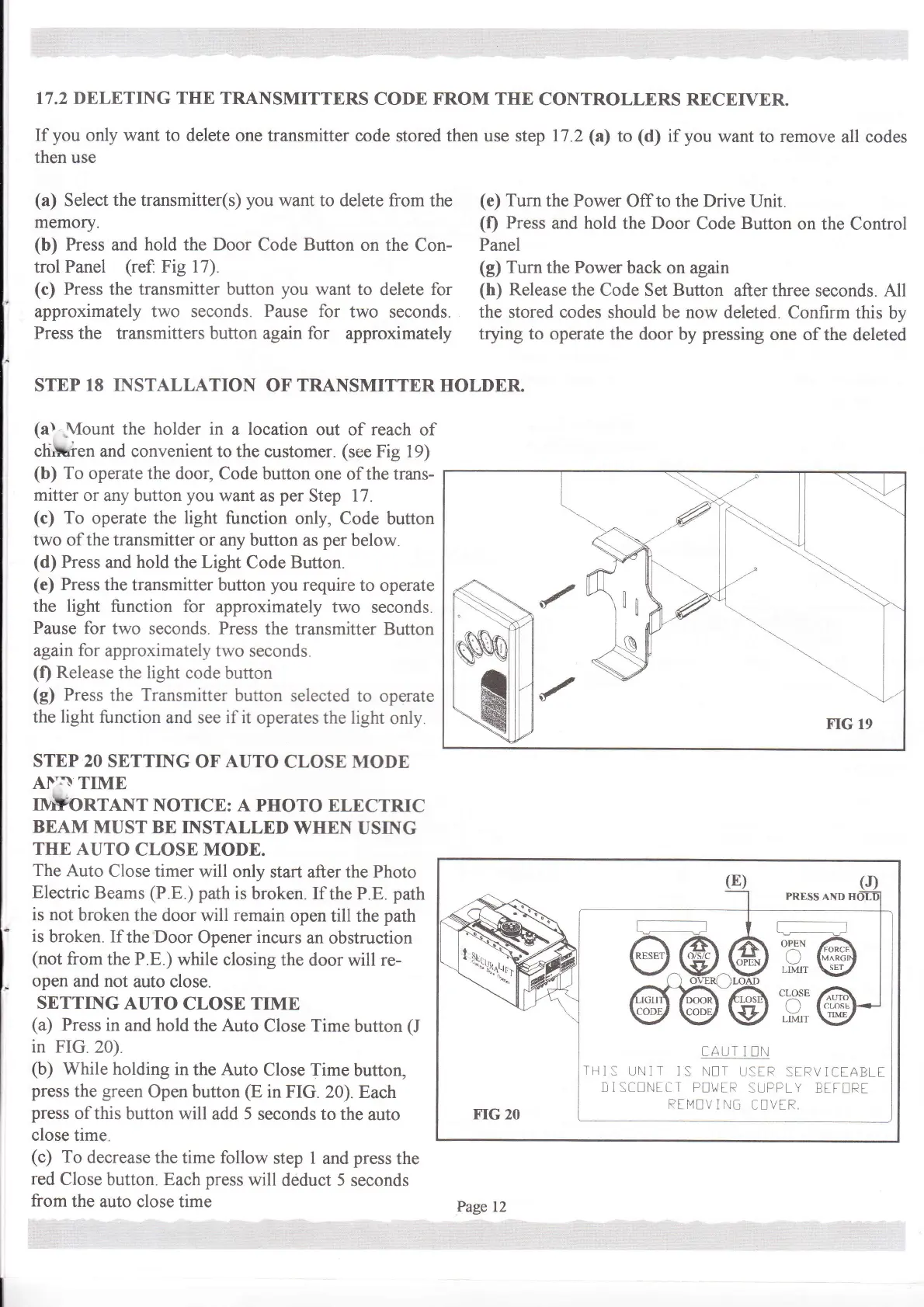
SETTING
AUTO
CLOSE
TIME
(a)
Press
in
and
hold
the Auto
Close Time
button
(J
in FIG 20)
(b)
While holding
in the Auto
Close Time
button,
press
the
green
Open
button
@
in FIG.
20). Each
press
of
this button
will add
5
seconds
to the
auto
close time.
(c)
To decrease
the time follow
step
1
and
press
the
red
Close
button.
Each press
will
deduct
5
seconds
from
the
auto close time
(e)
Turn
the Power
Off to the Drive
Unit.
(f)
Press
and
hold
the Door
Code
Button
on
the Control
Panel
(g)
Turn
the
Power
back on
again
(h)
Release
the Code Set Button
after three seconds. A11
the stored codes
should be now deleted.
Confirm
this by
trying to operate
the door by
pressing
one of
the deleted
@..@.
@@'
PRESS
AND HI
G__--
r
:H,@
:H:
@
cAULI
UN
TI]1:
UNIT ]S
N[T UStR
StRV]CIABLI
]] I SCEI'']t.T P!\,vtR
SUPFLY
BtIt]Rt
RtI'41]V
l
NG
Ct]ViR
trr,
\
.
''Jltut-'..
'
Page 12

Related product manuals