EasyManua.ls Logo

Automatic Technology Australia Securalift GDO 2v4 - Page 17

Default Icon
18 pages
Print Icon
To Next Page IconTo Next Page
To Previous Page IconTo Previous Page
Loading...
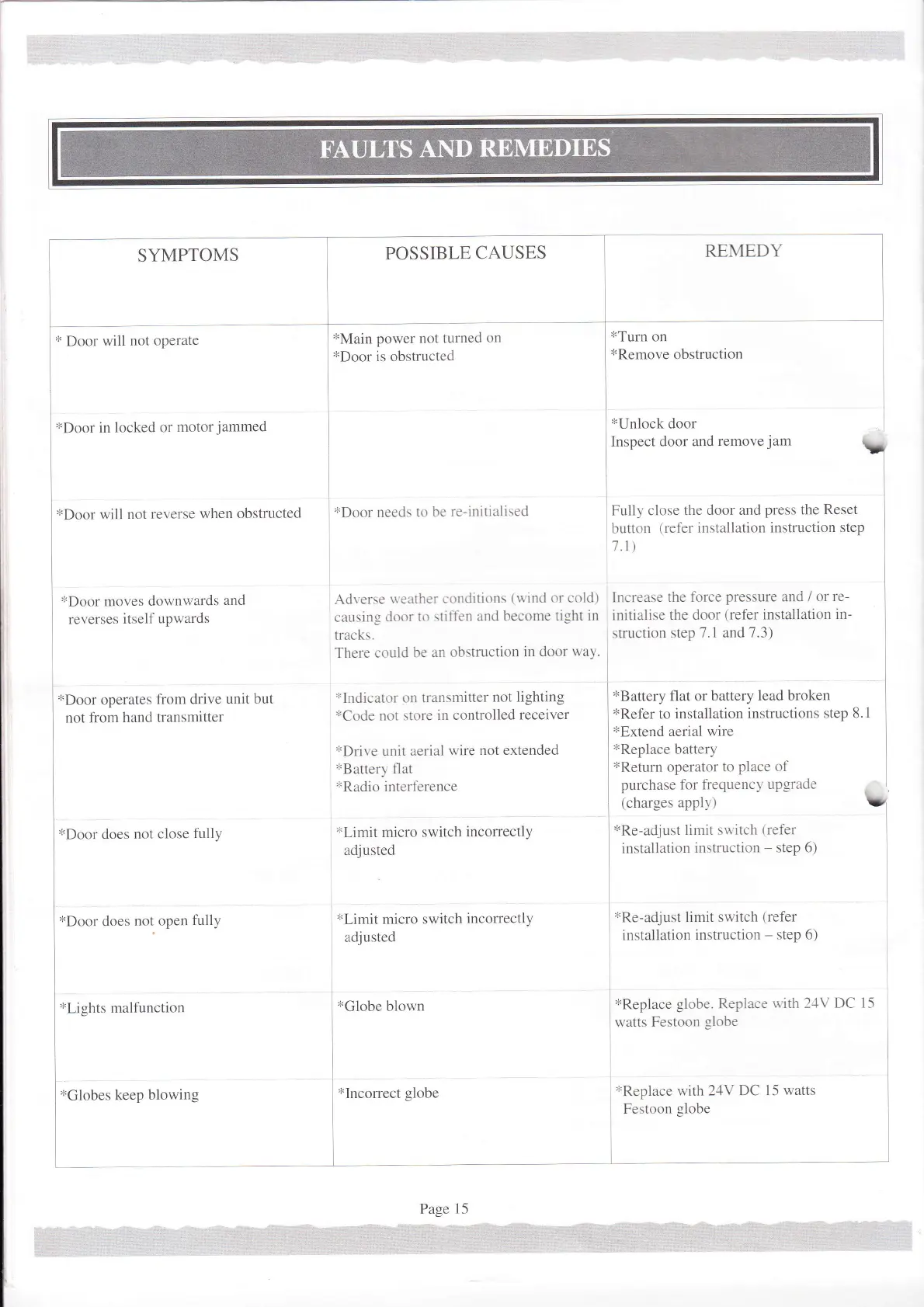
SYMPTOMS
*Door
in locked
or
motor
jammed
*Door
will
not reverse
when
obstructed
*Door
moves
downwards
and
reverses
itself
upwards
*Door
operates
fiom drive
unit but
not fiom
hand transmitter
*Door
does
not
close
fully
*Door
does
not
open
fully
*Lights
malfunction
POSSIBLE
CAUSES
REMEDY
tTurn
on
*Remove
obstruction
I
*rn,o.*
ooo.
lnspect
door and
removejam
V
I
Fully close
the door and
press
the
Reset
button
treler inslallation instruction
step
1.1)
i
Increase
the torce
pressure
and /
or re-
initialise
the door
(refer
installation
in-
struction
step 7.1 and
7.3)
*Battery
flat or
battery lead broken
*Refer
to
installation instructions
step 8.1
*Extend
aerial
wire
*Replace
battery
*Return
operator
to
place of
purchase
for frequencl'
upgrade
(charges
apply)
*Re-adjust
limit su'itch
(refer
installation
instruction
-
step 6)
*Main
power
not turned
on
]
*Doo.
is obstructed
*Door
needs
to be
re-initialised
Adverse
vneather conditions
(uind
or cold)
causing
door
to \tift'en
and become
tight
in
tracks.
There
could be
an obstruction
in door way.
olndicaror
on trunsmitter
not liShting
*Code
not store
in controlled
receiver
*Drive
unit aerial
wire
not extended
*Battery
flat
*Radio
interf-erence
*Limit
micro
switch
incorrectll
adjusted
*Limit
micro switch
incorrectly
adiusted
I
*Globe
blown
l
l
"l
xRe-adjust
limit switch
(refer
installation
instruction
-
step 6)
*Replace
globe. Replace
u
ith l-lV
DC l5
watts Festoon
globe
*Replace
with 24V
DC 15 watts
Festoon
globe
xGlobes
keep
blowing
*Incorrect
globe

Related product manuals