Need help?
Do you have a question about the Autonics SFC-R Series and is the answer not in the manual?
Instructions for attaching the product to a panel using bolts.
Instructions for mounting the product on a DIN rail.
Instructions for removing the product from a DIN rail.
Configuration of the off-delay time for safety outputs.
Configuration of various functions for advanced/non-contact units.
Details on connecting input signals and power supply.
Details on connecting safety and auxiliary outputs.
Configuration for logical AND connections between units.
Verification of the product's installation environment and safety.
Verification of the product's wiring for safety and functionality.
Testing the safety system's operational integrity.
Routine checks performed daily for product safety.
Periodic checks performed for product safety and maintenance.
Interpreting error codes and indicators for troubleshooting.
Example wiring for an advanced unit with a safety light curtain.
Example wiring for advanced unit, door lock switch, and expansion relay.
Example wiring for non-contact unit and safety non-contact door switch.
Example wiring for basic unit, emergency stop, and non-contact door switch.
Example wiring for a relay unit with a safety emergency stop switch.
Example wiring for a relay unit with a safety light curtain.
Example wiring for a relay unit with a safety door lock switch.
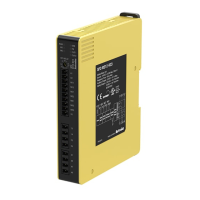
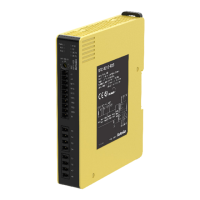
This document describes the Autonics SFC / SFC-R Series Safety Controllers and Safety Relay Units, designed to enhance safety in industrial environments. These devices are crucial for applications requiring high safety integrity levels, such as those involving machinery that could cause serious injury or economic loss.
The SFC / SFC-R Series units serve as central components in safety control systems, monitoring various safety inputs and providing safety outputs to control hazardous machinery. They are designed to achieve high safety performance levels, conforming to international safety regulations and standards such as SIL3, SIL CL3, PLe, CE, UL Listed, and S Mark.
The core function of these units is to process signals from safety input devices like emergency stop buttons, safety light curtains, safety door lock switches, and non-contact door switches. Based on these inputs and configured logic, the controllers activate or deactivate safety outputs, which typically control contactors or motor controllers to bring machinery to a safe state.
Different models within the series offer various output types, including P-channel FET safety outputs for instantaneous or off-delay control, and relay contact safety outputs, also with instantaneous or off-delay capabilities. The off-delay feature allows for controlled shutdown sequences, crucial for applications where immediate power cut-off could be hazardous or damaging.
Auxiliary outputs (X1, X2) are also provided. Auxiliary output 1 (X1) mirrors the state of the instantaneous safety outputs, turning ON when they are ON and OFF when they are OFF. Auxiliary output 2 (X2) indicates an error condition, turning ON when the ERR indicator is active. It is critical to note that these auxiliary outputs are non-safety outputs and must not be used for safety-related purposes.
The units support various connection configurations, including logic (AND) connections for integrating multiple safety functions and expansion relay unit connections to increase the number of available safety outputs. This modularity allows for flexible system design to meet diverse application requirements.
The SFC / SFC-R Series units are designed with user-friendly features to facilitate installation, operation, and troubleshooting.
Effective maintenance is crucial for ensuring the continuous safe operation of safety devices. The SFC / SFC-R Series includes features and recommendations to support this.
 General
| Control Method | PID control |
|---|---|
| Input Type | Thermocouple, RTD |
| Output Type | Relay, Current, Voltage, SSR drive |
| Display | LED |
| Power Supply | 100-240V AC, 24V AC/DC |
| Communication | RS485 (Modbus RTU) |
| Output Rating | Current: 4-20 mA |
| Set Point Range | Depends on input type |
| Ambient Humidity | 35-85% RH (non-condensing) |

 To Next Page