EasyManua.ls Logo

Autool X50 Plus - User Manual

Autool X50 Plus
8 pages
Print Icon
To Next Page IconTo Next Page
Loading...
AUTOOL X50 PLUS
Car OBD Multi-function Meter
User Manual
www.autooltech.com

Other manuals for Autool X50 Plus

Question and Answer IconNeed help?

Do you have a question about the Autool X50 Plus and is the answer not in the manual?

Summary

Trademark

Product Installation

Features of Product Hardware

Details the 32-bit ARM CORTEX-M3 CPU and high-speed communication protocols.

Early Alarm Function

Supports multiple early alarms like water temp, over-speed, and shifting reminders for safe driving.

Clearing Error Codes

Allows users to scan and clear vehicle error codes, reducing repair costs.

Product Description

X50 Plus Main Unit

Describes the physical components of the X50 Plus unit, including detectors and function keys.

Product Installation and Use

International OBD Protocol

Refers to the universal OBD plug protocol standards stipulated by SAE.

Product Function Settings

Electronically Controlled Diagnosis System

Provides access to diagnostic functions including scanning and clearing DTCs, and viewing data streams.

Car Performance Tests

Instrument Parameter Settings

Instrument Interface Settings

Factory Reset Settings

Restores the X50 Plus device data to its initial factory status.

Product Information

Instructions on Car Compatibility

Guides users on how to use the X50 Plus with various car models and troubleshooting compatibility issues.

Warranty

Warranty Access

Details the procedures for product repair or replacement based on fault conditions and guarantees new parts.

Warranty Not Covered

Lists conditions under which the product warranty is not applicable, such as unofficial purchase or misuse.

Overview

The AUTOOL X50 PLUS is a car OBD multi-function meter designed to enhance the driving experience by providing crucial vehicle information and diagnostic capabilities. This compact and stylish instrument is particularly beneficial for vehicles that lack a temperature gauge, tachometer, or fuel consumption meter. Its plug-and-play installation through the OBD port eliminates the need for wire cutting, making it easy and simple to set up.

Function Description:

The AUTOOL X50 PLUS serves as a comprehensive car trip computer, displaying and monitoring various vehicle parameters. Key functions include:
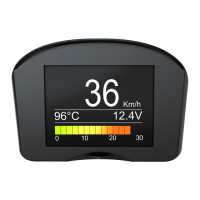
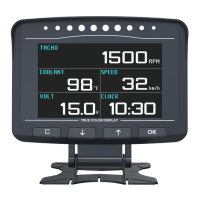
  • Real-time Data Display: It can show real-time data such as speed, engine RPM, engine temperature, and oil consumption. The display interface is customizable, allowing users to configure up to four data points simultaneously. Position 1 can display car speeds, engine rotation speeds, or coolant temperatures. Positions 2 and 3 can be configured for other data classes, while Position 4 is dedicated to instantaneous fuel consumption or an engine rotation progress bar.
  • Battery Voltage Monitoring: The device monitors vehicle battery voltage and generator charging voltage, providing insights into the electrical system's health.
  • Early Alarm Functions: To enhance driving safety, the X50 PLUS supports multiple early alarm functions:
    • Water Temperature Early Alarm: Alerts the driver if the engine reaches a high temperature, with "drop, drop" sounds and a red display for the temperature character.
    • Over-speed Early Alarm: Notifies the driver when a set speed limit is exceeded, using "drop, drop" sounds and displaying the car speed text in red.
    • Shifting Reminding Early Alarm: Provides a prompt tone and displays shift characters when the set rotation speed for shifting is reached. There's also a shift reminding upper limit to prevent unnecessary shifting at the highest gear.
    • Vehicle Fault Early Alarm: Informs the driver of potential vehicle faults.
  • Error Code Management: Car owners can scan and clear regular vehicle error codes, reducing repair costs and the need for professional assistance. The device can read car error code information and allows users to choose whether to clear car faults.
  • Car Performance Tests: The X50 PLUS includes features for car performance testing, such as acceleration performance tests, brake performance tests, acceleration target speeds, and initial braking speed.
  • Data Stream Reading: It can read vehicle data streams, allowing for real-time detection of car data.
  • Product Information Query: Users can query product software versions, communication protocols of the car, and access help/solutions for car compatibility problems.

Important Technical Specifications:

  • CPU: 32-bit ARM CORTEX-M3 CPU with a 72MHz maximum operating frequency.
  • Communication Protocols: Supports multiple high-speed automotive communication protocols.
  • Work Voltage: 10-18V DC.
  • Work Current: <80mA.
  • Sleep Mode Current: <15mA.
  • Work Temperature: -20~85℃.
  • Size (mm): 576746.
  • Compatibility: Suitable for standard OBD-II protocol compliant petrol and diesel vehicles.

Usage Features:

  • Intuitive Navigation: The device features a function key for menu navigation. Pressing left or right selects menus like Speed, Rotate, Engine Temperature, or Oil Consumption. Pressing the key in the middle confirms a selection, while a long press exits the current menu or returns to the previous one.
  • Parameter Settings: Users can customize various instrument parameters, including:
    • Engine Displacement Settings: Essential for accurate calculation of instantaneous and average fuel consumption.
    • Fuel Type Setting: Allows selection between petrol, diesel 1, and diesel 2, impacting fuel consumption data.
    • Over-speed Alarm Settings: Configures the speed threshold for the over-speed alarm.
    • High Water Temperature Alarm Settings: Sets the temperature threshold for the high water temperature alarm.
    • Shift Reminding Rotation Speed: Defines the RPM for shift reminders.
    • Shift Reminding Upper Limit: Sets the car speed at which shift reminders are shut down.
    • Instrument Standby Time: Configures the time after which the device automatically sleeps when the car is turned off.
    • Car Speed Error Correction: Allows adjustment of the displayed speed to match the car's speed meter.
    • Battery Voltage Correction: Corrects the voltage display for accuracy.
    • Alarm Voltage Settings: Sets a threshold to remind car owners about potential battery damage.
    • Instrument Digit Color: Offers seven color options for display customization.
    • Car Speed Reset Settings: In idle modes, if the car speed is below a set value, it will be displayed as zero.
    • Fuel Consumption Data Correction: Enables adjustment of fuel consumption data if there's a discrepancy between the displayed and actual consumption.
  • Factory Reset: A function to restore X50 Plus data to its initial status.
  • Plug and Play Installation: Designed for easy installation into the vehicle's OBD computer port. After successful linkage, the device emits a "drop" sound and displays vehicle protocols, indicating readiness for parameter setup.
  • Compatibility Solutions: Provides help instructions for resolving issues like abnormal dashboard lights or fault alarm lights in some cars. In cases where excess pins on the OBD plug cause issues, needle-nose pliers can be used to twist them off.

Maintenance Features:

  • Warranty: The AUTOOL X50 PLUS main unit comes with a 3-year warranty, and accessories have a 1-year warranty from the date of receipt.
  • Warranty Access:
    • Repair or replacement of equipment is provided based on specific fault conditions.
    • All replacement parts, accessories, or equipment are guaranteed to be brand new.
    • For product breakdowns within 90 days that cannot be solved, customers can provide video and pictures as proof, and AUTOOL will cover freight costs and provide necessary accessories for replacement.
    • After 90 days, the customer bears the freight cost, but accessories for replacement are provided free of charge.
  • Warranty Exclusions: The warranty does not cover products bought through non-official AUTOOL channels, or failures caused by incorrect use, use for other wrong purposes, or human factors.
  • Installation Note: For optimal adhesion of the double-sided panel, the automobile dashboard must be clean and free of wax. Heating the instrument panel with hot air during installation is recommended for the best effect.

Autool X50 Plus Specifications

General IconGeneral
BrandAutool
ModelX50 Plus
CategoryCar Alarm
LanguageEnglish

Related product manuals