Note:
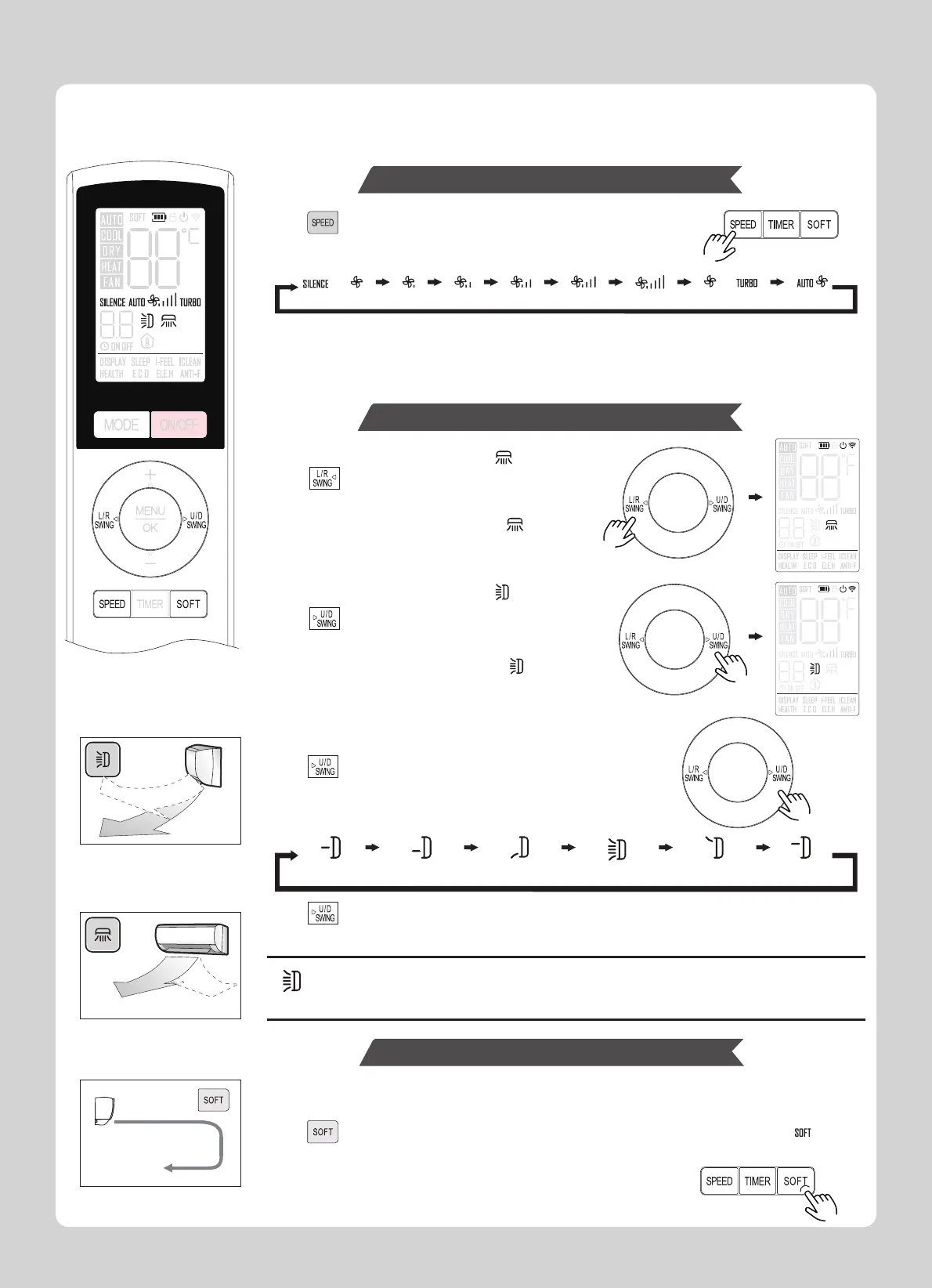
1.Auto is not available in fan mode.
2.Turbo is not available in auto mode.
3.The SPEED button is forced low speed in dry mode.
Press again and hold for 3 seconds or reinstall the battery of the remote control could
exit the “Rated swinging”
Note:
a.The up/down swing or the rated swing will turn off.
b.Press any of the “SOFT” button, “OFF”, “U/D SWING”
or switch mode will cancel the soft function.
press to turn on or off the soft function, and the screen will indicate or cancel “ ” icon.
When the air conditioner is on or the air conditioner is shutdown but the timer is on.
You can adjust the airflow rate to increase your comfort.
Press to select fan speed.
Each press changes fan speed in the following order:
1.Left and right airflow direction
Press to activate horizontal airflow direction.
The left-right swing blade will begin to swing,
and the screen will indicate or cancel “ ” icon.
2.Up and down airflow direction
Press to activate airflow direction.
The horizontal vane will begin to swing,
and the screen will indicate or cancel “ ” icon.
3.Rated swinging
Press and hold for 3 seconds, to activate rated swinging.
Each press changes airflow direction in the following order:
In the cooling mode, the unit blows air through up to 2430 Mico Vents preventing drafts while
still cooling the space.
The vane is set to the most efficient airflow direction.
COOL/DRY: horizontal position.
HEAT: position (5).
Fan Speed
(High)
(Low)
(Mid) (Auto) (Turbo)(Mid-Low) (Mid-High)(Silence)
Airflow Direction Adjustment
(AUTO)(3) (4) (5) (1) (2)
Soft Operation
(AUTO)
hold for
3 seconds
Directional Airflow Control:
Fan Speed and Airflow Direction Adjustment
5




 To Next Page