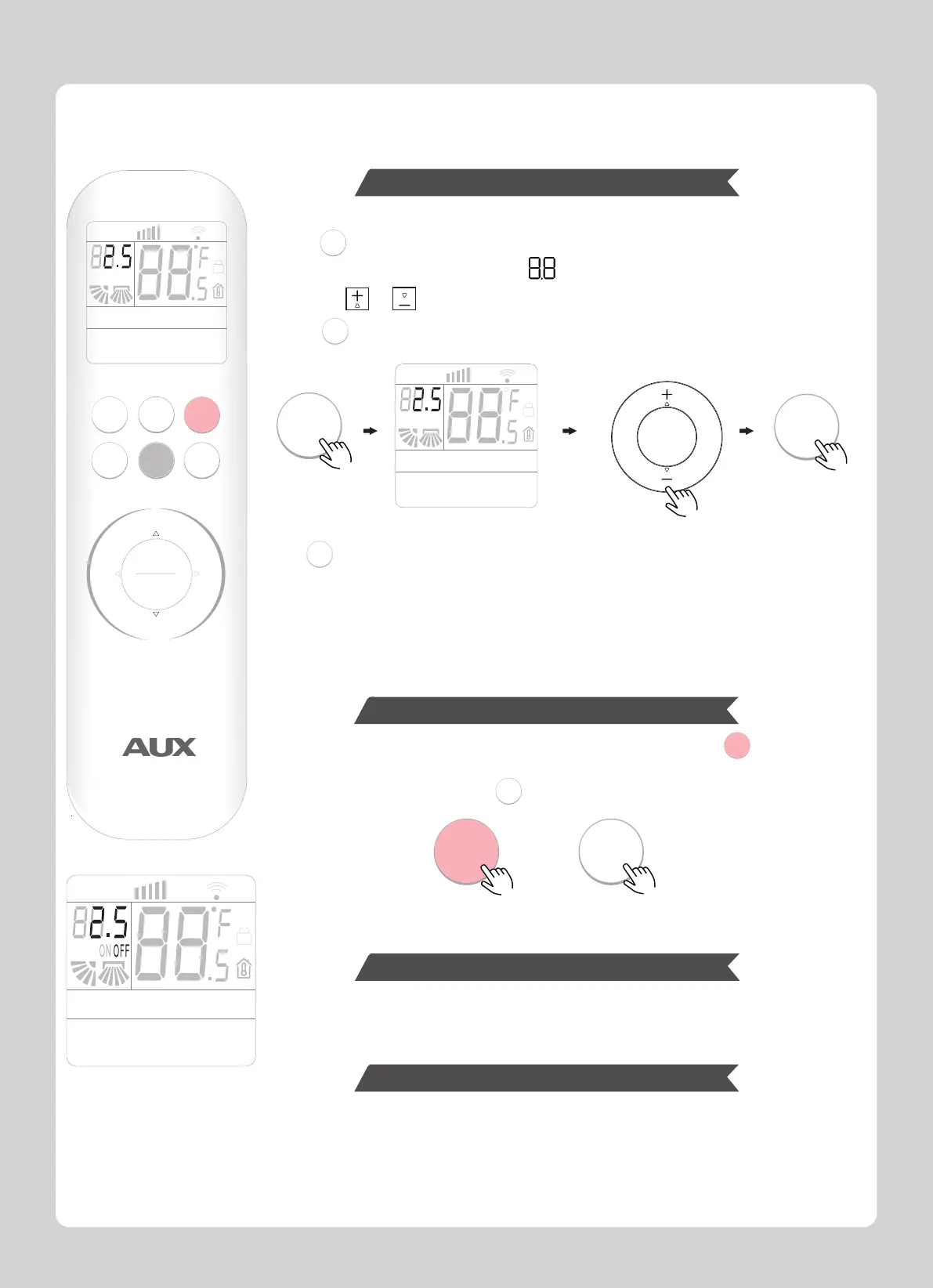
Timer functions are useful for automatically switching the air conditioner on or off.
ON/OFF TIMER Operation
After the timer power on setting is confirmed, the “ON” character will stop flashing and remain
lighting.
And the screen will display the corresponding mode, temperature, speed, swing , and all can
be set by pressing the corresponding buttons.
Note:
If the button is not pressed within 10 seconds after the “ON” start flashing,
the timer setting will be exited.
1.press will enter the timer function setting.
Then “ON” character will light up, and “ ” will be displayed and flashed in the screen.
2.Press the or buttons to set the number of hours in which the unit will be turned on.
3.Press again to confirm when the desired time is reached.
When the unit is turned off.
When the unit is turned on.
The operation method is the same as on timer.
The operation method is the same as cancel on timer.
or
TIMER
TIMER
TIMER
TIMER
TIMER
TIMER
ON/OFF
ON/OFF
TIMER
SPEED AUTO TURBO
RUN
HOUR
ON OFF
AUTO
COOL
DRY
HEAT
FAN
HEALTH
ECO
SLEEP
SILENCE
ELE.H
DISPLAY
LIGHT
iCLEAN
I-FEEL
Anti-F
SPEED AUTO TURBO
RUN
HOUR
AUTO
COOL
DRY
HEAT
FAN
HEALTH
ECO
SLEEP
SILENCE
ELE.H
DISPLAY
LIGHT
iCLEAN
I-FEEL
Anti-F
+
-
SPEED
ON/OFF
TIMER
MENU
OK
L/R
SWING
U/D
SWING
SPEED AUTO TURBO
RUN
HOUR
ON OFF
AUTO
COOL
DRY
HEAT
FAN
HEALTH
ECO
SLEEP
SILENCE
ELE.H
DISPLAY
LIGHT
iCLEAN
I-FEEL
Anti-F
COOL
HEAT
MODE
1.After setting the timed power on, if the timer has not yet expired, press to directly turn on
the unit and cancel the timed power on.
2.If timer setting is confirmed, press to cancel the timer function.
ON TIMER Operation
Cancel ON TIMER Operation
OFF TIMER Operation
Cancel OFF TIMER Operation
6



 To Next Page