DISPLAY / SLEEP / I-FEEL / ICLEAN / HEALTH /
ECO / ANTI-F / ELE.H Operation
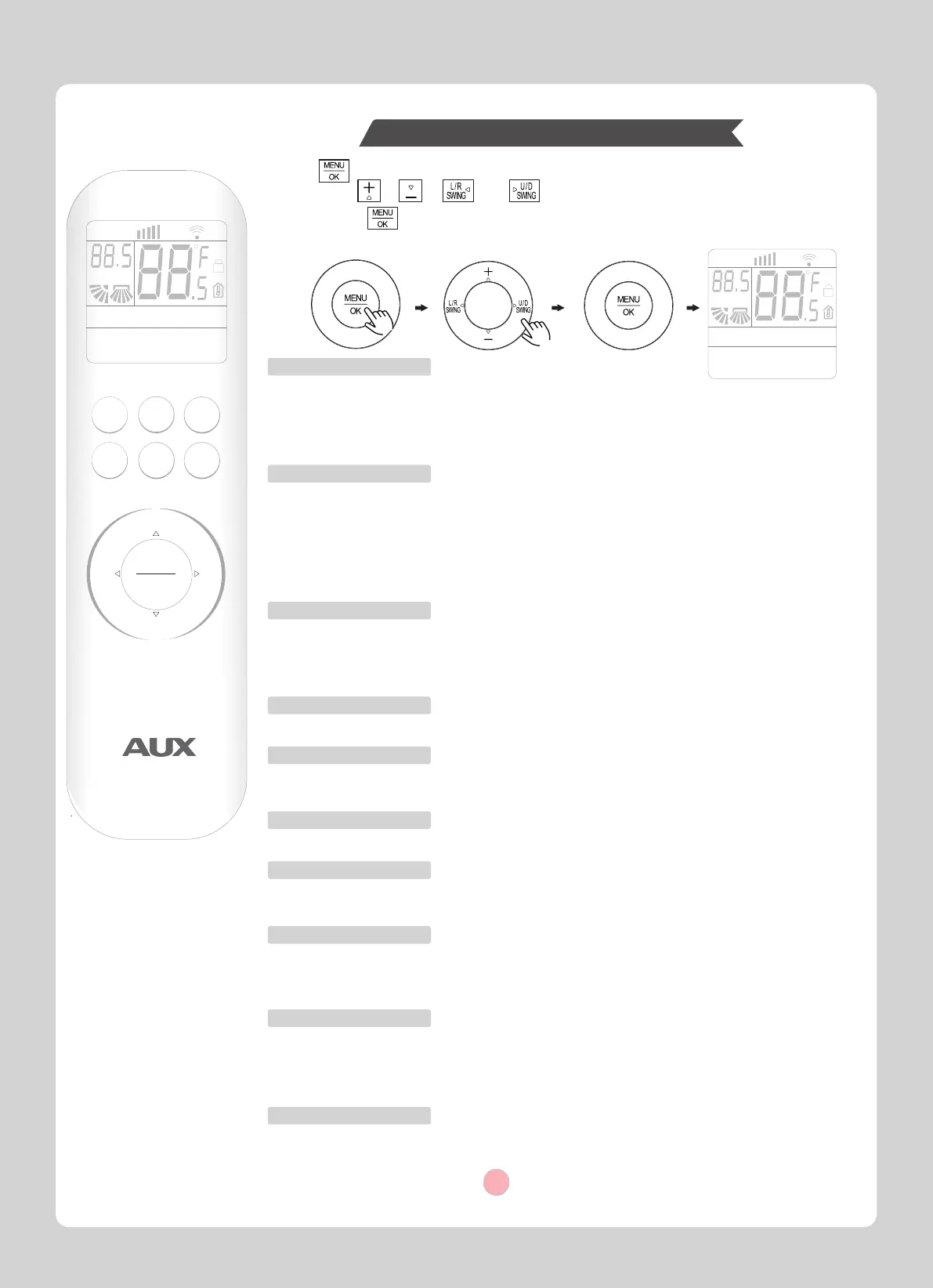
In function selection mode, the characters in LCD flashes as the functions are being selected.
1.Press to enter the function selection mode.
2.Then press , , and button to choose the function which you want.
3.After pressing button, the selected function will operate.
SPEED AUTO TURBO
RUN
HOUR
ON OFF
AUTO
COOL
DRY
HEAT
FAN
HEALTH
ECO
SLEEP
SILENCE
ELE.H
DISPLAY
LIGHT
iCLEAN
I-FEEL
Anti-F
2.ECO function
3.SLEEP function
4.SILENCE function
When the air conditioner is on, select this function to activate.
The unit will activate (deactivate) the function of silent wind.
5.ELE.H function
6.DISPLAY function
When the air conditioner is on, select this function to activate.
The unit will activate or deactivate automatically the function of display on the air-conditioner
screen according to the indoor ambient brightness.
7.LIGHT function
9.ANTI-F function
8.I-FEEL function
10.ICLEAN function
ON/OFF
+
-
SPEED
ON/OFF
TIMER
MENU
OK
L/R
SWING
U/D
SWING
RUN
HEAT
FAN
SILENCE
ELE.H
iCLEAN
SPEED AUTO TURBO
HOUR
ON OFF
AUTO
COOL
DRY
HEALTH
ECO
SLEEP
DISPLAY
LIGHT
I-FEEL
Anti-F
COOL
HEAT
MODE
1.HEALTH function
When the air conditioner is on, select this function to activate.
After activating the health function, the air conditioner will activate modules such as UVC to
purify the air.
Note: The health function will be automatically canceled when the air conditioner is turned off.
This function is combined with the functions of air conditioning, and some products do not have
this function.
When the air conditioner is on and in the COOL mode, select this function to activate.
The variable frequency air conditioner will enter the ECO function, which consumes the least
electricity, and will automatically exit after 8 hours. The ECO function is not available on fixed
frequency air conditioners. Changing modes or turning off the air conditioner will automatically
cancel the ECO function.
Note: The electricity consumption is affected by the ambient temperature and the house
structure etc., and when the ambient temperature is high or the house has a large area, be
cautious to use the ECO function.
When the air conditioner is on, select this function to activate.
After entering the sleep function, the air conditioner automatically adjusts the operating
temperature and wind speed, and turns off the lights.
The unit will exit sleep function in 10 hours of continuous operation and restore the previous status.
Note: The sleep function cannot be activated in fan or auto mode.
When the air conditioner is on and in the HEAT mode, select this function to enable.
The unit will activate the auxiliary heating function automatically according to the ambient
temperature, so as to accelerate the heating.
When the air conditioner is on, select this function.
The air conditioning display screen will turns off or on.
When the air conditioner is off, select this function to activate.
The unit will automatically clean the dust on the evaporator and dry or blow-dry the moisture.
The cleaning function will automatically shut off after 30 minutes.
During the cleaning function, if the button is pressed, the unit will turn on immediately.
When the air conditioner is on, select this function to enable.
The air conditioner intelligently detects the temperature at the user's location and adjusts its
operation accordingly. It first sets the average room temperature, then fine-tunes it based on the
temperature around the user's position.
When the air conditioner and the remote are off, select this function to activate. Upon activation,
After each shutdown, the air conditioner automatically starts to operate for about 3 minutes
to dry the moisture on the evaporator. This prevents the accumulation of bacteria, which can
cause fungus, unpleasant odors, and potential health issues.
Note: If you need to turn off this function. Press the ANTI-F function again.
Mode Selection
7



 To Next Page
 Loading...