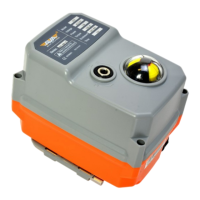
Join the orange and grey revolution
INSTALLATION, OPERATION &
MAINTENANCE
AVA Actuator IOM’s
Here are some general instrucons relang to the Installaon, Operaon and Maintenance
of our electric actuators.
We also cover some of the Frequently Asked Quesons by our customers over the years
from around the world.
Check out our website for all the latest Technical Support documents including product
videos and for our Smart Actuators, our screen by screen user guides.
www.avactuators.co.uk
SCAN FOR TECH
SUPPORT
SUPPORT INSTALLATION, OPERATION & MAINTENANCE
Cover No need to remove cover, doing so can invalidate your warranty
Heater The heater opon is prewired. When the actuator is powered, the heater is working
Orientaon Install vercally or horizontally upright, not to be installed underslung/upside down
Explosion Proof All series are suitable for SAFE AREA use only. Series 20 available as EX Rated
IP Rang IP67 weather proof, we advise against jeng/pressure washing actuators
Connector If your actuator is received with the white connector, you can remove it and terminate cable
Warranty Basic Series is 12 months 20,000 operaons. Smart Series is 24 months 60,000 operaons
End of Travel All actuators have end of travel limit switches except Modulang actuators, see below
4-20mA Output Smart Modulang actuators have posion feedback only, they don’t have end of travel feedback
Wiring Box Series 80-400Nm ulise a wiring box at the rear of the actuator. Remove to wire actuator
Maintenance All series of the actuators maintenance free. We recommend actuators are operated daily.
Keep Powered Yes, we recommend the actuators are powered at all mes to ensure the heater and feedback operate
SUPPORT FREQUENLTY ASKED QUESTIONS AND COMMON FAULT DIAGNOSIS
Capacitor Charge When inially using Failsafe actuators, allow short period of me for the actuator to charge capacitor.
Alert on Screen Smart actuators show ALERT when actuator has ‘Excessive Valve Torque’ or Motor Failure
No Control If your Modulang Actuator shows ‘NoCtrl’ check wiring, your actuator cannot see the modulang input
Feedback Error Ensure you are using resistors for Modulang actuators as per wiring diagram.
3rd Posion To put actuator into B33 or 3rd posion, apply power to both Red and Black at same me.
Adjust Angle Basic You can adjust the working angle of the actuator through adjusng the cams in the Basic series
Adjust Angle Smart You can use the rmware to set the working angle and this will also set the end of travel limit switches
LED Modulang Series 20-110 where LED ed will only show the LED on alarm. 200-400 series will also show open/close
Actuator Spins 360 If a Basic actuator and actuator rotates 360 degrees, internal micro switches are likely damaged
Screen isn't on For Smart actuators, check wiring and ensure excess voltage not applied. If ok, contact our support team


 To Previous Page
 Loading...