Need help?
Do you have a question about the Avalue Technology ECM-945GSE and is the answer not in the manual?
Identifies the product as ECM-945GSE with Intel Atom N270 and 945GSE chipset.
Device compliance with FCC Part 15 rules and conditions for operation.
Legal notices regarding copyright and trademarks for the product.
Disclaimers on product changes, liability, and the policy on critical components in life support devices.
Introduction to Avalue's customer services and commitment to product reliability.
Guidance on obtaining technical support and accessing the latest product documentation online.
Contact details for Avalue's headquarters and international branches for support and inquiries.
Details of the two-year warranty provided by Avalue Technology for its products.
Step-by-step instructions for users to follow when reporting a defective product for warranty service.
Essential safety guidelines for working with computer hardware, focusing on power and static discharge.
A checklist of items included in the ECM-945GSE package to ensure all parts are present.
A chronological record of changes and updates made to the user's manual.
Explains the manual's goal in detailing the ECM-945GSE and advises users on its study.
Comprehensive list of system specifications including CPU, memory, I/O, display, and audio components.
A block diagram illustrating the overall architecture and data flow of the ECM-945GSE.
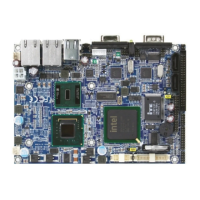
Visual layout of connectors and components on the ECM-945GSE board.
Step-by-step instructions for setting up the ECM-945GSE system.
Instructions for installing the SODIMM memory module.
Lists and describes the function of jumpers and connectors on the motherboard.
Guides on setting jumpers for AT/ATX mode and input power selection.
Instructions on how to enter the BIOS Setup utility during system boot.
Explains the keyboard controls and navigation methods within the BIOS setup interface.
How to access help within BIOS and advice for recovering from incorrect settings.
Description of the BIOS Main Menu, its functions, and navigation.
Configuration options for standard CMOS settings like time, date, and video mode.
Settings for configuring IDE hard disk drives, including auto-detection and manual parameters.
Options for CPU features, thermal management, and security settings.
Setting the order in which the system attempts to boot from various storage devices.
Configuration for virus warning, CPU cache, and Hyper-Threading Technology.
Settings for optimizing POST speed and defining the boot device sequence.
Settings for NumLock status, Gate A20, and typematic keyboard repeat rate.
Options for system passwords, APIC mode, MPS version, and DRAM configuration.
Settings related to floppy drive reporting and the display of the EPA logo during POST.
Configuration options for the chipset, managing bus speeds and memory access.
Detailed settings for DRAM timing, including CAS latency, RAS to CAS delay, and precharge.
Settings for system memory frequency, BIOS cacheable options, memory hole, and PCI Express root ports.
Selection of the compliance mode for PCI-E interface.
Configuration for on-chip frame buffer size, DVMT mode, boot display, panel resolution, and TV standard.
Settings for integrated peripherals such as IDE devices, SATA, and PCI IDE interfaces.
Configuration for SATA modes, onboard LAN, audio codec, and LAN boot ROM.
Settings for serial ports, parallel port mode, DMA, and the watch dog timer function.
Options for enabling and configuring USB controllers, operation mode, and device support.
Configuration for PCI Express PM, ACPI functions, and suspend types.
Settings for power saving modes, video off methods, and suspend types.
Configuration for modem IRQ usage and system inactivity timers for suspend modes.
Settings for soft-off by power button, wake-up events, and resume by alarm.
Settings for configuring the Plug and Play and PCI bus system.
Configuration for PCI IRQ assignments, palette snoop, and maximum payload size.
Displays system status for CPU, fan, and voltages. Includes options for loading defaults.
Options to load fail-safe defaults or optimized defaults for system performance.
Procedures for setting up system passwords to restrict access and configuration changes.
Instructions on how to save CMOS changes and exit the BIOS setup utility.
Instructions on how to exit the BIOS setup without saving any configuration changes.
Step-by-step guide for installing the Intel 945GSE chipset driver from the DVD-ROM.
Instructions for installing the Intel graphics display driver for Windows XP.
Guide for installing the Intel 82583V Gigabit LAN Ethernet driver.
Instructions for installing the Realtek ALC655 audio driver.
Detailed mechanical drawing of the ECM-945GSE board with dimensions and component placement.
Explanation of Power-On Self-Test (POST) messages and beep codes for system errors.
List and description of common error messages encountered during the POST process.
Continuation of POST error messages related to display settings, EISA configuration, and hard drive initialization.
Further POST error messages concerning EISA configuration, keyboard, memory address, and parity errors.
Additional POST error messages related to EISA configuration, system halt conditions, and wrong board detection.
POST error messages for floppy disk failures, hard disk issues, keyboard errors, and ROM checksum.
Reference for POST codes and a link to the Phoenix-Award website for more information.
Detailed descriptions of normal POST codes from C0 to BF, covering chipset and memory tests.
Descriptions of normal POST codes from 3 to 24, covering Super IO, video, keyboard, and CMOS checks.
Descriptions of normal POST codes from 25 to 42, including video interface, DMA, and interrupt tests.
Descriptions of normal POST codes from 43 to 5D, covering EISA modes, memory tests, and CPU display.
Descriptions of normal POST codes from 5E to 7C, covering setup, floppy, hard drive, and serial/parallel ports.
Descriptions of normal POST codes from 7D to 96 and FF, covering POST error checks, security, and boot attempts.
Descriptions of quick POST codes from 65 to 71, covering device initialization and setup.
Descriptions of quick POST codes from 72 to 80 and FF, covering FDD, HDD, POST errors, and boot.
Descriptions of S4 POST codes from 5A to 69, covering chipset initialization and device setup.
Descriptions of BootBlock POST codes from 1 to FF, covering memory tests, KB, video, and boot sector.
 General
| Form Factor | Mini-ITX |
|---|---|
| Chipset | Intel 945GSE + ICH7M |
| Graphics | Intel GMA 950 |
| Video Output | 1 x VGA |
| Power Supply | 12V DC input |
| Operating System Support | Windows XP, Windows 7, Linux |
| CPU Support | Intel Atom N270 |
| Memory Support | 1 x SODIMM, DDR2 400/533MHz, up to 2GB |
| Storage Interface | 1 x IDE |
| LAN | Realtek RTL8111C Gigabit Ethernet |
| USB Ports | 4 x USB 2.0 |
| Serial Ports | 1 x RS-232 |
| Audio | Realtek ALC662, 5.1-channel HD Audio |
| Expansion Slots | 1 x Mini PCIe |
| Operating Temperature | 0°C ~ 60°C |
| Parallel Port | 1 x LPT |

 To Next Page