User’s Manual
ECM-945GSE User’s Manual
65
3.5.4.1.1 On-Chip Serial ATA Setting
The field under the SATA setting includes SATA Mode (IDE), On-Chip Serial ATA (Auto),
PATA IDE Mode (Secondary) and SATA Port (P0, P2 is Primary).
Item Options Description
SATA Mode
IDE
AHCI
It allows you to select the operation mode for
SATA controller.
On-Chip Serial ATA
Disabled, Auto,
Combined Mode,
Enhanced Mode,
SATA Only
It provides access to set the mode of the
On-Chip SATA devices.
SATA PORT Speed Settings
Disabled
Force GEN I
Force GEN II
This item allows you to select the speed of
SATA ports.
PATA IDE Mode
Secondary This item shows the PATA IDE mode.
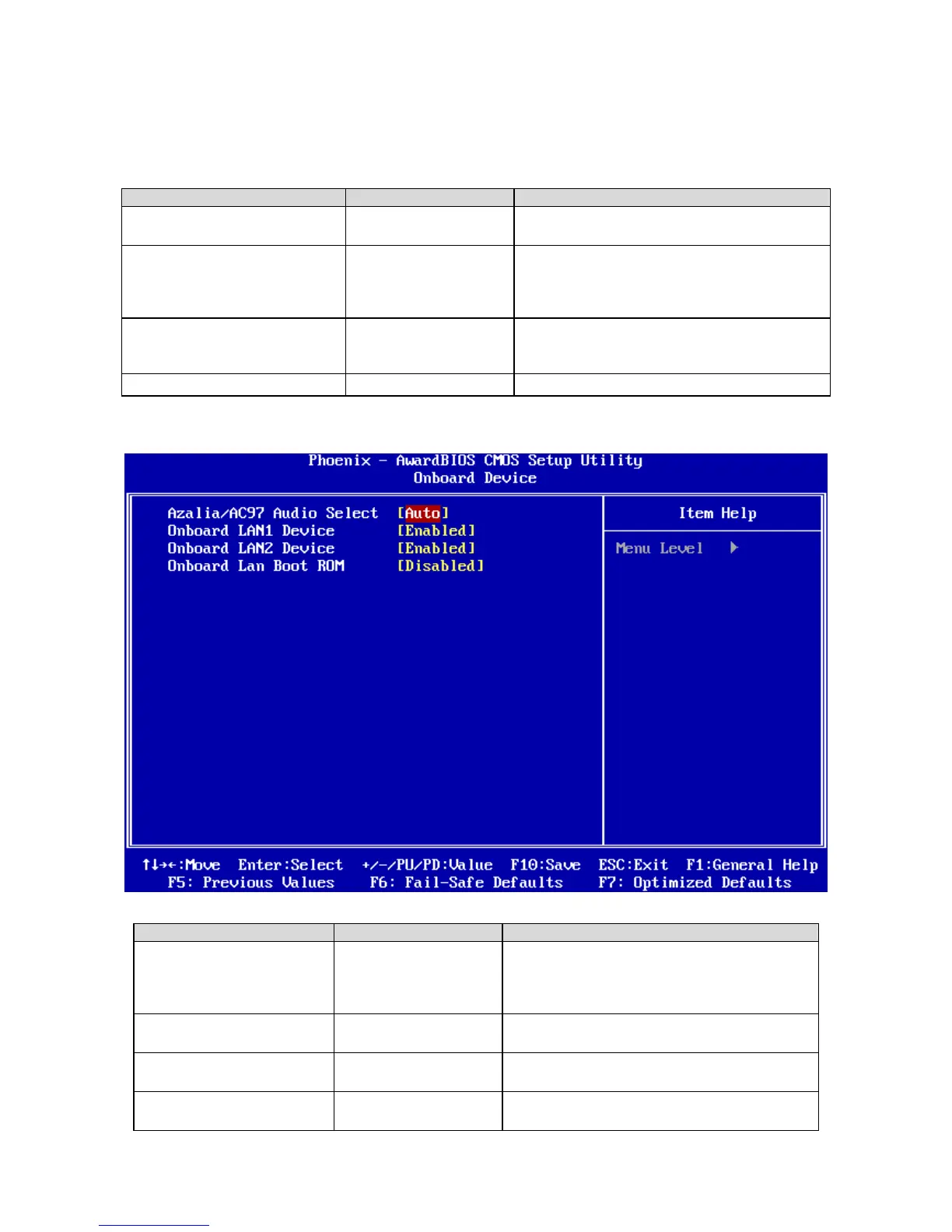
3.5.4.2 Onboard Device
Item Options Description
Azalia/AC97 Audio Select
Auto
Azalia
AC97 Audio
All Disabled
This item allows you to select the Audio codec.
Onboard LAN1 Device
Enabled
Disabled
This item allows you to enabled the PCIe Lan1
Device.
Onboard LAN2 Device
Enabled
Disabled
This item allows you to enabled the PCIe Lan2
Device
Onboard Lan Boot ROM
Enabled
Disabled T
This item allows you to enabled the LAN Boot
ROM.


 To Next Page