EasyManua.ls Logo

Avalue Technology HPM-246 - System Event Log

Avalue Technology HPM-246
97 pages
Print Icon
To Next Page IconTo Next Page
To Previous Page IconTo Previous Page
Loading...
User’s Manual
HPM-246 User’s Manual
71
the OS Boot Watchdog Timer policy.
Power Control Policy
Do Not PowerUp
Last Power State
Power Restore
Unspecified[Default]
Configure how the system should respond if AC Power
is lost, Reset not required as selected Power policy will
be set in BMC when policy is saved.
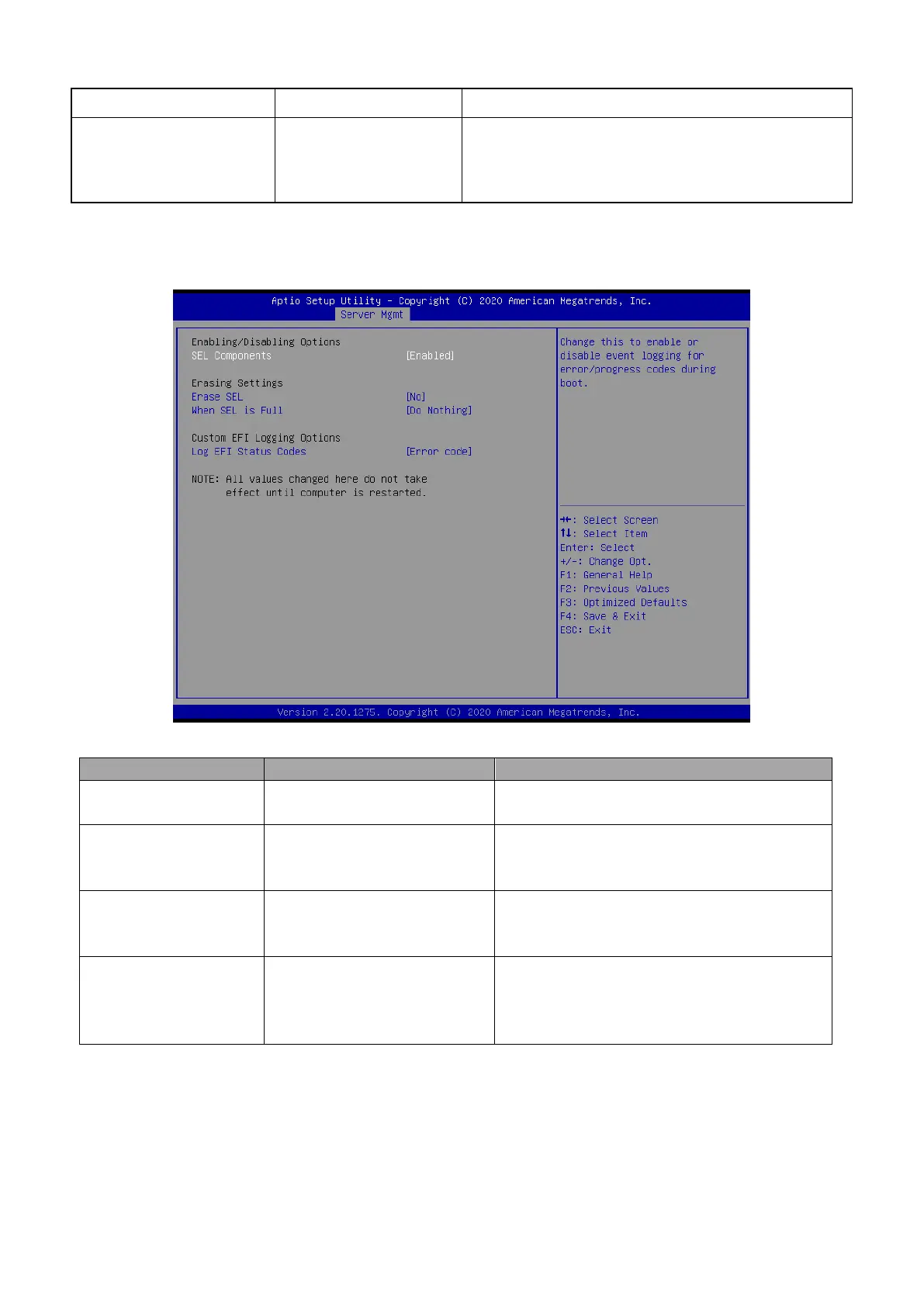
3.6.4.1 System Event Log
Item
Option
Description
SEL Components
Enabled[Default]
Disabled
Change this to enable or disable event logging
for error/progress codes during boot.
Erase SEL
No[Default]
Yes, On next reset
Yes, On every reset
Choose options for erasing SEL.
When SEL is Full
Do Nothing[Default]
Erase Immediately
Delete Oldest Record
Choose options for reactions to a full SEL.
Log EFI Status Codes
Disabled
Both
Error code[Default]
Progress code
Disable the logging of EFI Status Codes or log
only error code or only progress code or both.

Table of Contents

Related product manuals