Valve Camshaft (Green) 17
Rev C
Valve Camshaft (Green)
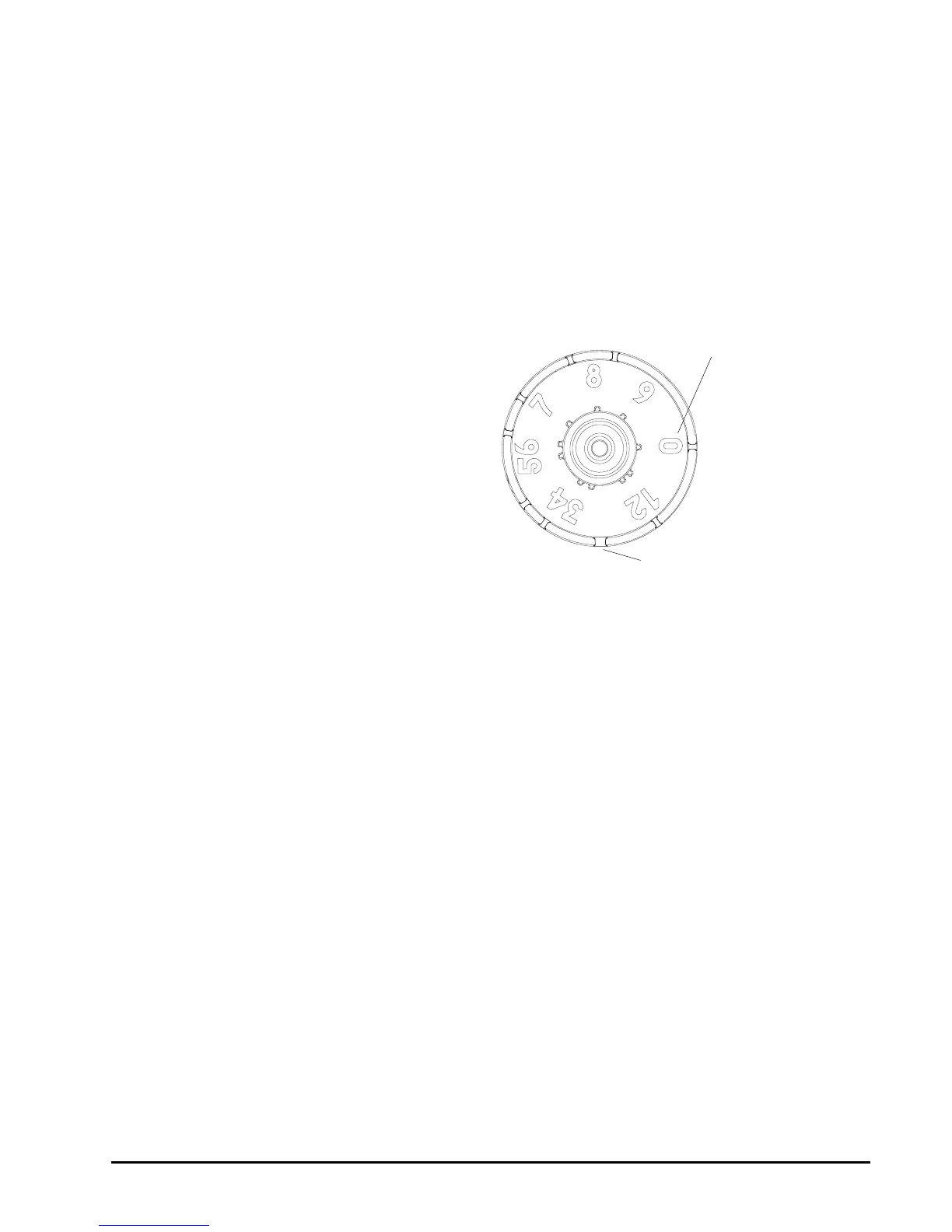
The front end of the camshaft has an indicator cup. The cup has slots in
the outer periphery and numbers on the inside face (Figure 7).
The numbers can be seen with the cover off, from the front over the top of
the controller. The number at the top indicates which regeneration cycle is
currently in progress.
Figure 7
Camshaft Front End for
269 Valve Bodies
The corresponding slot for the number is positioned at the optical sensor
which is approximately 90 degrees out of phase.
Regeneration Cycle Indicators
0 = Treated Water - normal operation mode
1=Brine Refill
2=Brine Prep
3 = Brine Draw / Slow Rinse Cycle
*4 = Holiday
*5 = Brine Empty / Slow Rinse
6, 7= System Pause
8 = Backwash Cycle
9=Fast Rinse Cycle
*Cycles are skipped unless "Holiday Mode" is enabled.
Treated Water Slot
Treated Water Indicator
(normal operation)


 To Next Page