BEDIENUNG OPERATION
DIGITALE EINGÄNGE
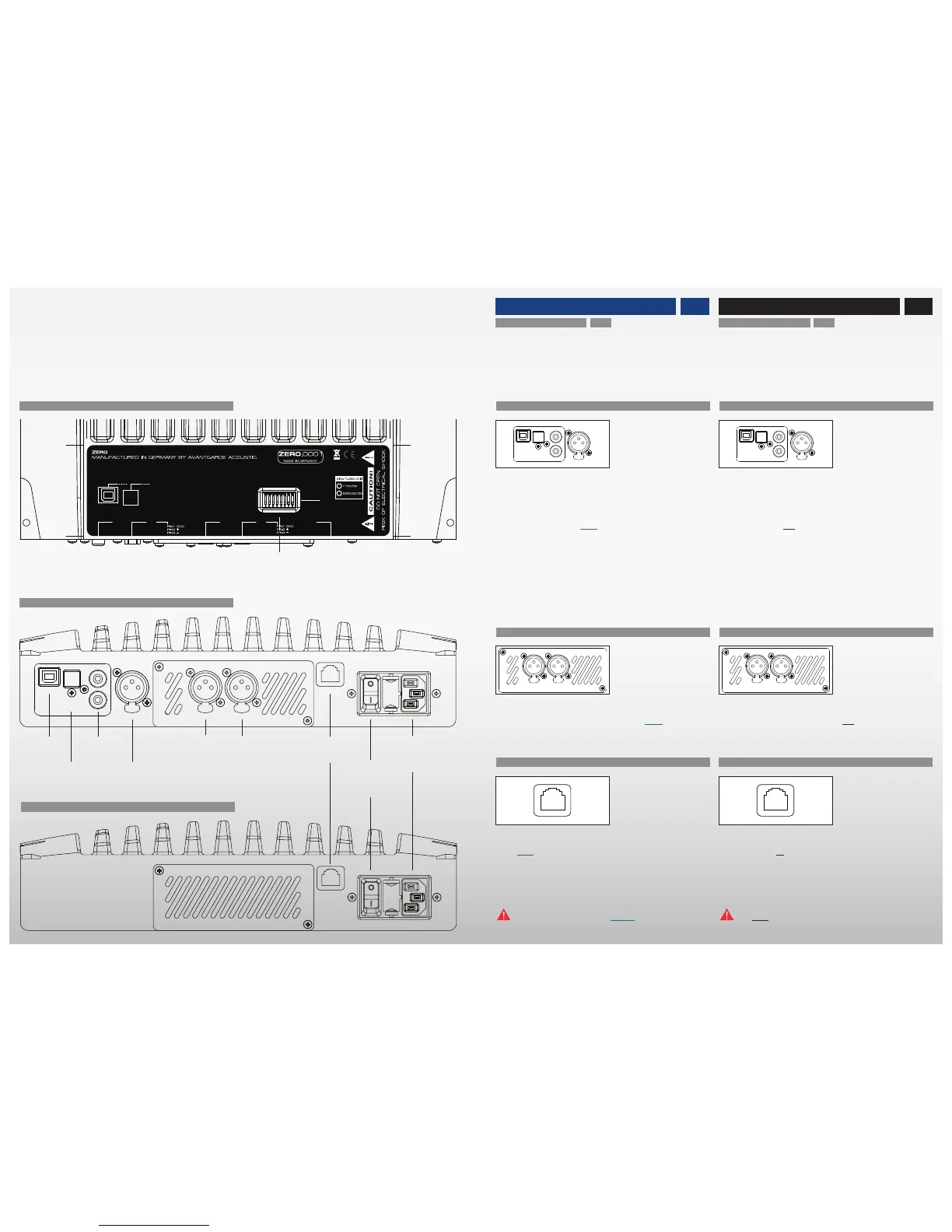
• Die digitalen Musikquellen mit den digitalen Eingängen
(USB ❶, TOSLINK ❷, SPDIF ❸ und/oder AES/EBU ❹)
des Master Lautsprechers (siehe Abb. links) verbinden.
• Der Lautsprecher ist nicht mit einem eingebauten WLAN
Empfänger ausgerüstet. Zur Integration des Lautsprechers
in einem Funknetz, eine externe WLAN Schnittstelle (z.B.
AirPort Express) über ein optisches TOSLINK Digitalkabel
mit dem TOSLINK ❷ Eingang des Lautsprechers verbinden.
Es können alle digitalen Eingänge gleichzeitig belegt
werden. Das Aktivieren des entsprechenden Eingangs er-
folgt mit der Fernbedienung.
ANALOGER EINGANG (OPTIONAL)
• Optional ist ein analoger Eingang ❺-❻ erhältlich. Dieser
hochwertige Analog-Digital Konverter ist nicht im Standard
Lieferumfang enthalten, kann aber jederzeit vom authori-
sierten Service Personal nachgerüstet werden.
WIRE–LINK ZWISCHEN MASTER UND SLAVE
• Master und Slave Lautsprecher sind untereinander über
Funk oder optional einer Kabelverbindung (Wire–Link ❼)
verbunden. Hierfür Ethernet Kabel (CAT.5/5e/6 LAN Kabel
mit Standard 8P8C/RJ45 Stecker; 100 Ohm) verwenden.
Bei Verwendung des Wire–Links schaltet sich das Funk–
Modul automatisch aus.
Die Wire–Link ❼ Buchse NICHT zum Anschluss des
Lautsprechers an ein Ethernet Datennetz verwenden!
GAIN
WIRE LINK
ANALOG INPUT
BALANCED
(OPTIONAL)
POWER
DIGITAL INPUTS
OPTUSB
SPDIF2
SPDIF1
AES/EBU LEFT RIGHT
DIGITAL INPUTS
• Connect the digital music sources with the digital inputs
(USB ❶, TOSLINK ❷, SPDIF ❸ and/or AES/EBU ❹) of the
master speaker (see graphics left).
• The speaker is not equipped with an internal WLAN re-
ceiver. Connect an external WLAN interface (ex. AirPort
Express) through an optical TOSLINK cable with the
TOSLINK ❷ input of the master speaker, to integrate the
speaker in a WLAN environment.
All digital inputs can be connected at a time. The activa-
tion of the inputs is done with the remote control.
ANALOG INPUT (OPTIONAL)
• An analog input ❺-❻ is available an an option. This high
quality analog-digital converter is not included in the stan-
dard version of the system. The analog-digital converter can
be retrofitted anytime by authorized service staff.
WIRE–LINK BETWEEN MASTER AND SLAVE
• Master and slave speaker communicate with each other
via radio signal or alternatively via a Wire–Link ❼. For the
Wire–Link ❼ connection use an Ethernet Kabel (CAT.5/5e/6
LAN cable with standard 8P8C/RJ45 plug; 100 Ohm). The
radio module will automatically switch–off, when the Wire–
Link is connected.
Do NOT use the Wire–Link ❼ socket to connect the
speaker to an Ethernet computer network.
MASTER – AUFSICHT / TOP VIEW
SLAVE – SEITENANSICHT / SIDE VIEW
MASTER – SEITENANSICHT / SIDE VIEW
PIN 1 = GND
PIN 2 = hot
PIN 3 = cold
PIN 1 = GND
PIN 2 = hot
PIN 3 = cold
❶
❷
❸
❹
❺ ❻
❼
❽
❾
❿
1312
USB
TOSLINK OPT.
2 x SPDIF
AES/EBU
XLR ANALOG
(optional)
LEFT RIGHT
WIRE–LINK
ON/OFF
SWITCH
MAINS
INPUT
DIP–SWITCH
BASS RESPONSE


 To Next Page