FERNBEDIENUNG REMOTE CONTROL
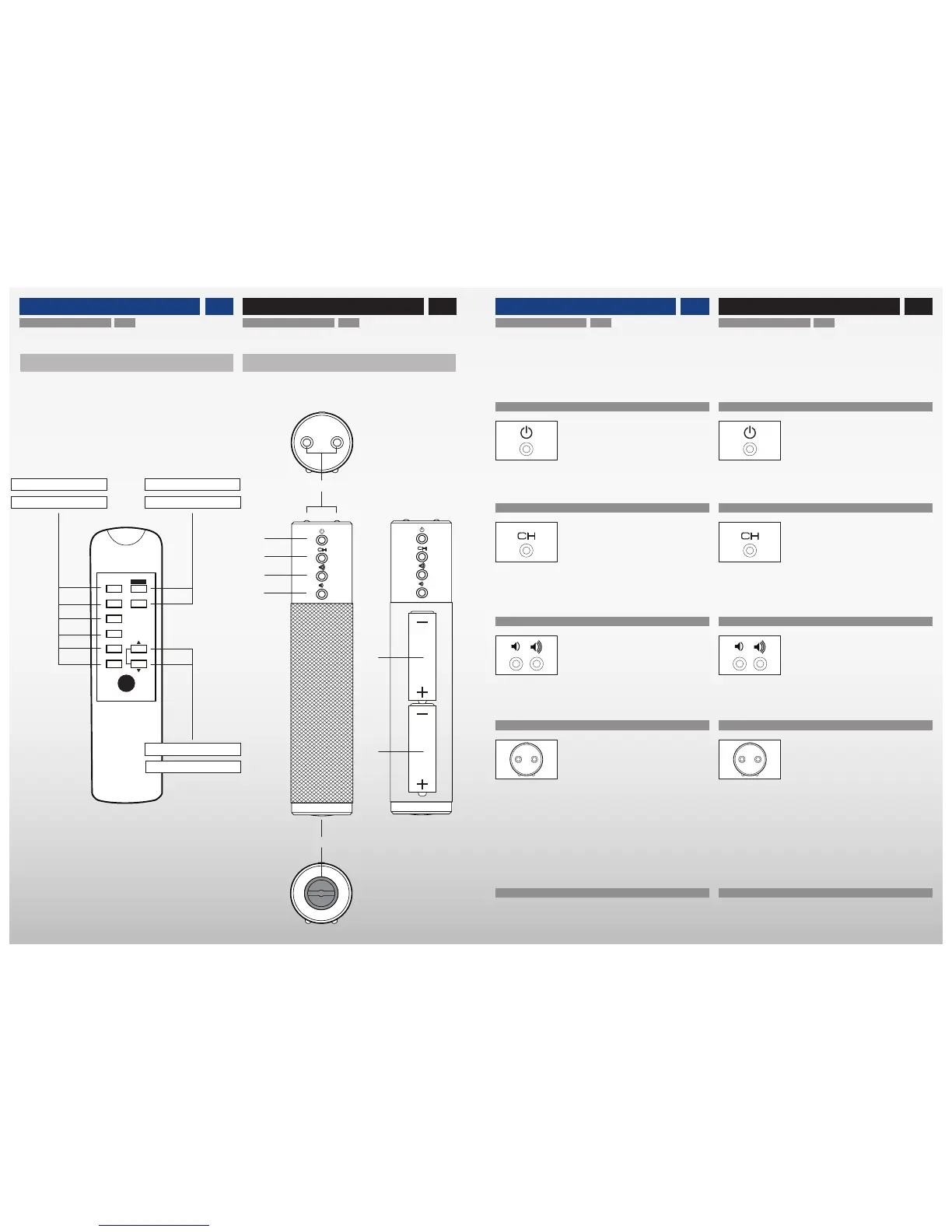
EINGANGSTASTER
• Drücken der Eingangstaste ⓬ schaltet zwischen den Ein-
gängen (USB ❶, TOSLINK ❷, SPDIF ❸, AES/EBU ❹ und
ANALOG ❺❻) um.
INFRAROT SENDER
• Die beiden Infrarot Sender ⓯ befinden sich an der Vor-
derseite der Fernbedienung. Für einen guten Empfang des
Infrarot Signals die Fernbedienung in Richtung Empfänger
Sensor des Master Lautsprechers halten. Der IR Sensor
befindet sich frontseitig oberhalb des verchromten Logos.
Starke Lichtquellen oder Sonnenlicht können den Infra-
rot Empfang beeinträchtigen.
AUSTAUSCH DER BATTERIEN
• Zum Einsetzen bzw. Austauschen der beiden 1,5V Typ AA
Batterien ⓱ und ⓲ den Schraubdeckel des Batteriefachs
⓰ mit Münze entgegen dem Uhrzeigersinn aufschrauben.
STANDBY TASTE
• Drücken der Standby Taste ⓫ schaltet zwischen
STANDBY– und ON–Betrieb um.
LAUTSTÄRKEREGLUNG
• Drücken der Lautstärketaste ⓭ erhöht die Lautstärke.
• Drücken der Lautstärketaste ⓮ senkt die Lautstärke.
REMOTE CONTROL – INPUT SWITCH
• Pressing the input switch ⓬ toggles between the in-
puts (USB ❶, TOSLINK ❷, SPDIF ❸, AES/EBU ❹ and
ANALOG ❺❻).
REMOTE CONTROL – INFRARED TRANSMITTER
• Both infrared emitters ⓯ are located at the frontside of
the remote control. Point the remote control towards the in-
frared sensor of the Master speaker to ensure good recep-
tion. The IR sensor is located at the front side of the Master
speaker above the Avantgarde chrome logo.
Strong sources of light or direct sunlight may interfere
and disable the infrared reception.
CHANGING THE BATTERIES
• To insert or replace the two 1.5V Typ AA batteries ⓱ and
⓲ open the round screw cap of the battery compartment ⓰
with a coin by turning it counter–clockwise.
REMOTE CONTROL – STANDBY SWITCH
• Pressing the standby switch ⓫ toggles between
STANDBY and ON.
REMOTE CONTROL – VOLUME CONTROL
• Pressing the volume button ⓭ increases the volume.
• Pressing the volume button ⓮ decreases the volume.
ZERO 1
by Avantgarde Acoustic
USB
OPT
COAX 1
COAX 2
AES
ANALOG
ON
VOL
OFF
FERNBEDIENUNG REMOTE CONTROL
STANDARD
• im Lieferumfang enthalten
• included as standard
OPTIONAL
• als Zubhör erhältlich
• available as an option
1718
16
⓯
⓫
⓬
⓭
⓲
⓰
⓮
⓱
EIN-/AUS Taster
ON/OFF Switch
LAUTSTÄRKE Taster
VOLUME Control
EINGANGS Taster
INPUT Select


 To Next Page