User Manual
ARIA 3
8
EN
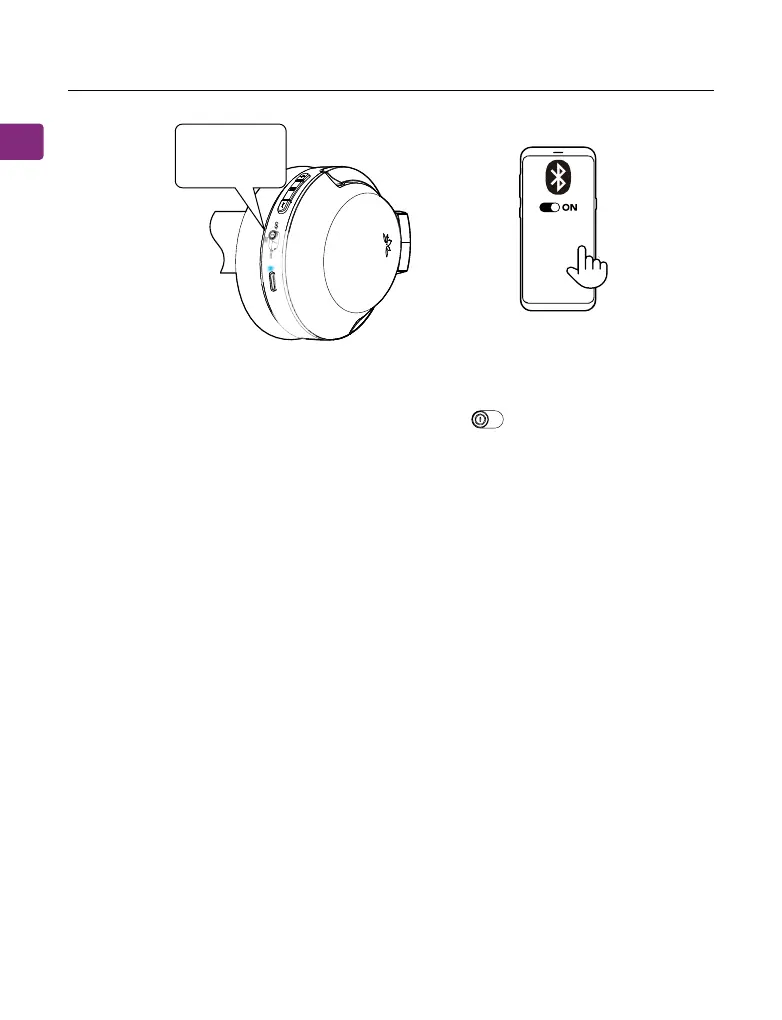
For subsequent use, your headphones should automatically reconnect to the
last-paired device within a few seconds of being turned on. If not, you can
manually activate reconnection by sliding the switch to “PAIR” once,
or by selecting “Avantree Aria 3” in your device’s Bluetooth menu.
ON
PAIR
OFF
Using with Your PC
To connect the headphones to your PC, follow these steps:
STEP 1
Turn on the headset. It will enter pairing mode automatically on the rst use.
Otherwise, slide and hold the power switch to the “PAIR” position until you
hear “Pairing” and see the LED ashing RED & BLUE.
STEP 2
Go to your computer’s Bluetooth settings and search for the Avantree device.
Click “Connect”.
STEP 3
Keep the devices close together. Once successfully connected, the headset’s
LED will turn solid blue, and you will hear a “Connected” voice indicator.
OFF
Accessory
Accessory
Avantree Aria 3
MY DEVICES
Connected



 To Next Page