User Manual
ARIA 3
9
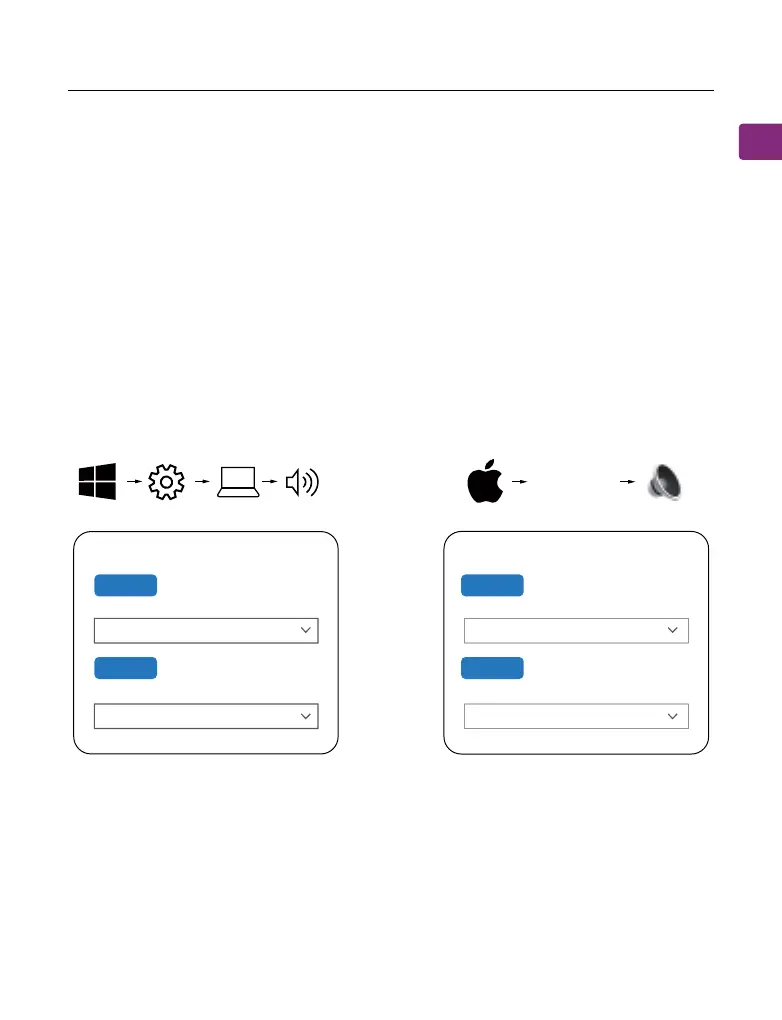
Conguring Audio Settings (Only for PC)
You may need to congure your audio settings when using the Aria 3 with
your PC or laptop.
STEP 1
In your device’s audio settings, ensure that “Avantree Aria 3” is selected as
the default for both SOUND OUTPUT / PLAYBACK and INPUT / MICROPHONE
device.
For subsequent use, the headset should automatically reconnect to the last
paired device within a few seconds after turning on. If not, manually
reconnect by sliding the power switch to “PAIR” once or selecting “Avantree”
from your device’s Bluetooth menu.
Sound
Output
Choose your output device
Input
Choose your input device
Avantree Aria 3
Avantree Aria 3
Settings System Sound
Sound
Avantree Aria 3
Output
Select a device for sound output:
Avantree Aria 3
Input
Select a device for sound input:
System
Preferences...
Sound



 To Next Page