11
EONUser Manual
EN
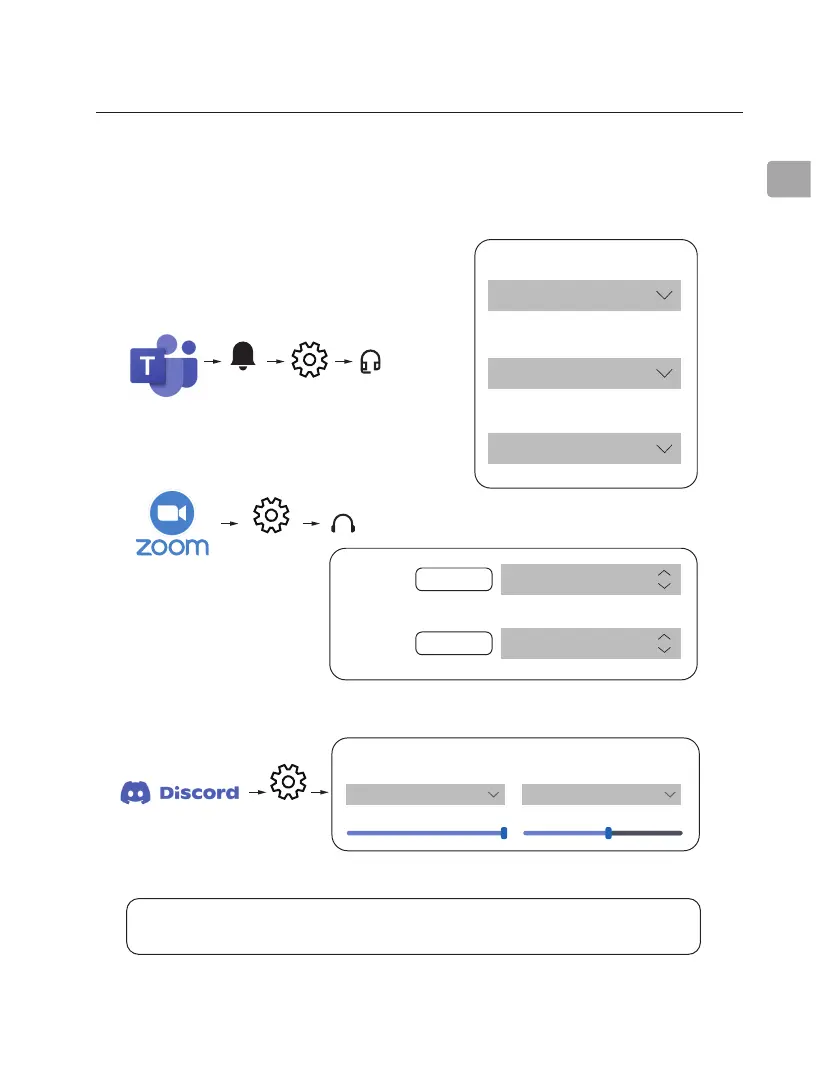
Settings
Settings
Settings
Avantree Eon
Avantree Eon (Hands Free)
Avantree Eon (Hands Free)
Avantree Eon (Hands Free)Test Speaker
Avantree Eon (Hands Free)
Activity
Audio devices
Devices
Audio
Speaker
Speaker
Microphone
Microphone
Test Mic
INPUT DEVICE
VOICE SETTINGS
OUTPUT DEVICE
INPUT VOLUME OUTPUT VOLUME
Avantree Eon (Hands Free) Avantree Eon (Hands Free)
STEP 2:
Repeat the above steps in your meeting software (i.e. Teams, Zoom,
Skype, etc.)
NOTE: On Windows 11 / macOS, there is no “Hands Free” option; select “Avantree Eon”
as the default instead.”



 To Next Page