8
EONUser Manual
EN
STEP 1
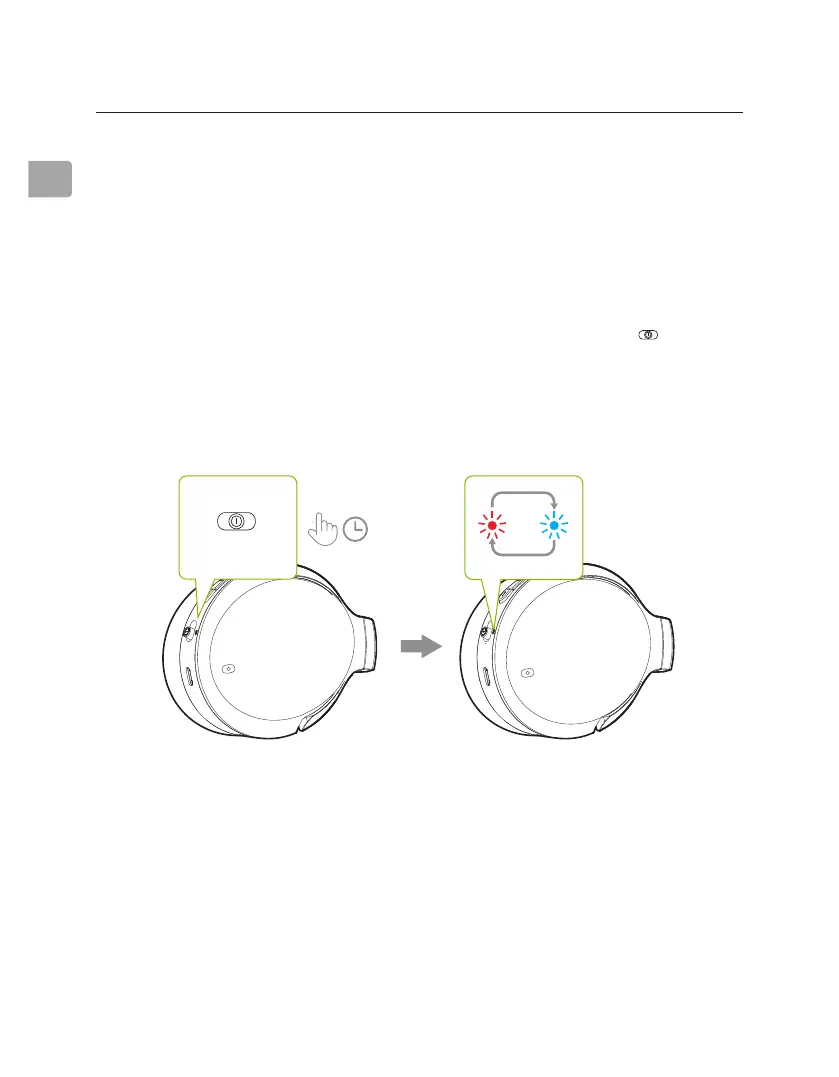
Turn on the headphones. For rst time use, the headphones will enter
PAIRING mode automatically.
If not, put your headphones into PAIRING mode by sliding the switch
to “HOLD TO PAIR” and holding for 2 seconds until the LED ashes red & blue.
OFF/
Wired
ON
Hold
to Pair
OFF/
Wired
ON
Hold
to Pair
OFF/
Wired
ON
Hold
to Pair
Connecting the Headphones to Your Device
Pairing & Connecting
STEP 2
Turn on your device's Bluetooth and select "Avantree Eon" in the Bluetooth
menu.
Hold for 2s
OFF/
Wired
ON
Hold
to Pair



 To Next Page