7
EONUser Manual
EN
OFF/
Wired
ON
Hold
to Pair
A
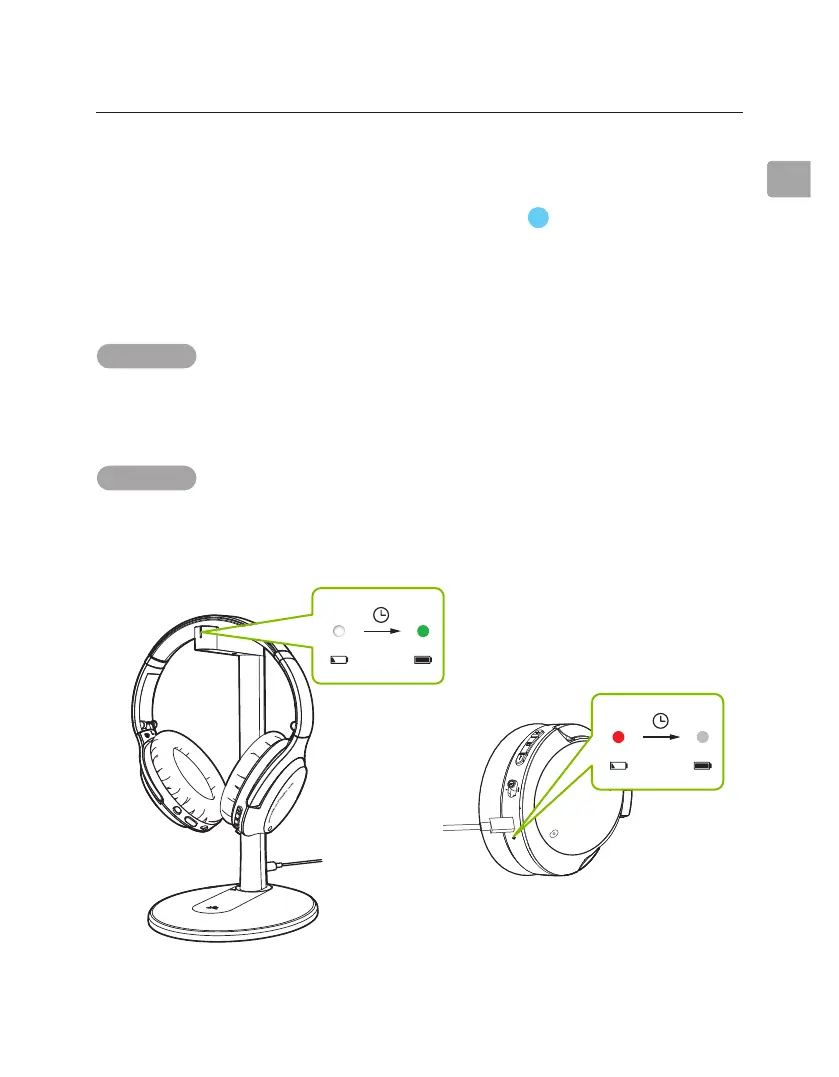
A “BATTERY LOW” voice prompt and a ashing red light will indicate low
battery. In order to charge, you can use either a 5V/500mA-2A rated USB
adapter (your phone charger or similar should work) or PC USB port as a
power source.
Charging the Headphones
OPTION 1 Charging with the stand
Place the headphones on the charging stand. The charging dock’s LED will
turn white while charging and turn green once charging is complete.
OPTION 2 Charging via USB cable
Alternatively, you can plug the provided type C power cable directly into the
headphones’ charging port.
ANC
EQ
2.5hrs
A
v
a
n
t
r
e
e
2.5hrs



 To Next Page