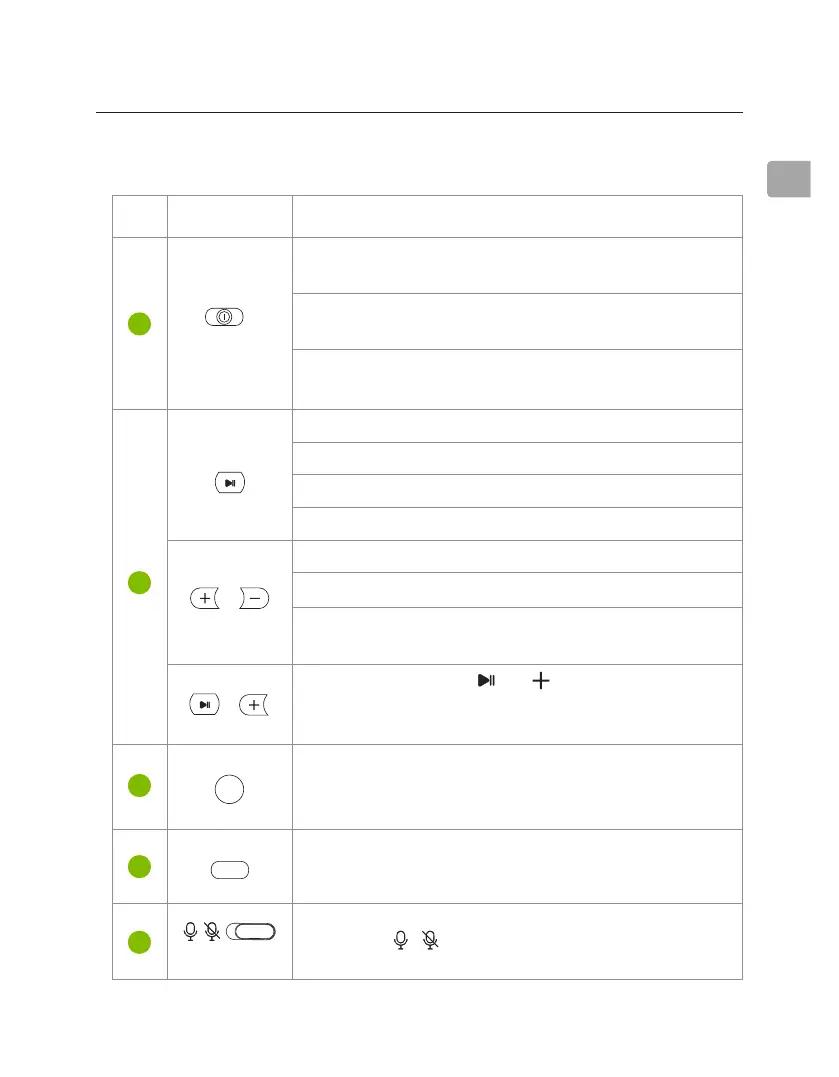
Press & hold both “ & ” for 1 second to
turn sidetone on / o sidetone (mic monitoring;
hear yourself speak)
5
EONUser Manual
EN
Button Functions
OFF/
Wired
ON
Hold
to Pair
EQ
/
/
ANC
(on boom mic)
1
2
5
3
4
Switch to the “ON / OFF” position to turn the
headphones on / o
Press once to play / pause
Switch to the “WIRED” position to use as wired
headphones
Switch to the “HOLD TO PAIR” position & hold for
2 seconds to enter pairing mode
Press & hold both buttons for 5 seconds to clear
pairing history
Press once to switch between balanced and
bass-boosted modes
Switch to / to unmute / mute microphone
Press once to switch among Active Noise
Cancellation / Transparency (hear your
surroundings) / Normal modes.
Press once to accept / end call
Press once to increase / decrease volume
Press & hold for 2 seconds to skip / replay track
Press & hold for 2 seconds to reject call
Press twice to redial last number
No. Button Functions



 To Next Page