User Manual Quartet
13
Advanced Features
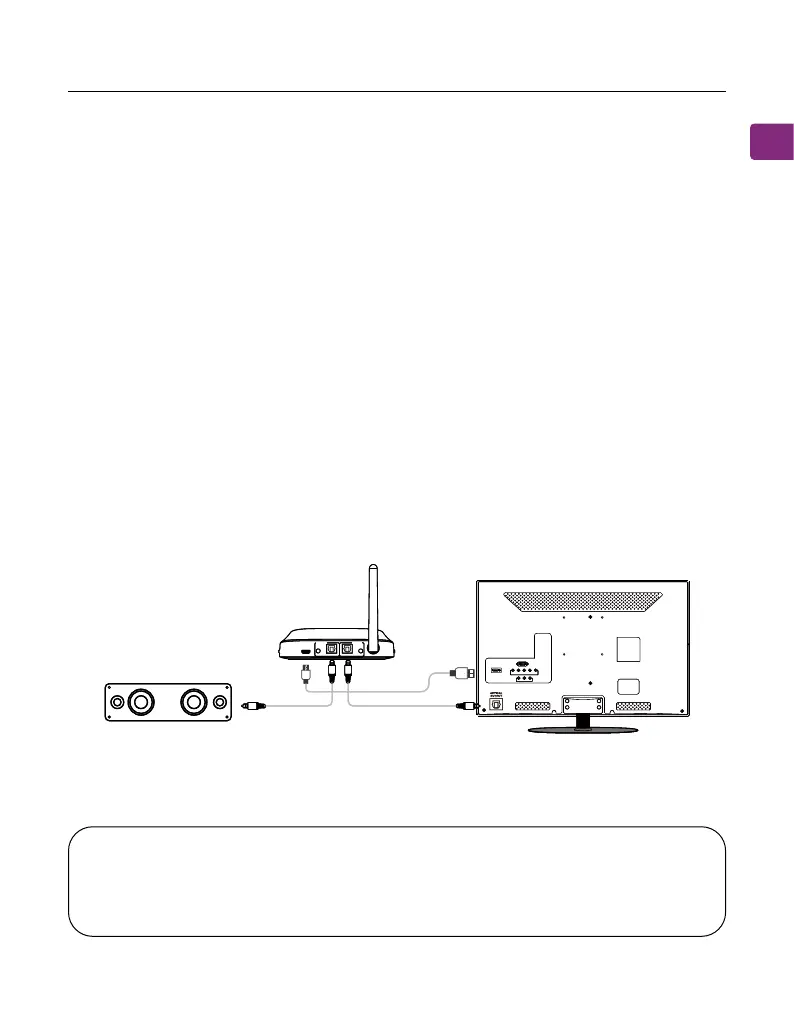
Listening with a Soundbar
The Quartet’s pass-through function allows you to listen through both the
headphones and an external soundbar / stereo AVR simultaneously.
STEP 1
Set up the transmitter and connect it to your TV
STEP 2
Plug an additional optical, 3.5mm AUX, or RCA audio cable into the correlating
audio port in the transmitter’s “BYPASS / SPEAKER” section.
STEP 3
Plug the other end into your external sound system, then you’re good to go.
DC IN
AUX AUX
OPTICAL OPTICAL
RX Output TX Input
TV/Audio Source
Sound System
DC IN
AUX AUX
OPTICAL OPTICAL
RX Output TX Input
TV/Audio Source
Sound System
NOTE : Bypass only works with the same type of input / output, i.e. if you
connect to your TV via OPT, you’ll need to connect to your speaker via OPT
as well.



 To Next Page