User Manual Quartet
7
Setting Up
Connecting to Your TV
The transmitter must be connected to a power source via the provided power
cable in order to function. Plug the transmitter into either:
• A TV’s USB port (we recommend this so that the transmitter auto powers
ON / OFF in tandem with your TV), OR
• A nearby wall outlet - 5V/500mA-2A rated USB charger (requires a USB
adapter, your phone charger should work. Please contact support@avantree.
com if you’d like to claim a free one)
Oncethetransmitterisconnectedtoitspowersource,slide the
switch to the ON position andconnectthe transmittertoyourTV.
Youcanchooseoneof3dierentwaystodothis:
STEP 1
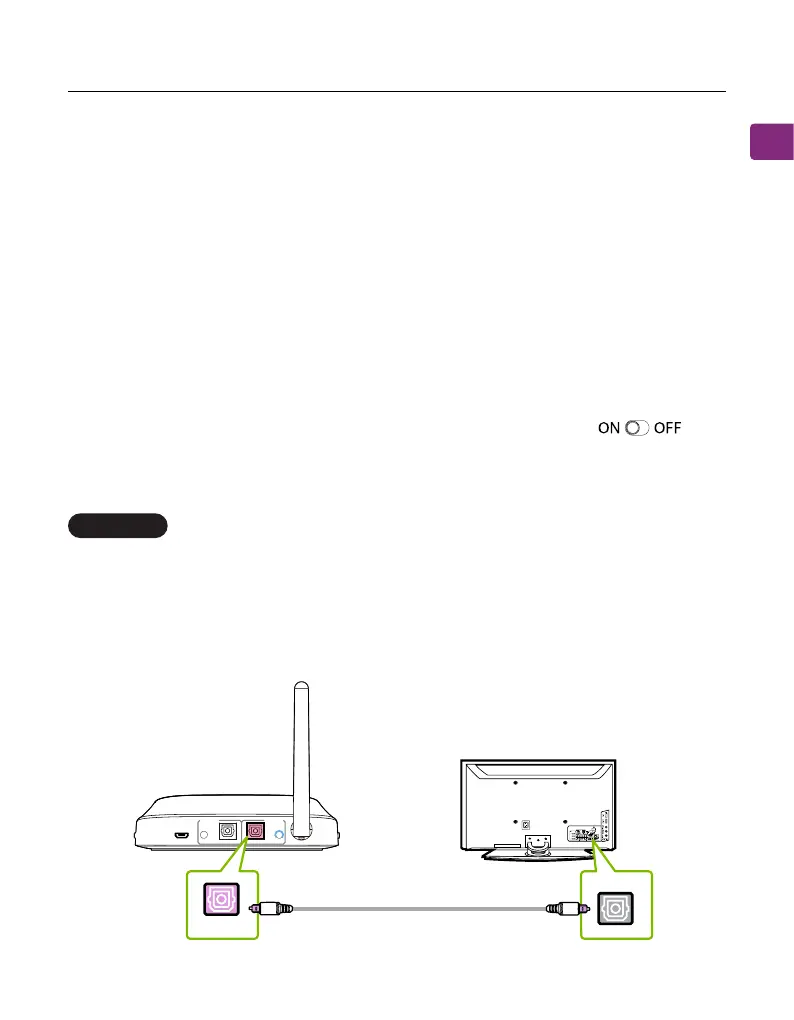
Plug the provided optical audio cable into the TV’s optical OUT or OPT OUT
port, then plug the other end into the transmitter’s optical port in the “INPUT
FROM TV” section.
Optical port (recommended)
OPTION 1
TV
DC IN AUX AUX
OPTICALOPTICAL
RX Output
To Speaker
TX Input
From TV
OPT OUT
OPTICAL



 To Next Page