2
Overview
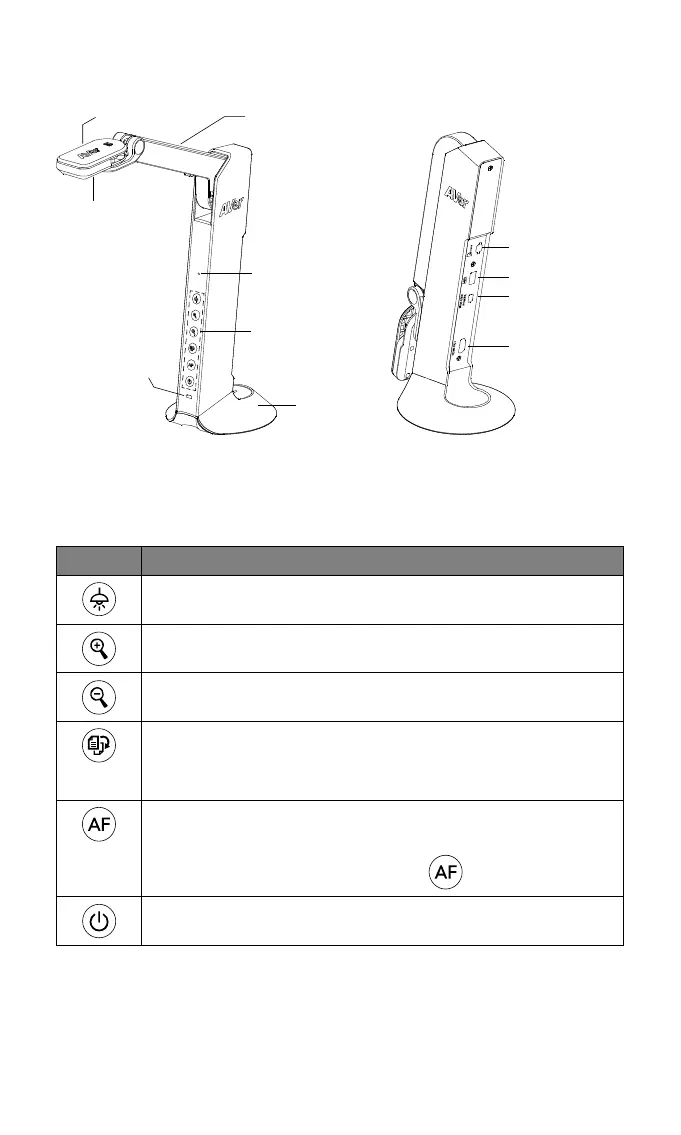
Camera Head
LED Lighting
Arm
Built-in MIC
Functional
Buttons
Status Indicator
Stand Base
Micro SD Card Slot
USB Port
Mini USB/
Power Port
HDMI Out Port
Function Buttons
Control Panel
Button Function
Lamp on/off
Press and hold 3 seconds to call out OSD menu.
Zoom in
Zoom out
Rotate 0/180°
Press and hold 3 seconds to freeze the screen. Un-freeze,
press and hold 3 seconds again.
Auto focus
Press and hold 3 seconds to start recording.
To stop recording, press and hold
3 seconds again
Power on/off



 To Next Page