70
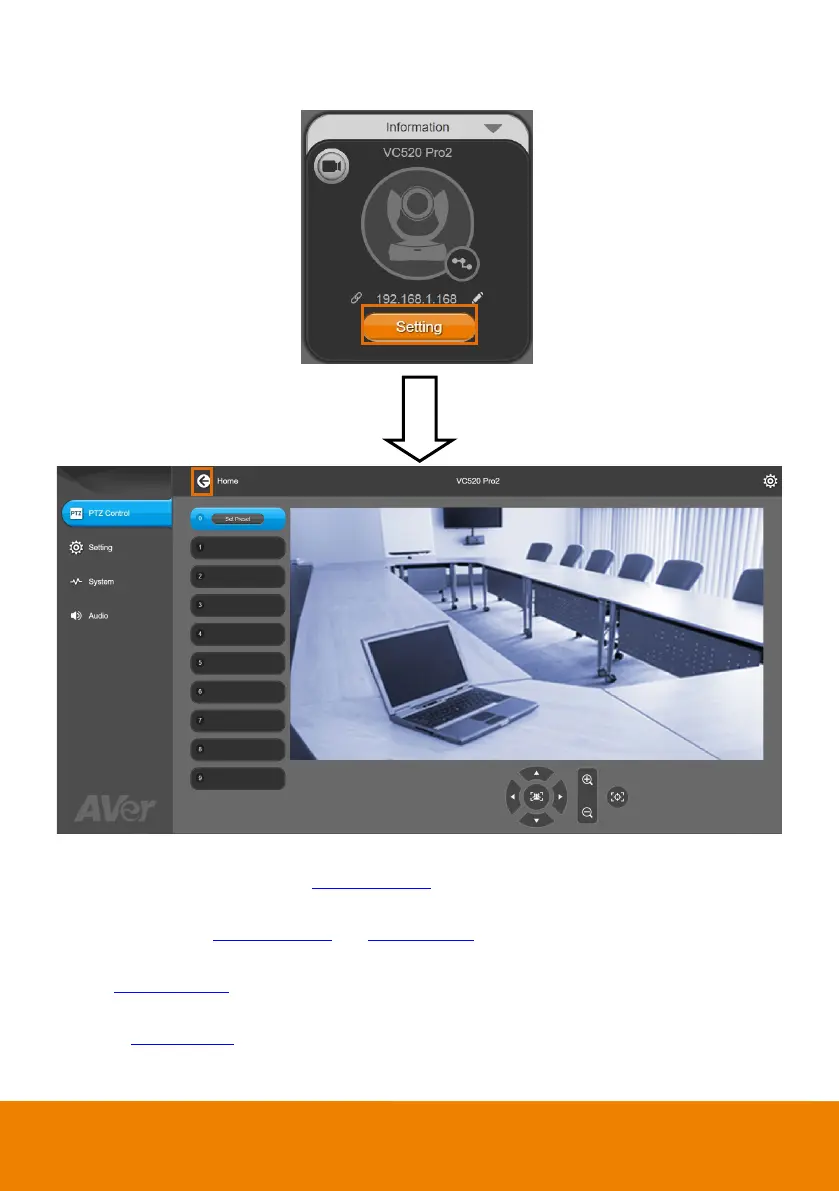
9. Setting: Click “Setting” button to setup parameters of the camera and speakerphone. Click
arrow icon to leave the Setting page.
PTZ Control: Use control panel to setup preset positions. Since most of operations are the
same as web page, refer to Setup the Preset
section (page 26) for detailed setup.
Setting: To setup parameters of the camera. Since most of operations are the same as web
page, refer to Camera Settings and Image Settings
section (pages 27~41) for detailed setup.
System: To setup system. Since most of operations are the same as web page, refer to
System Settings
section (pages 50~59) for detailed setup.
Audio: To setup audio parameters. Since most of operations are the same as web page, refer
to Audio Settings
section (pages 60~63) for detailed setup.



 To Next Page