2. Main parts, keyboard and display
5 FX 50 User Instructions
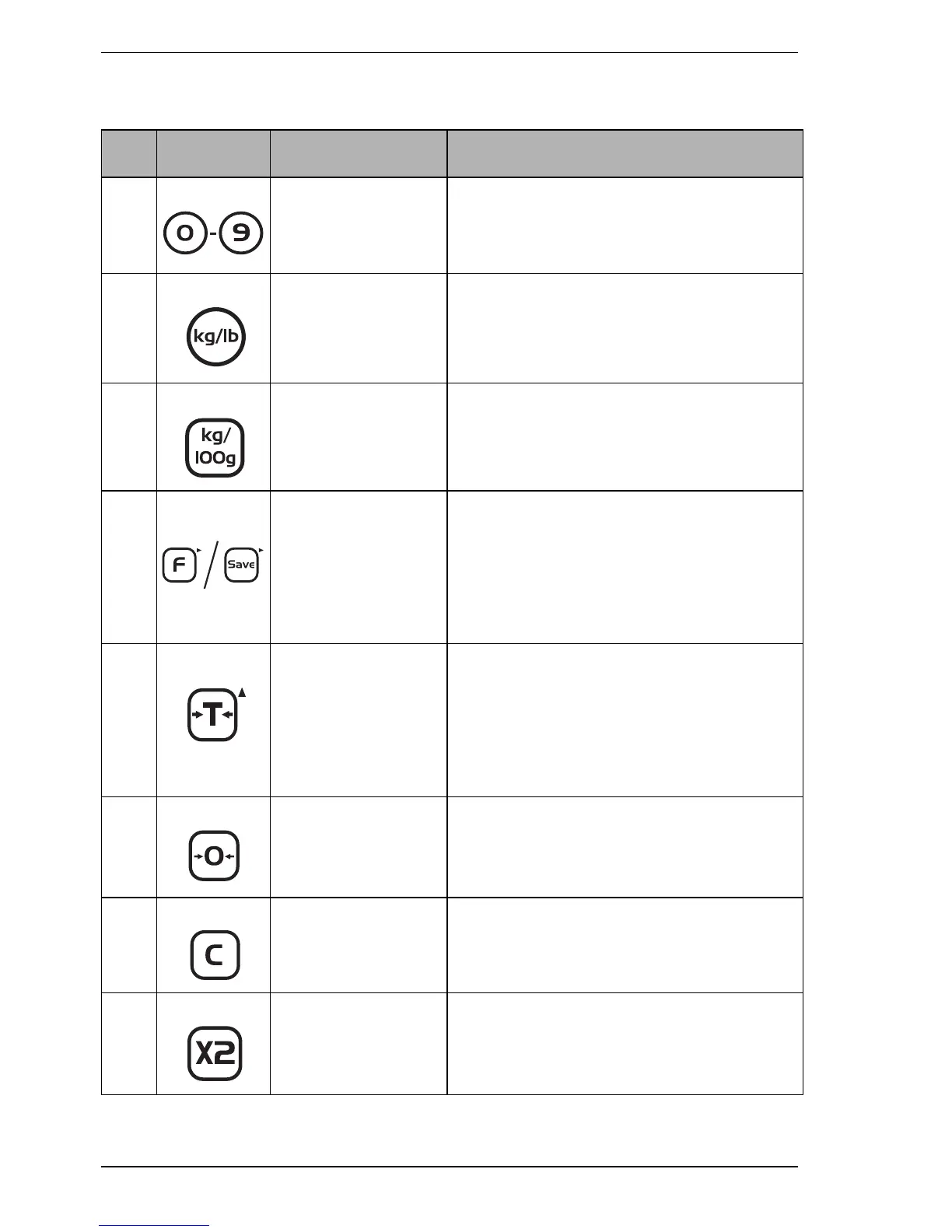
No. Key Key name Press this key to ...
1 Numeric keys Enter individual unit prices, unit prices
for direct PLUs and indirect PLUs,
known tares and proportional tares.
2 Units of Weight
key (USA option)
Switch between kilogram and pound
units of weight. An arrow T appears in
the display above the units you
selected.
3 Price Base
Selection key
(UK, Europe &
RoW option)
Switch between a price per kilogram
and a price per 100 grams price base.
An arrow T appears in the display
above the price base you selected.
4 Fix key (UK,
Europe & RoW) or
Save key (USA).
Also Menu
Navigation key
(X).
Fix or save a weight or price you
entered until you cancel it. You also
press this key (X) to scroll through the
menu options.
5 Tare key. Also
Select Menu
Option key (S).
Enter and clear tare weights such as
item containers and wrappers. The
scale subtracts the tare weight when
items are packaged for weighing. You
also press this key (S) to select an
option from the menu.
6 Zero key Manually zero the scale and return the
unit price and total weight displays to
zeros.
7 Clear key Clear incorrect entries and error
conditions.
8 Multiply by 2 key
(USA only)
Multiply the total price by two.








 To Next Page