7
Connecting to External Devices
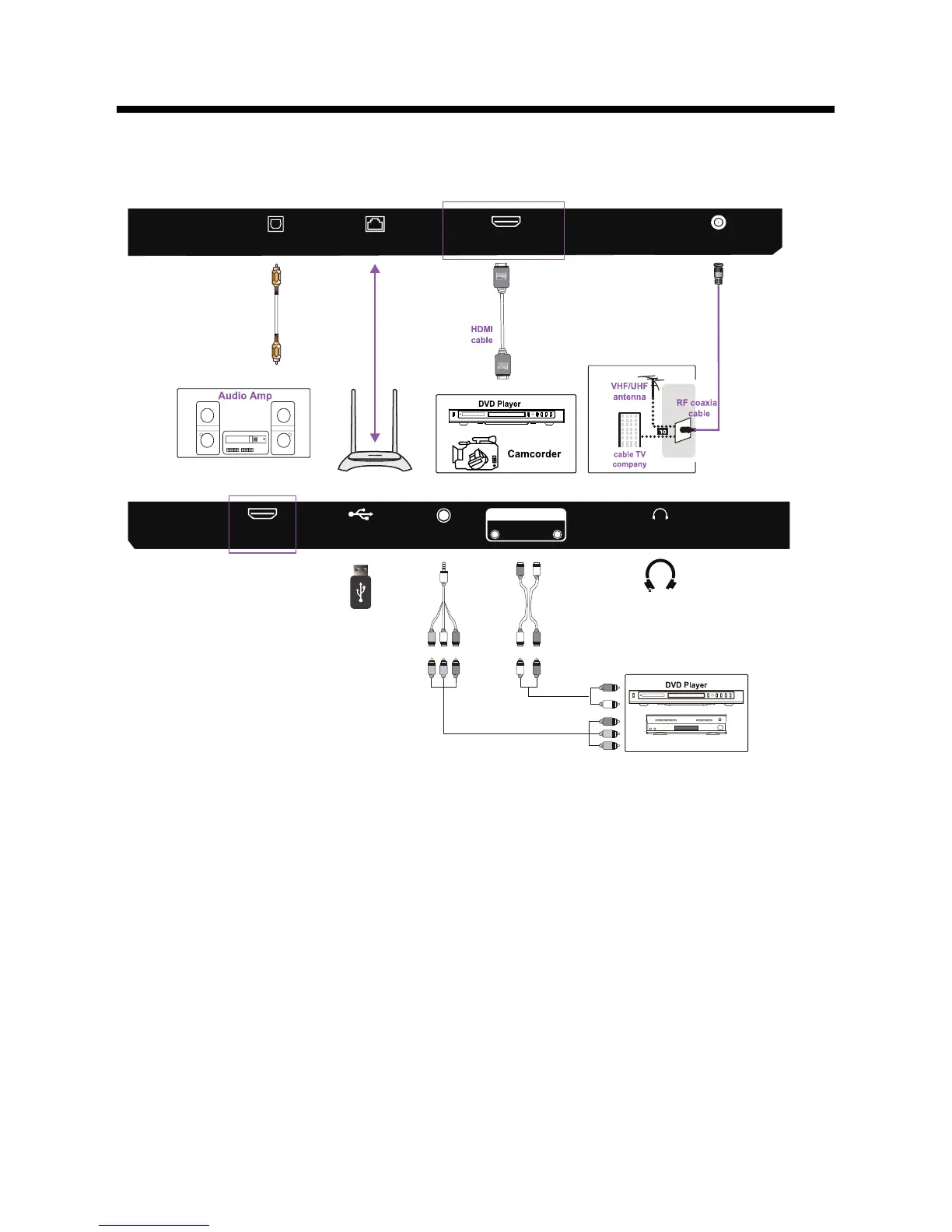
Connecting external devices to your LED TV
RJ45: Network connection port.2.
5. USB
6. YPBPR/AV: Connect to the YPbPr video output terminal of the DVD.
Connect video output from a DVD or VCR.
7. AUDIO IN: Audio input.
3. HDMI : Connect to High-Definition(HD) signal output device.
8. HEADPHONES: Connect to the Headphones.
1. OPTICAL: Connect a digital sound system to this jack.
4. RF: Connect to the antenna(75Ω VHF/UHF) socket with the RF coaxial cable.
cable receiver/satellite box
Not supplied
Not supplied
LR G B
R G B
R
L R
R
L
R
G
B
RJ45
OPTICAL
HDMI1
(ARC)
RF
HDMI2
USB
Headphone
INPUT
L
R AUDIO
YPbPr/AV


 To Next Page