10
EN
2.4 - EXAMPLE: PROGRAMMING AN EMAIL
ALERT TO BE SENT WHEN MOTION IS DETECTED
To program an alert to be sent when motion is
detected,youneed2emailaddresses:theaddress
of the sender which will be used by the camera,
andthe addresswhich will receivethe alerts. The
camera uses the username and password of the
sender address to connect and send the email.
Conguration depends on the chosen email
provider'ssettings.
Note:The2emailaddressescanbethesame(you
willsimplybesendinganemailtoyourself).
Inourexample,weusewww.gmail.com:
sender-address@gmail.com sends the alerts,
addressee@gmail.com receives the alerts. Both
addressesneedtohavebeencreatedbeforehand.
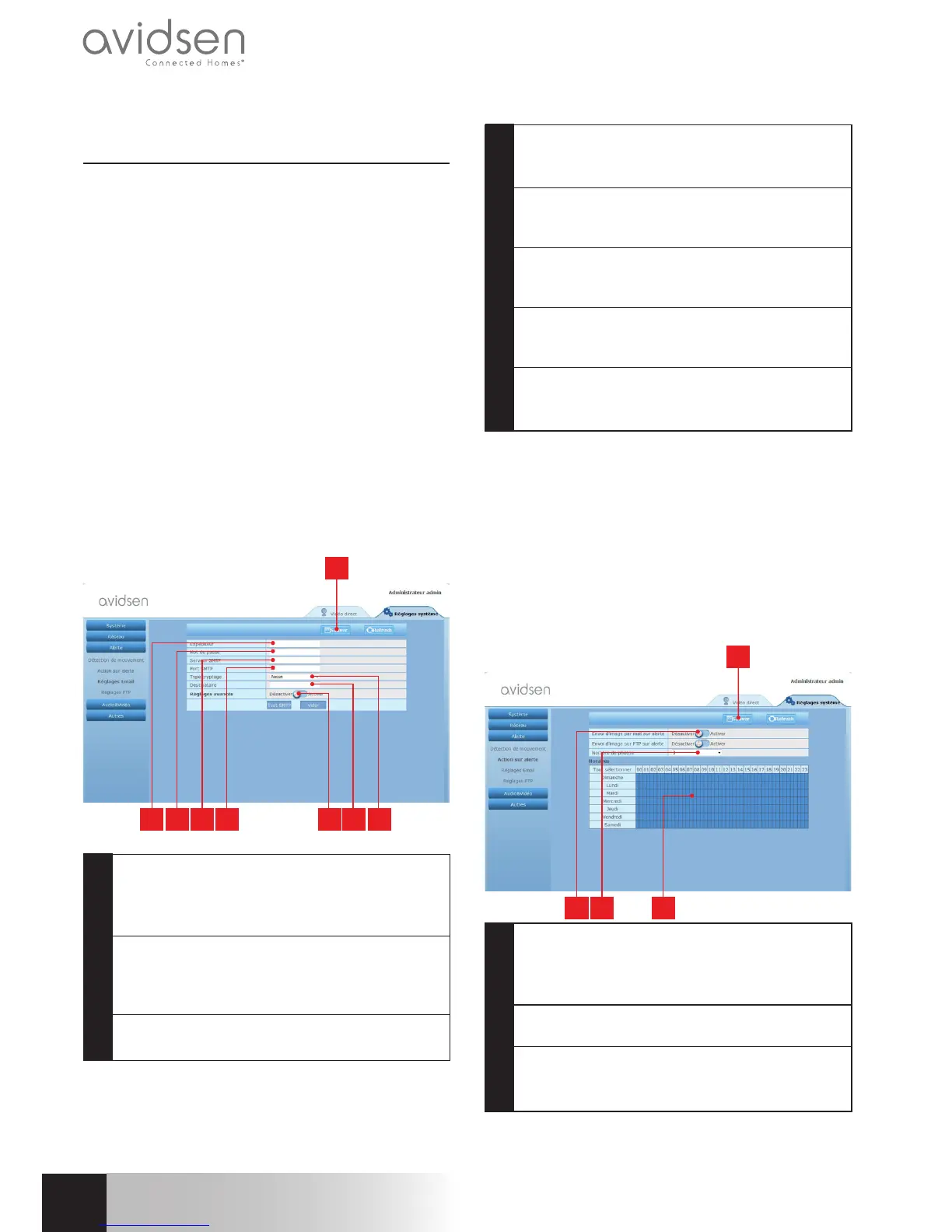
Firstofall,gointo"Email"underthe"Alerte[Alert]"
heading:
2 3 4 5 6 7 8
1
1 IMPORTANT:Whenyouhavenished
conguringthedevice,donotforgettoclick
on"Save"atthetopofthescreentoconrm
theentriesyouhavemade.
2 Sender:Namethatyoumustenterto
connecttothemailboxthatwillsendout
thealerts.InourexampleusingGmail,thisis
thesenderaddress:sender-address@gmail.com
3 Password:Thepasswordusedtologinto
sender-address@gmail.cominourexample
4 SMTPserver:varieswiththeemailprovider
sendingthealert.In
ourexampleusingGmail,smtp.gmail.com
5 SMTPPort:varieswithemailprovider
ofaddresssendingthealert.In
ourexampleusingGmail,587
6 SMTPTest:allowsyoutosimulatesending
anemailandensurethatyourcamerais
properlycongured.
7 Addressee:Here,entertheemailaddress
thatwillreceivethealerts.Inourexample:
addressee@gmail.com
8 Typeofencryption:connectionsecurity
setting,varieswithemailprovider.Inour
exampleusingGmail,SMARTTLS
Note:itdoesnotmatterwhotheemailproviderof
the addressee or addressees is as it is the email
providerof the sender which dictates what needs
tobeentered.However,youmustensureyoucheck
thatthealertsarenottreatedasspambyanyofthe
addressees.
When you have nished conguring your camera,
itwillbeabletosendemails.Youmustnowtellit
whentosendthembyclickingon"Alerte[Alert]",
"Action sur alerte [Alert action]":
2 3 4
1
1 IMPORTANT:Whenyouhavenished
conguringthedevice,donotforgettoclick
on "Save"atthetopofthescreentoconrmthe
entriesyouhavemade.
2 Checkthebox"Sendinganimageviaemail
alert"toactivateemailalerts.
3 Numberofphotos:Here,indicatehowmany
photosyouwishtoreceiveasanattachment
whenanemailalertistriggered.
720P HD WIFI IP CAMERA
d - CONFigurATiON



 To Next Page
 Loading...




