12
EN
Clickon"Save"toconrmthenonthethumbnailfor
yourcameratodisplaytheimagefromyourcamera.
Note: the images are taken from the Android
versionoftheapplication.TheiPhoneversionworks
inexactlythesameway.
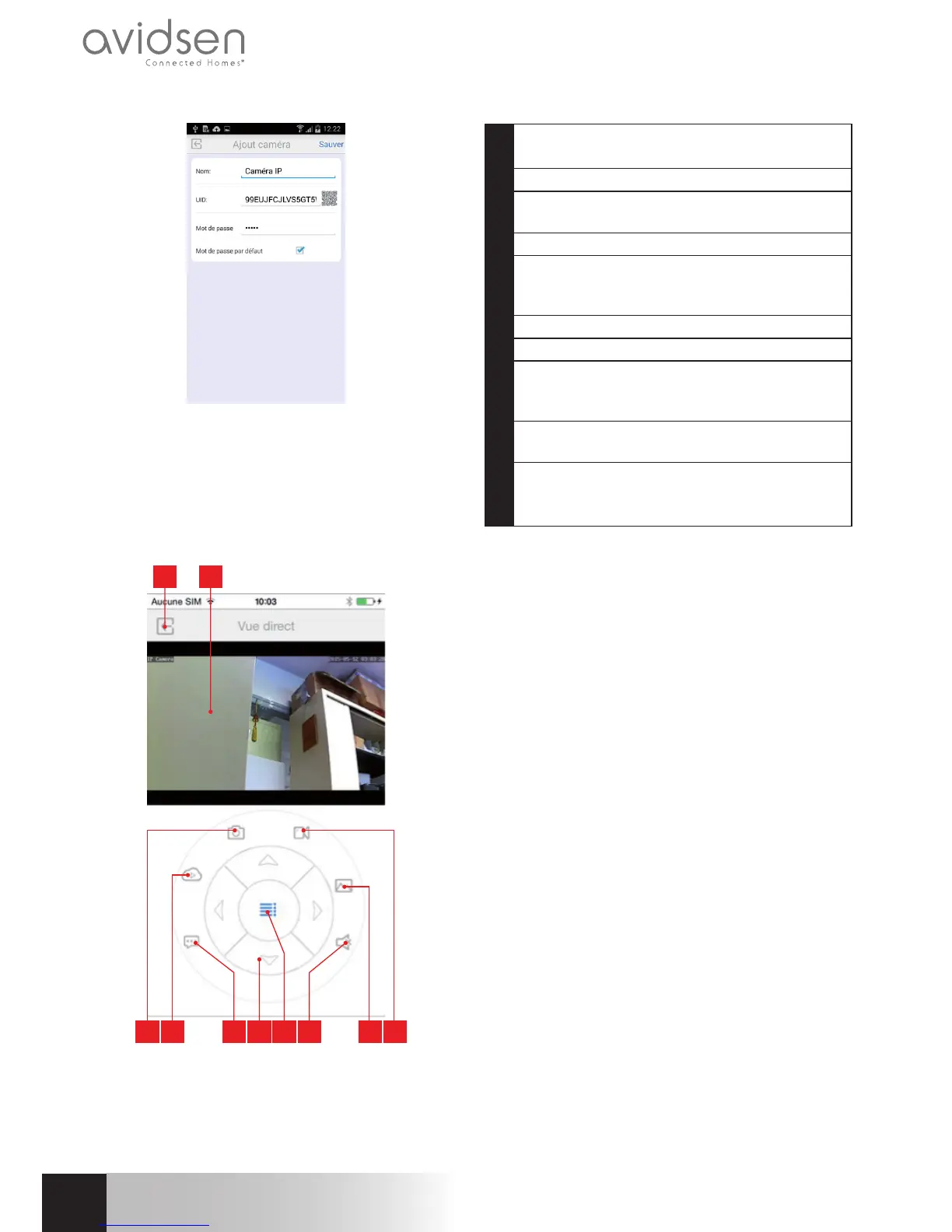
The conguration options and commands can be
accessedbyclickingonyourcameravideofeed:
4 103 95 86 7
1 2
1 Returntothemainmenuandthelistof
savedcameras
2 Viewingwindow
3 Takingaphotowiththecameraandsavingit
toasmartphoneortablet
4 Notusedonthismodel
5 Activatingordeactivatingthecamera's
loudspeaker.Allowsyoutotalktoaperson
viathecamera'sloudspeaker
6 Motorcontrols(motorisedmodelsonly)
7 Displaying/hidingcontrols
8 Enablingordisablingthecamera's
microphone.Usedforlisteningtosounds
pickedupbythecamera
9 Accesstothephotosandvideosstoredin
thesmartphoneortablet'smemory
10 Start/stopofarecordingwiththecamera,
savingtoasmartphoneoratablet
(compatiblemodelsonly).
720P HD WIFI IP CAMERA
E - uSiNg THE prOduCT ON A SMArTpHONE


 To Next Page
 Loading...





