Smart 3D RADAR Settings
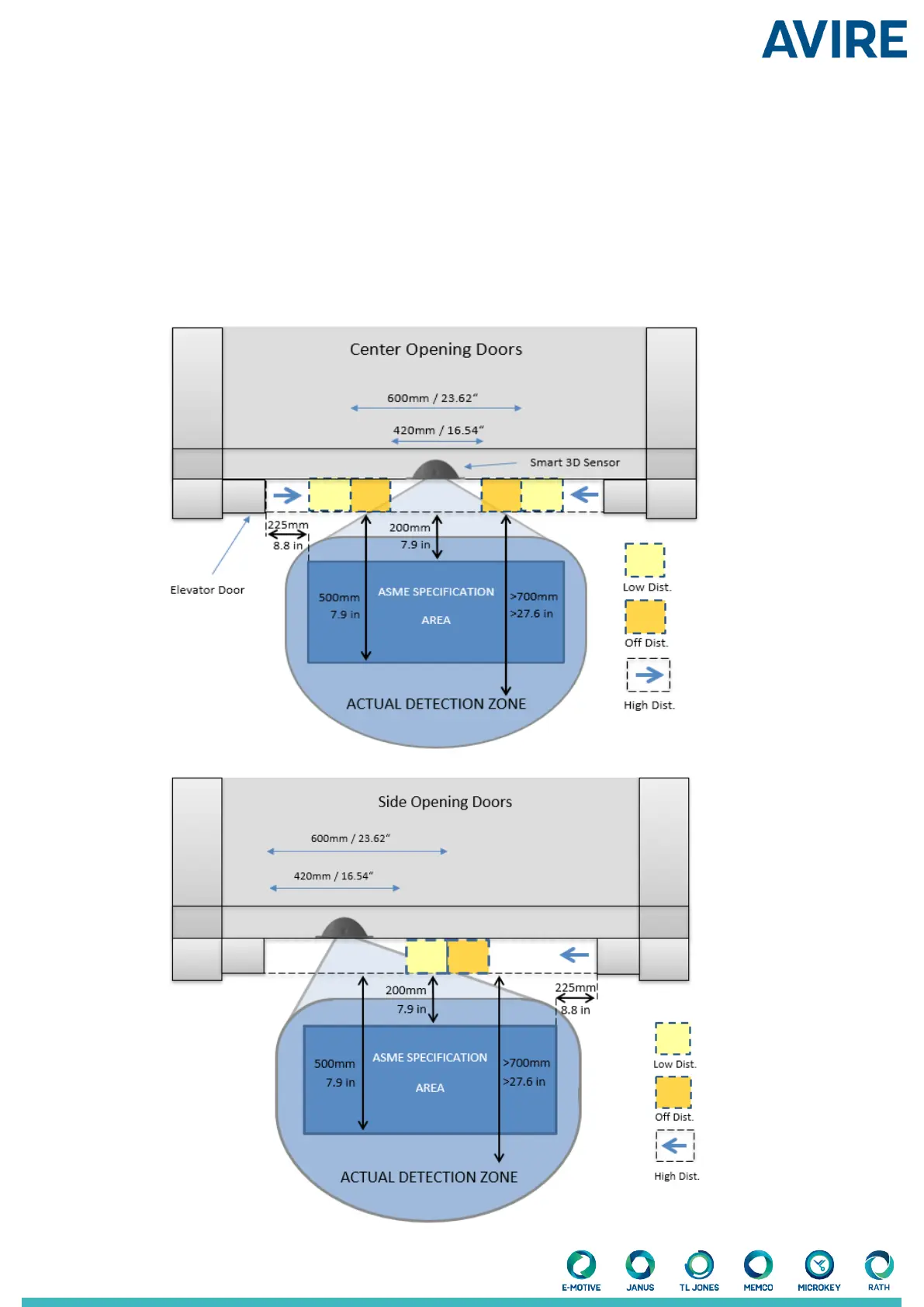
The Smart 3D system is designed to change its eld of view based on how close the doors are from shutting. The Smart
3D Radar recognises the doors going through three zones;
High distance, Low Distance
and
O distance.
As the doors
pass through each zone the detection zone
is altered (made narrower and shorter) so that as the doors shut and the
sensor is not triggered by the movement of the doors. The point at which these zones are entered can be congured.
+ 3D Rdr Low Dist (SF1)
Sets the door separation distance (in) at which the Smart 3D detection area is switched from high to low. The default is
set to 600mm / 23.62”.
+ 3D Rdr O Dist (SF2)
Sets the door separation distance (in) at which the Smart 3D detection is turned o. The default is set to 420 mm / 16.54”.
Fig.2


 To Next Page