5. Menu Navigation
Panachrome
+
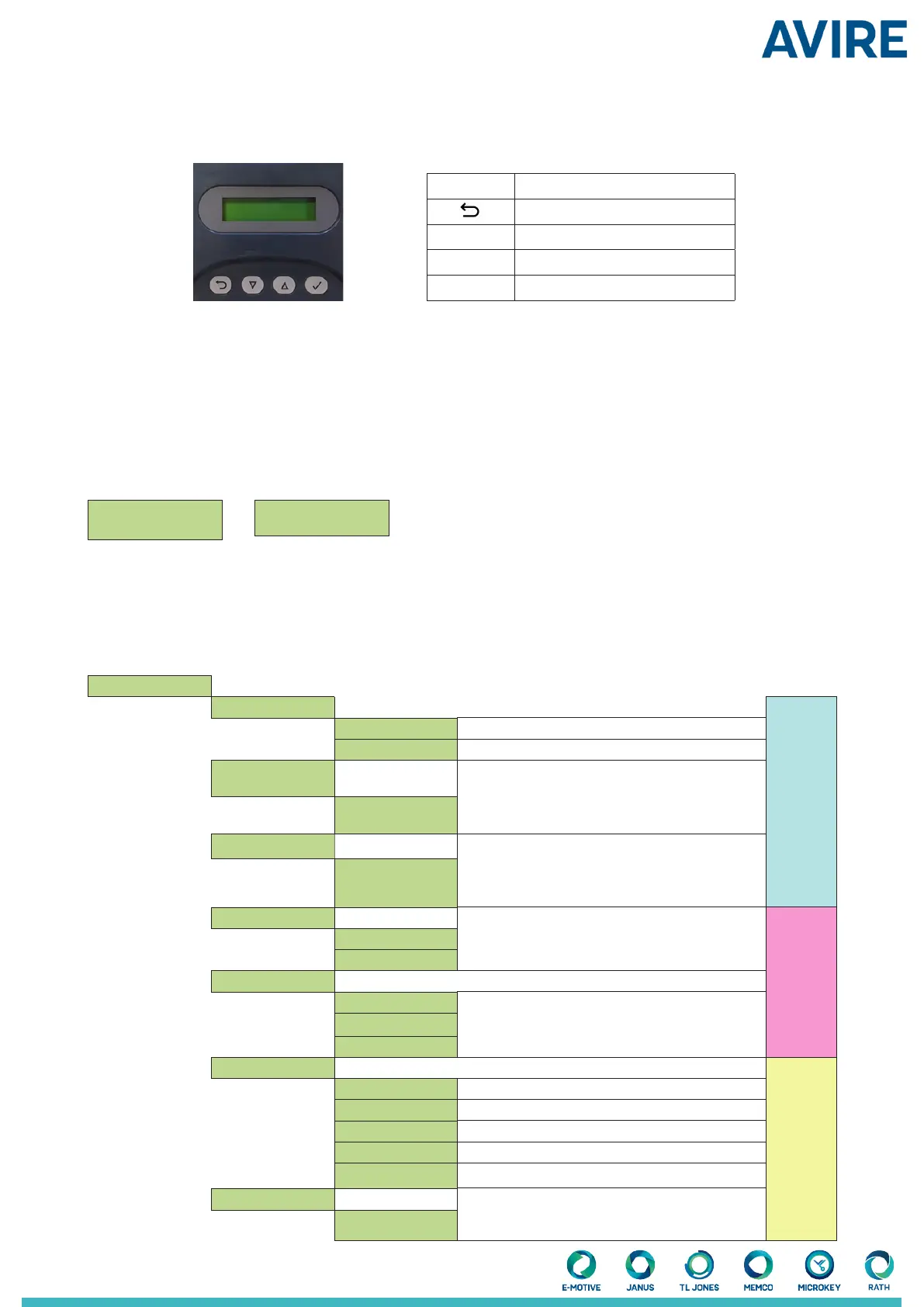
settings can be changed by using the 4-button keypad and screen.
Key Function
Go back/cancel
▼
Menu and value down
▲
Menu and value up
Menu item select and conrm
To enter the settings menu rst press ▼.
Press ▼ and ▲ to go to the desired function then use to select. Some functions have multiple choices so use ▼ and ▲
to view. An active function is indicated by a * symbol.
Note: the bottom line on the display is the active function or menu item. The top row displays ‘Panachrome
+
’ when the
rst level is selected then changes when sub-menus are accessed.
For example:
First level Second Level
Panachrome
+
Visible Diodes
There are 3 types of tones when navigating through the menus:
1. Single short high pitched – menu navigation
2. Single low pitch tone – incorrect selection
3. Three short tones – settings change conrmation
Smart 3D Conguration Options
Visible Diodes ▼
Mode
3D
3D Radar enable
O Turns O Smart 3D sensor
On Turns On Smart 3D sensor
3D Rdr Low Dist
Sets the door separation distance (in) at which
the Radar detection area is switched from high
to low. The default is set to 600mm/23.62”.
Each increment change is 10mm/0.4”
Radar
Settings
+0 (default)
3D Rdr O Dist
Sets the door separation distance (in) at which
the Radar detection is turned o. The default is
set to 420mm/ 16.54”. Each increment change is
10mm/0.4”
+0 (default)
3D IR Enabled
** Only Available with 3D light curtains. Enable/
disable 3D Infra-red detection. Advise to switch
to o when using Smart 3D
O
On.
IR Sensitivity IR Settings
High
** Only Available with 3D light curtains. Sensitivity
settings to be changed if IR is enabled and you are
getting false triggers from the device.
Intermediate
Low
3D Mode
On at closing 3D activates when the doors are closing
On at 800mm/31.5” 3D activates when the doors are approx 800mm apart
On always 3D always with no 3D time-out Common
On (10s) 3D always with 10s 3D time-out
On (20s) 3D always with 20s 3D time-out
Time-out Count Counts the 3D triggers (2 to 10) and disables 3D once
this count is reached. Note: resets with a 2D trigger or
doors fully closed
1-10
Conguration and Testing


 To Next Page
 Loading...