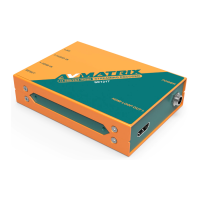
The AVMATRIX SE1117 is a high-definition audio and video streaming encoder designed to convert SDI video and audio sources into IP streams. This device facilitates live broadcasting on various streaming platforms such as Facebook, YouTube, Ustream, Twitch, and Wowza by transmitting the encoded stream to a media server via a network IP address.
Function Description:
The primary function of the SE1117 is to encode and compress SDI video and audio into H.265/H.264 IP streams. It supports dual-stream encoding, allowing for both a main stream and a sub-stream. The encoder can transmit these streams using a variety of network protocols, including RTSP, RTP, RTMPS, RTMP, HTTP, UDP, SRT, unicast, and multicast. A key feature is its ability to perform live streaming without the need for a connected computer, simplifying the setup for broadcasters. The device also offers advanced functionalities such as image and text overlay, as well as mirror image and upside-down image adjustments for video output. It can stream both video and audio, or audio only, depending on the user's requirements.
Important Technical Specifications:
Connections:
- Video Input: 1x SDI Type A
- Video Loop Out: 1x SDI Type A
- Analog Audio Input: 1x 3.5mm line in
- Network: 1x RJ-45 (100/1000Mbps self-adaptive Ethernet)
- Power: DC 12V In
The SE1117 supports a wide range of SDI input formats, including:
- 1080p at 60/59.94/50/30/29.97/25/24/23.98/23.976 Hz
- 1080i at 50/59.94/60 Hz
- 720p at 60/59.94/50/30/29.97/25/24/23.98 Hz
- 576i at 50 Hz
- 576p at 50 Hz
- 480p at 59.94/60 Hz
- 480i at 59.94/60 Hz
Video Encoding:
- Video Coding: H.265/H.264
- Video Bitrate: 16Kbps ~ 12MKbps
- Encoding Resolution:
- 1920x1080
- 1680x1056
- 1280x720
- 1024x576
- 960x540
- 850x480
- 720x576
- 720x540
- 720x480
- 720x404
- 720x400
- 704x576
- 640x480
- 640x360
- Encoding Frame Rate: 5-60fps
Audio Encoding:
- Audio Coding: ACC/MP3/MP2/G711
- Audio Bitrate: 24Kbps ~ 320Kbps
System:
- Network Protocols: HTTP, RTSP, RTMP, RTP, UDP, Multicast, Unicast, SRT
- Configuration: Web configuration, Remote upgrade
Physical and Environmental:
- Consumption: 5W
- Temperature: Operating temperature -10°C ~ 60°C; Storage temperature -20°C ~ 70°C
- Dimension (LWD): 104x75.5x24.5mm
- Weight: Net weight: 310g, Gross weight: 690g (Gross weight includes packaging and accessories)
- Accessories: 12V 2A power supply; Mounting bracket (optional)
Usage Features:
Network Configuration and Login:
The encoder connects to a network via an Ethernet cable. Its default IP address is 192.168.1.168. The device can automatically obtain a new IP address when DHCP is enabled on the network. Alternatively, DHCP can be disabled, and the encoder's network settings can be manually configured to match the computer's network segment. The default subnet mask is 255.255.255.0, and the default gateway is 192.168.1.1. Access to the encoder's management web page is achieved by visiting its IP address through an Internet browser. The default username and password for login are both "admin."
Management Web Page:
The web-based management interface allows users to configure all encoding settings.
- Language Settings: The interface supports Chinese (中文), Japanese (日本語), and English, selectable from the top-right corner.
- Device Status: Users can monitor the status of both the main stream and sub-stream, and preview the streaming video directly from the web page.
- Network Settings: The network can be configured for dynamic IP (DHCP Enable) or static IP (DHCP Disable).
- Main Stream Settings: This section allows configuration of the main stream's video properties, including mirror image and upside-down image adjustments. Users can select and configure network protocols such as RTMP, HTTP, RTSP, UNICAST, MULTICAST, RTP, and SRT. It's important to note that only one of HTTP, RTSP, UNICAST, MULTICAST, or RTP can be enabled simultaneously.
- Sub Stream Settings: Similar to the main stream, the sub-stream's network protocol (RTMP, HTTP, RTSP, UNICAST, MULTICAST, RTP, SRT) can be configured. Again, only one of HTTP, RTSP, UNICAST, MULTICAST, or RTP can be active at the same time.
- Audio Settings: The encoder supports audio embedding from either SDI embedded audio or an external analog line-in input. Audio encoding modes include ACC, MP3, and MP2.
- OSD Overlay: Users can insert a logo and text onto both the main and sub-stream videos. The logo file must be named "logo.bmp," have a resolution below 1920x1080, and be less than 1MB in size. Text content can be up to 255 characters, with adjustable size, color, position, and transparency.
- Color Control: The brightness, contrast, hue, and saturation of the streaming video can be adjusted via the web page.
- ONVIF Settings: Specific settings related to ONVIF (Open Network Video Interface Forum) are available for integration with compatible systems.
Live Stream Configuration (Example for YouTube):
- Main Parameters: Set the stream protocol to H.264. Other options are generally recommended to be left at their default configuration but can be adjusted based on network conditions. For instance, if network speed is slow, the Bitrate Control can be switched from CBR (Constant Bitrate) to VBR (Variable Bitrate), and the bitrate can be adjusted within the range of 16 to 12000 Kbps.
- RTMP Options: Configure the RTMP settings.
- Stream URL and Key: Enter the stream URL and stream key, concatenating them with a "/" to form the complete RTMP URL. For example, if the stream URL is "rtmp://a.rtmp.youtube.com/live2" and the stream key is "acbsddjfheruifghi," the combined RTMP URL would be "rtmp://a.rtmp.youtube.com/live2/acbsddjfheruifghi."
- Apply: Click "Apply" to initiate the live stream.
Maintenance Features:
System Settings:
- Password Management: The default password is "admin," which can be changed by the user through the web page.
- Firmware Upgrade: The current firmware version can be checked on the web page. New firmware can be uploaded and upgraded through the web interface. It is crucial not to turn off the power or refresh the web page during the upgrade process.
- Reboot Schedule: The encoder can be configured to reboot automatically after a specified period (0-200 hours), which can be useful for certain applications requiring periodic resets.
Safety Precautions:
The manual emphasizes several safety guidelines to ensure proper operation and prevent damage or injury. These include:
- Avoiding unstable surfaces for placement.
- Operating only on the specified supply voltage.
- Disconnecting the power cord by the connector, not by pulling the cable.
- Avoiding placing heavy or sharp objects on the power cord.
- Ensuring proper grounding to prevent electrical shock.
- Not operating in hazardous or explosive atmospheres.
- Avoiding use near water.
- Preventing liquids, metal pieces, or foreign materials from entering the unit.
- Handling with care during transit, preferably using original packing materials.
- Not removing covers or accessing internal circuitry with power applied. Internal servicing should only be performed by qualified personnel.
- Turning off the unit and disconnecting all connections if any abnormality or malfunction occurs before moving it.
The AVMATRIX SE1117 is a robust and versatile streaming encoder, offering comprehensive features for professional live broadcasting with a focus on ease of use and reliability.

 Need help?
 General

 To Next Page