- 21 -
XGSM - Technical features
XGSM is a device which, when used with the Xtream central control unit, allows you to make and receive calls via the GSM mobile phone network.
How to proceed
a. Completely disconnect the power supply, both network
and battery
b. Insert the appropriate plastic supports in the holes loca-
ted on the control panel electronic board with the guides
facing outwards.
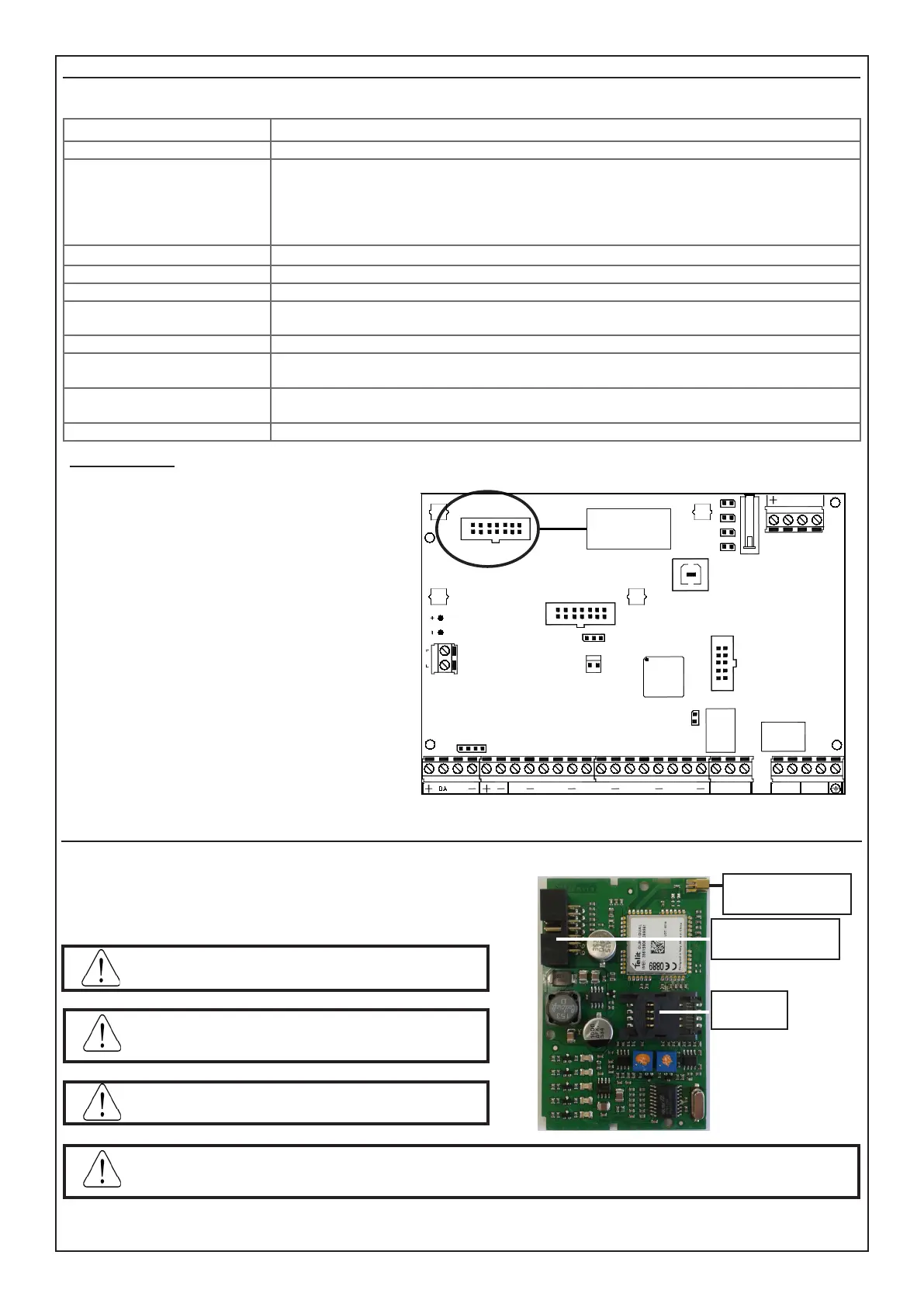
c. Insert XGSM electronic board on connector J1 making
it slide inside the supports guides until it stops.
d. Break the presetting on the control panel housing.
e. Pass the antenna cable through the hole and insert it on
the pre-settings as shown in the illustration.
f. Insert the antenna and x by fastening the nut.
g. Connect the antenna cable to the GSM module.
h. Give power back to the control panel.
Outdoor connections: • GSM Channel
Telephone numbers proles: • n. 16 numbers, that can be associated to any alarm or technical event
Protocols: •
•
•
•
•
FAST FORMAT with assignable channels
VOCAL
SIA
SIA 2nd level
CONTACT-ID
RTC Remote Telephone Control - • programmable activation for every individual user prole
Voltage: • nominal voltage: 12 V =
Environmental conditions: • temperatura -10°C / + 55°C - umidità 95%
Absorption: •
•
in quiete: 50 mA
in trasmissione: 400 mA
Electronic board sizes: • 93 x 15 x 60 mm
Declaration • The GSM modules used are compliant with R&TTE Directive 99/05/EC as
declared under the responsibility of the same manufacturer.
Time alarm transmission •
•
D2 Vocal mode 12 sec., M2 vocal mode 12 sec.
D2 SIA DC09 10 sec., M2 SIA DC09 10 sec.
Interface Type • Proprietary interface compliant to ETSI ES 203-21 and RTTE
S7
BATTERY
AC
J3
CONN ETH
S5
J4
1
SERVICE
J5
MEMORY
CARD
J2
USB
SNATCH
TAMPER
S1
PB1
OC1
OC2
OC3
J1
CONN GSM
L2
DA DB
L1 L3 L4
L5 L6
L7
L8
T
NO NC
C
A B A' B'
1 2 3
2
Plug-in
connector
SIM Card Inclusion/Antenna Connector Input
To insert the SIM Card:
1. Open the slide support
2. Insert the SIM Card in the presetting
3. Close the slide support until completely xed
Before inserting and removing the SIM Card, completely
remove power from the control panel.
SIM Card
position
Antenna
Connector Input
Connector plug-in
central
Disable all call transfers
Deactivate the answering machine
Delete all SMS from the SIM
The warning of low SIM Card happens upon reaching
of the 8 Euros threshold.
If the security PIN code of the SIM card is not disabled it must be entered in the corresponding input step of the panel
programming menu. If a wrong PIN code is entered, the panel will execute maximum two attempts to activate the XGSM
module then stop, and will keep it blocked until a new PIN code is programmed. An error message will be displayed.



 To Next Page