Home
Awox
Home Lighting
SMLm-c9-E27
Page 37
Awox SMLm-c9-E27 - Page 37
60 pages
Manual
Save Page as PDF
To Next Page
To Next Page
To Previous Page
To Previous Page
Loading...
Ref: 1.8
User
G
uide L
ED Bulbs Bluet
ooth Mesh
AwoX
Confidential Do
cument
–
Do not
copy
Page:
37
of
60
2.
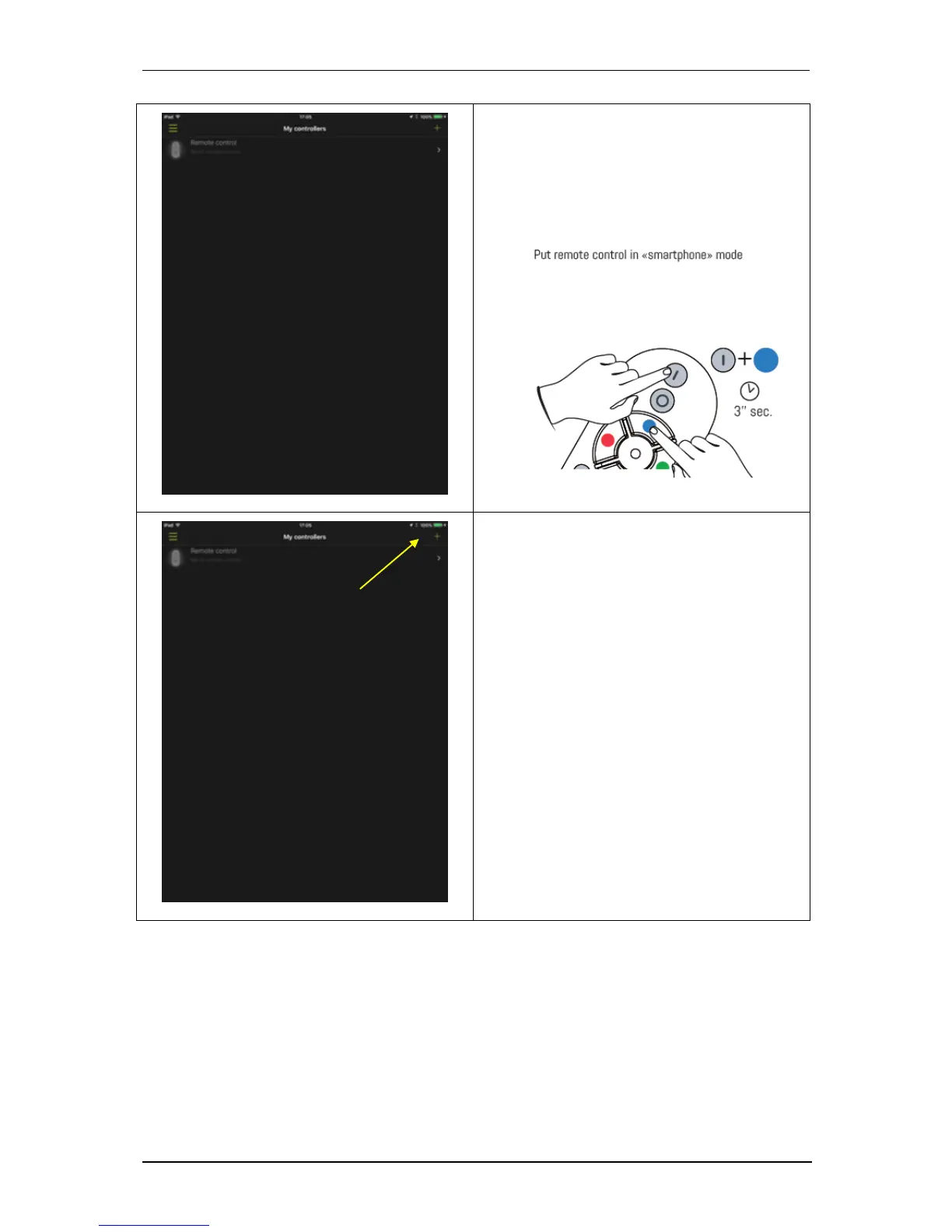
Our unique remote c
ontrol is listed
here.
Put the new rem
ote in smartph
one
mode: Simultane
ously press the ON
and
BLUE button on the re
mote control for
at least 3 seconds. Th
e LED on the
remote control should
blink.
3.
Click button
+
36
38
Table of Contents
Main Page
Default Chapter
2
Table of Contents
2
1 Introduction
4
Advantages of Bluetooth Mesh Technology
4
Why Do You Need to Create a Cloud Account
4
Ind Quickly What You Need in this Guide
5
2 Pack Bulbs(S) + Remote Control
6
Control Your Bulb with Your Remote Control
6
Remote Control Functions
7
Luminosity Setting
7
Color Setting
8
Temperature of White Setting
8
Visual Effects Setting
8
Favorites Setting
8
Control Your Bulbs also from Your Smartphone
9
Install the Application
9
Ajouter Votre Telapplicationecommande Dans Lapplication
10
Application Smart Control
10
3 Pack Standalone Bulb
20
Installating the App
20
Associate the Bulb with the App
20
4 Adding a Bulb
25
Adding a Bulb T a Group Without Remote Control
25
Adding a Bulb in a Group Already Control from a Remote
25
I F the Remote was Never Associated to the App
25
I F the Remote Is Already Associated in the App
25
5 Adding a Remote Control
29
Adding a Remote Control to a Group Devoid of Remote
29
Dding a Remote Control to a Group Already Controlled by Another Remote
36
I F the Group and the First Remote Are Already Associated with the App
36
I F the Group and the First Remote Are Not Associated with the App
40
6 Basic Functions
41
Light Control
41
Alarm and Extinction Programming
44
Rogramming the Automatic Detection
47
Group Creation
49
7 Troubleshooting
53
Cannot Pair My Remote Control with My Bulb
53
M y Bulb Does Not Respond or Badly Respond to the Remote Control
53
Loss or Deterioration of a Remote Control
53
Unpair a Remote and a Bulb
57
I F the Remote and the Bulb Are Not Integrated in the App
57
I F the Remote and the Bulb Are Already Integrated in the App
58
Reset
59
Reset a Bulb
59
Reset of a Remote
60
Related product manuals
Awox SMLm-c13g-E27
60 pages


 To Next Page