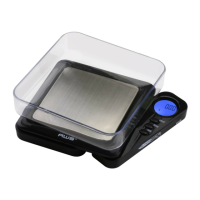
of an empty container or vessel for net weight determination.
NOTE: The weight of the container will subtract from the
available capacity (subtractive taring).
1. Place the empty container or vessel on the weighing
platform.
2. Press the TARE/MODEkeybriey.Thedisplaywill
thenresettozero.Ifthecontainerisremoved,its
weight will be displayed as a negative number.
3. Youmaynowllthecontainerwiththequantityto
be weighed. The display will show the net weight of
the contents.
4. To return to normal weight display (gross weight),
remove any items from the weighing platform and
press the TARE/MODEkeyagaintore-zerothe
scale.
VII. Calibration
Initial calibration is performed at the factory. However, the
calibration can drift slightly due to stresses from shipping.
Also, due to changes in local acceleration of gravity around
the world, adjustment is recommended when moving the
scale from one location to another. To check calibration:
1. Place the required calibration weight on the scale
and note the displayed value.
2. If the displayed value is not within acceptable
tolerance (see chart on next page), adjustment is
required.


 To Next Page