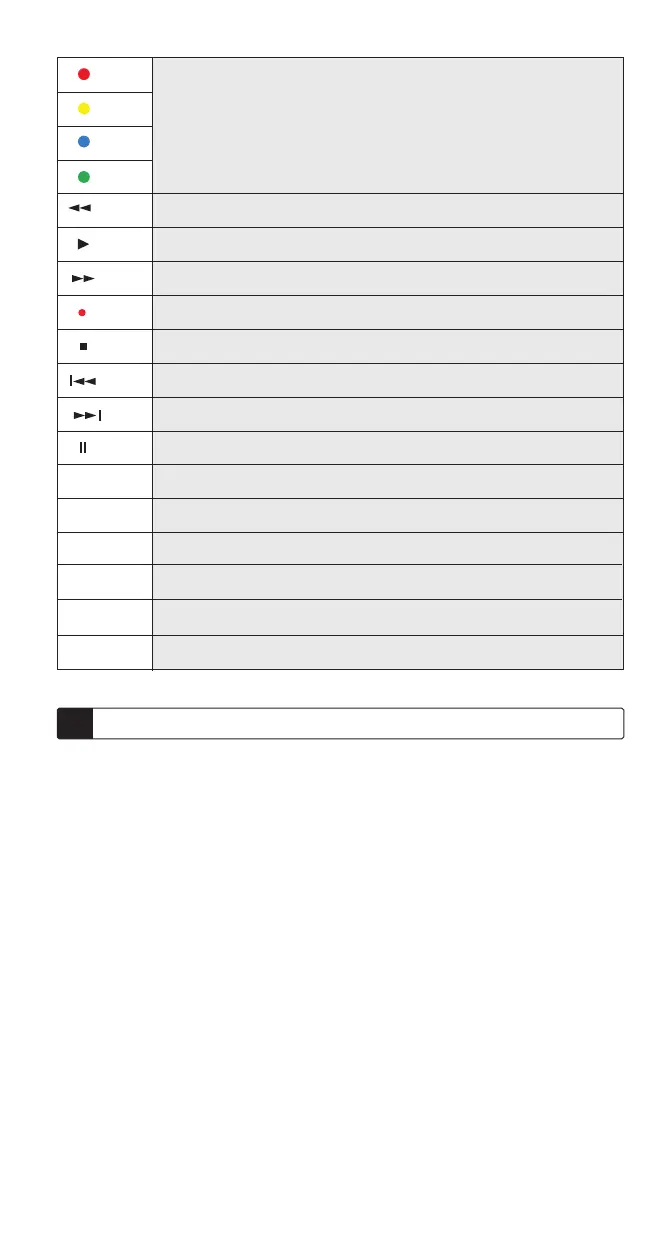
When accessing the Text mode, these colored keys allow you to access the
fasttext function of your TV, sometimes for Menu navigation.
Fast reverse
Play
Fast Forward
Record
STOP, stops changing pages in teletext mode.
SKIP - key, expand key in TV mode depends on your TV.
SKIP - key, MIX key in TV mode depends on your TV.
Pause
INFO Function
Guide
FAV key with the same function as your original remote control.
For set up
Select the device you want to set or use.
Backlight enable / disable.
INFO
GUIDE
FAV
SET
TV1, TDT, SAT, DVD,
TV2, CD, AUX, VCR
Light
2 Setup
There are three setup modes, the following explanation will walk you through
this setup process.
Direct code setup
1. There is a comprehensive code list attached, before manual setup, select your device’s 3-digit code from
the list.
2. Switch on the device to be controlled.
3. Press the SET button fi rst and hold it down while pressing the respective DEVICE button on your remote
control. For example: To program your TV set, press fi rst SET and then TV simultaneously.
4. When the LED under the corresponding device button lights up, release the buttons.
5. Use numeric keys to enter the 3-digit code applicable for your device.
6. When the LED goes out, setup is completed.
7. Check whether the main applications of your device can be operated with the remote control keys (see
„Verify setup“). If they do, your setting was successfully; you are ready to set another device, with the same
procedure.
8. If your remote control’s key do not work, try the next codes corresponding to your device’s brand by the step
3~7, until the main applications of your device can be operated with the remote control keys.
If the LED blinks twice and remains light at setup mode, please repeat the Step 5 by entering other codes
till LED goes out.
Pressing the respective DEVICE button to stop the manual setup.
If no button was pressed for more than 15 seconds, setup stops automatically, the LED goes out.
If the device locked, LED blink twice and then exit the direct code setup.



 To Next Page