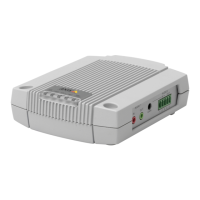
AXISA9188NetworkI/ORelayModule
Howtosettherootpassword
ToaccesstheAxisproduct,youmustsetthepasswordforthedefaultadministratoruserroot.
ThisisdoneintheCongureRootPassworddialog,whichopenswhentheproductisaccessed
forthersttime.
Topreventnetworkeavesdropping,therootpasswordcanbesetviaanencryptedHTTPSconnection,
whichrequiresanHTTPScerticate.HTTPS(HypertextTransferProtocoloverSSL)isaprotocol
usedtoencrypttrafcbetweenwebbrowsersandservers.TheHTTPScerticateensuresencrypted
exchangeofinformation.
Thedefaultadministratorusernamerootispermanentandcannotbedeleted.Ifthepasswordfor
rootislost,theproductmustberesettothefactorydefaultsettings.Forinformationabouthowto
resettheproducttofactorydefault,seetheproduct’sUserManual.
TosetthepasswordviaastandardHTTPconnection,enteritdirectlyinthedialog.
TosetthepasswordviaanencryptedHTTPSconnection,followthesesteps:
1.ClickUseHTTPS.
Atemporarycerticate(validforoneyear)iscreated,enablingencryptionofalltrafcto
andfromtheproduct,andthepasswordcannowbesetsecurely.
2.Enterapasswordandthenre-enterittoconrmthespelling.
3.ClickOK.Thepasswordhasnowbeencongured.
Howtoresettofactorydefaultsettings
MaintenanceInstructions
TokeepthenetworkI/Omodulerunningsmoothly,Axisrecommendsregularmaintenanceofthe
networkI/Omoduleandconnecteddevices.
Domaintenanceatleastonceayear.Thesuggestedmaintenanceprocedureincludes,butisnot
limitedto,thefollowingsteps:
•MakesurealltheconnectionsbetweennetworkI/Omoduleandtheexternaldevices
aresecure.
•Verifyallthehardwareconnections.Thisrequiresaccesstotheproduct’swebpages.
Iftheresultsfromanyofthestepsaboveindicatefaultsorunexpectedbehavior:
-Testthesignalsofthewiresusingappropriateequipmentandcheckifthe
wiresorcablesaredamagedinanyway.
-Replacealldamagedorfaultycablesandwires.
-Oncethecablesandwireshavebeenreplaced,verifyallthehardware
connectionsagain.Thisrequiresaccesstotheproduct’swebpages.
20



 To Next Page