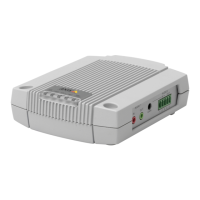
AXISA9188NetworkI/ORelayModule
•AXISDynamicDNSService(alloperatingsystems).AfreeservicefromAxisthatallows
youtoquicklyandsimplyinstallyourAxisnetworkproduct.RequiresanInternet
connectionwithoutanHTTPproxy.Formoreinformation,seewww.axiscam.net
•ARP/Ping(alloperatingsystems).SeeAssignIPAddressUsingARP/Ping.Thecommand
mustbeissuedwithin2minutesofconnectingpower.
•DHCPserver(alloperatingsystems).ToviewtheadminpagesforthenetworkDHCP
server,seetheserver’suserdocumentation.
AssignIPAddressUsingARP/Ping
Theproduct'sIPaddresscanbeassignedusingARP/Ping.Thecommandmustbeissuedwithin2
minutesofconnectingpower.
1.AcquireafreestaticIPaddressonthesamenetworksegmentasthecomputer.
2.Locatetheserialnumber(S/N)ontheproductlabel.
3.Openacommandpromptandenterthefollowingcommands:
Linux/Unixsyntax
arp-s<IPaddress><serialnumber>temp
ping-s408<IPaddress>
Linux/Unixexample
arp-s192.168.0.12500:40:8c:18:10:00temp
ping-s408192.168.0.125
Windowssyntax(thismayrequirethatyourunthecommandpromptasan
administrator)
arp-s<IPaddress><serialnumber>
ping-l408-t<IPaddress>
Windowsexample(thismayrequirethatyourunthecommandpromptasan
administrator)
arp-s192.168.0.12500-40-8c-18-10-00
ping-l408-t192.168.0.125
4.Restarttheproductbydisconnectingandreconnectingthenetworkconnector(PoE).
5.ClosethecommandpromptwhentheproductrespondswithReplyfrom
192.168.0.125:...orsimilar.
6.Openabrowserandtypehttp://<IPaddress>intheLocation/Addresseld.
Note
•ToopenacommandpromptinWindows,opentheStartmenuandtypecmdinthe
Run/Searcheld.
•TousetheARPcommandinWindows8/Windows7/WindowsVista,right-clickthe
commandprompticonandselectRunasadministrator.
•ToopenacommandpromptinMacOSX,opentheTerminalutilityfromApplication>
Utilities.
19



 To Next Page